When you click on links to various merchants on this site and make a purchase, this can result in this site earning a commission. Affiliate programs and affiliations include, but are not limited to, the eBay Partner Network.
v41.500, will do some more testing later today UPDATE and questions - tried again today and have some questions for @Popolou
1. How long does / should the Actual value input signals scan take?
2. Should I have the engine running? I tried without but with a PSU plugged in
3. What happens if I get a timeout on a module (in my case I got a timeout from the PDK ECU)
1. There's no set time (and it depends on the module selected) but you'll notice when the scan completes as all the fields will be populated as the scan goes down the list
2. Not unless you are trying to capture live engine data (which is not common).
3. The data will just not be pulled in and it will be omitted from the simulation file. You could always try again and then later parse that data into a more "complete" xml file but i have not come across that situation myself.
I assume you did this fine the first time but it seems you cannot repeat the log capture?
TY @Popolou I'll try again. The first time I didn't record the SIM beyond the 'select all modules' and complete the search. Yesterday was my first attempt at the submenu search - I'd misunderstood your original message thinking the submenus were simply the next screen (F12) option on the 'select all modules' screen
I tried to code something simple such as Traffic Sign recognition. It went without issues if i skipped the error. Later i tried to do active lane keeping. Same story.
It's same error, it seems unrelated to what am I trying to code. From my perspective something is missing from my PIWIS installation. It's failing to match my instrument cluster ECU with piwis embedded rules. I'll try to download another PIWIS version and try again and report back here.
Overalll the error can be skipped. Problem is that the coding changes will be made in every control unit except of instrument cluster ) I added active lane keeping, which should show some symbols in instrument cluster when it's turned on.
Overall it works and performs corrections using steering wheel and is visible in PCM, but it will just not display visual feedback that it's active in instrument cluster, because instrument cluster failed to code these changes. )
@Norton34 can you tell me how you enabled Traffic Sign recognition?
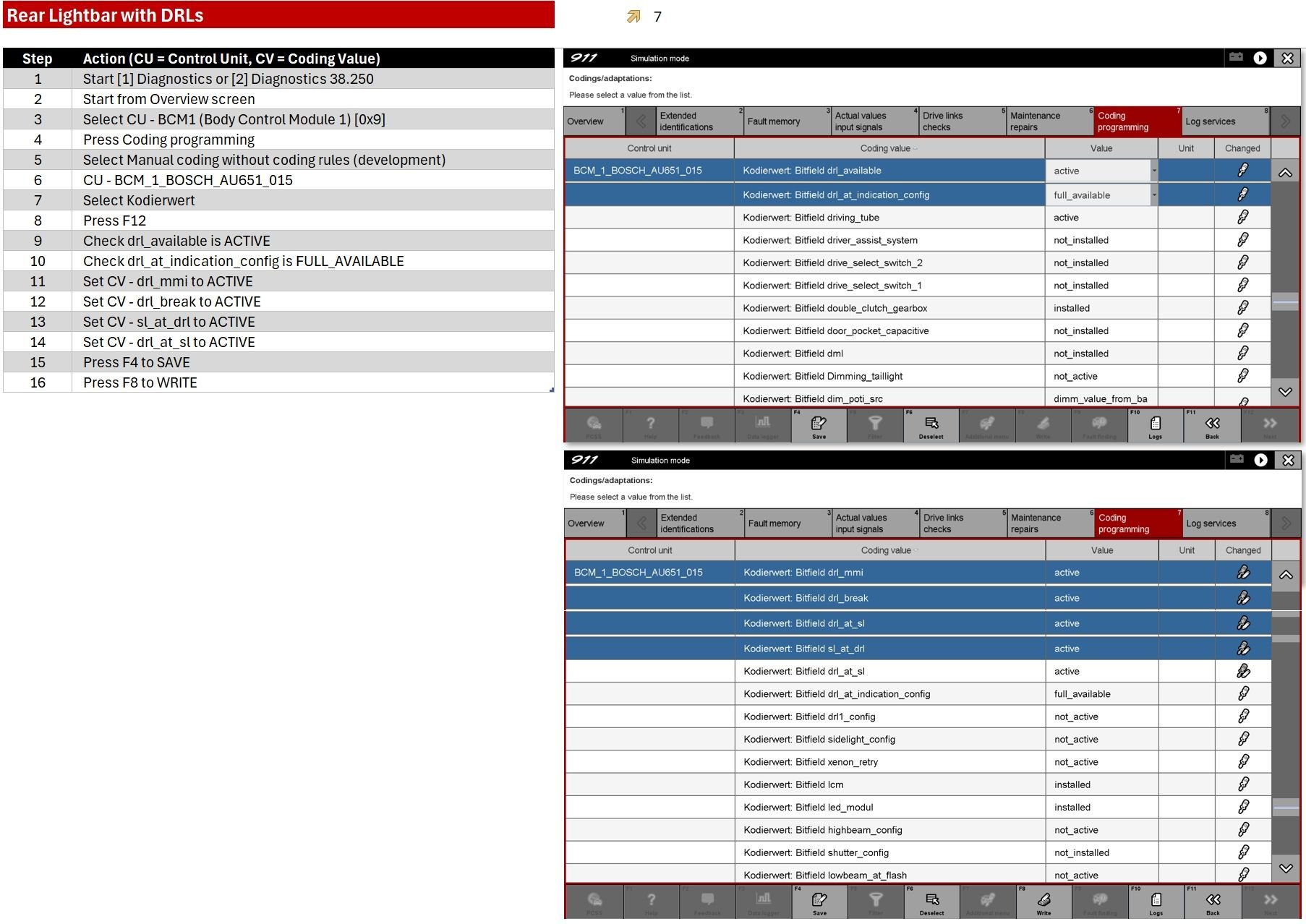
For those who need a step-by-step for enabling the rear lightbar so it's always on with DRLs (which I think is a great feature especially when driving during daytime rain). Taken from @siberian early on this thread
For those who need a step-by-step for enabling the rear lightbar so it's always on with DRLs (which I think is a great feature especially when driving during daytime rain). Taken from @siberian early on this thread
Can I suggest a small alternative?
Setting the values as above, causes the DRL's (front and rear) only to come on when the car is in drive mode. i.e DRL's are now OFF when car is stationary. Perhaps not intended behaviour if all you wanted was Rear DRL's along with Fronts.
If need rear DRL's and everything else as standard behaviour; then just need to set 'Bitfield sl_at_drl' to aktiv. The first 3 values in your screenshot can remain InActive.
(drl_mmi, drl_break, drl_at_sl can remain InActive).
@asunnyhero
Please try and confirm if it works... On the Taycan, this works.
one minor clarification is that in my settings the DRLs are (all with auto lights setting and during daylight)
DRLs off - with ignition ON, PDK in P and ebrake ON
DRLs on - with ignition ON, PDK in P and ebrake OFF
DRLs on - car moving
I think this highlights two use cases beyond the standard setting
1. DRLs on or off (front & rear) when stationery, subject to ebrake
2. DRLs on or off (front & rear) when driving
I will try #1 but actually wanted #2 but always open to options!
I would like to know if it can enable full LED-Matrix anti-dazzle functionality. If it's possible, I would spec this out on my build and "bribe" a tech to code it. But I'm not laying out the $2000 upgrade w/o knowing that it can be done just with coding and not additional hardware.
MC Squared in Lewisville TX activated my Matrix headlights for me. Works like a champ. here’s my little blurb about it
I have a 2020 911 4S does anybody know if it’s possible to code the doors to pop pit as you approach aka extend comfort access know some MY20 had it and they took it out of some months.
Excellent, but let's remember to give props to @rnlst_log , the OG of enabling active matrix on .1 and .2 cars. Everyone else is just 'standing on his shoulders'...
Originally Posted by TheSKPR
MC Squared in Lewisville TX activated my Matrix headlights for me. Works like a champ. here’s my little blurb about it
Setting the values as above, causes the DRL's (front and rear) only to come on when the car is in drive mode. i.e DRL's are now OFF when car is stationary. Perhaps not intended behaviour if all you wanted was Rear DRL's along with Fronts.
If need rear DRL's and everything else as standard behaviour; then just need to set 'Bitfield sl_at_drl' to aktiv. The first 3 values in your screenshot can remain InActive.
(drl_mmi, drl_break, drl_at_sl can remain InActive).
@asunnyhero
Please try and confirm if it works... On the Taycan, this works.
QQ - what settings would you recommend for DRL setup as follows:
Front (sidelights ON, headlight OFF) and Rear (tail lights ON and lightbar ON) when:
1. Ignition is ON
2. Lights set to AUTO
OK - why are there zero tutorials out there on PIWIS 4 is beyond me.
Just received last night, and after I hooked this up to the car and verified it connected to it successfully, I could not find where to put the thing into Engineering mode. Didn't have a ton of time last night, but help a brother out, where is this located now?
Reference, PIWIS 3 is under settings, Diagnostics Configuration and the Mode tab - in version 4, I don't have anything like this under settings.
So, I went through this one (and his other one). It's a bit hard to follow without any discussion and everything displayed is in a different language. Is there a specific part of this video I need to focus on?
Once I go into diagnostics, 4 looks to be very similar to 3....it's just getting this in engineering mode.
So, I went through this one (and his other one). It's a bit hard to follow without any discussion and everything displayed is in a different language. Is there a specific part of this video I need to focus on?
Once I go into diagnostics, 4 looks to be very similar to 3....it's just getting this in engineering mode.
There really isn’t a specific engineering mode in 4 as far as I can tell; at least nothing that uses that language. There seems to be a virtual mode and the actual VT4G/VCI login/connection prompts. When I log into mine and seek to code, the language changes from English to German and that’s it.
Last edited by M3Inline6; Mar 26, 2026 at 04:59 PM.
There really isn’t a specific engineering mode in 4 as far as I can tell; at least nothing that uses that language. There seems to be a virtual mode and the actual PT3G/VCI login/connection prompts. When I log into mine and seek to code, the language changes from English to German and that’s it.
When I went under coding programming - I only had 2 options (the automatic coding, which I believe is used for setting up new devices/fixing issues - and the top code that I never went into on PIWIS 3). Only seeing those 2 options led me to thing I'm in V mode. At least - what what I saw on PIWIS 3 in V mode.
If what you're listing is accurate, then how to I edit settings which is under that Manual Coding option?
May need to hook it up again and post some screen shots.
Porsche 911 GT3 Artisan Edition Pays Homage to Japanese Culture
Slideshow: Porsche has created a Japan-only 911 GT3 Artisan Edition that blends track-ready hardware with design cues inspired by traditional Japanese craftsmanship.
Porsche Reveals Coupe Variant of the Electric Cayenne With a Fresh Look
Slideshow: Porsche's latest electric Cayenne Coupe blends dramatic styling with supercar acceleration, turning the brand's midsize SUV into a 1,139-horsepower flagship.










 ) I added active lane keeping, which should show some symbols in instrument cluster when it's turned on.