When you click on links to various merchants on this site and make a purchase, this can result in this site earning a commission. Affiliate programs and affiliations include, but are not limited to, the eBay Partner Network.
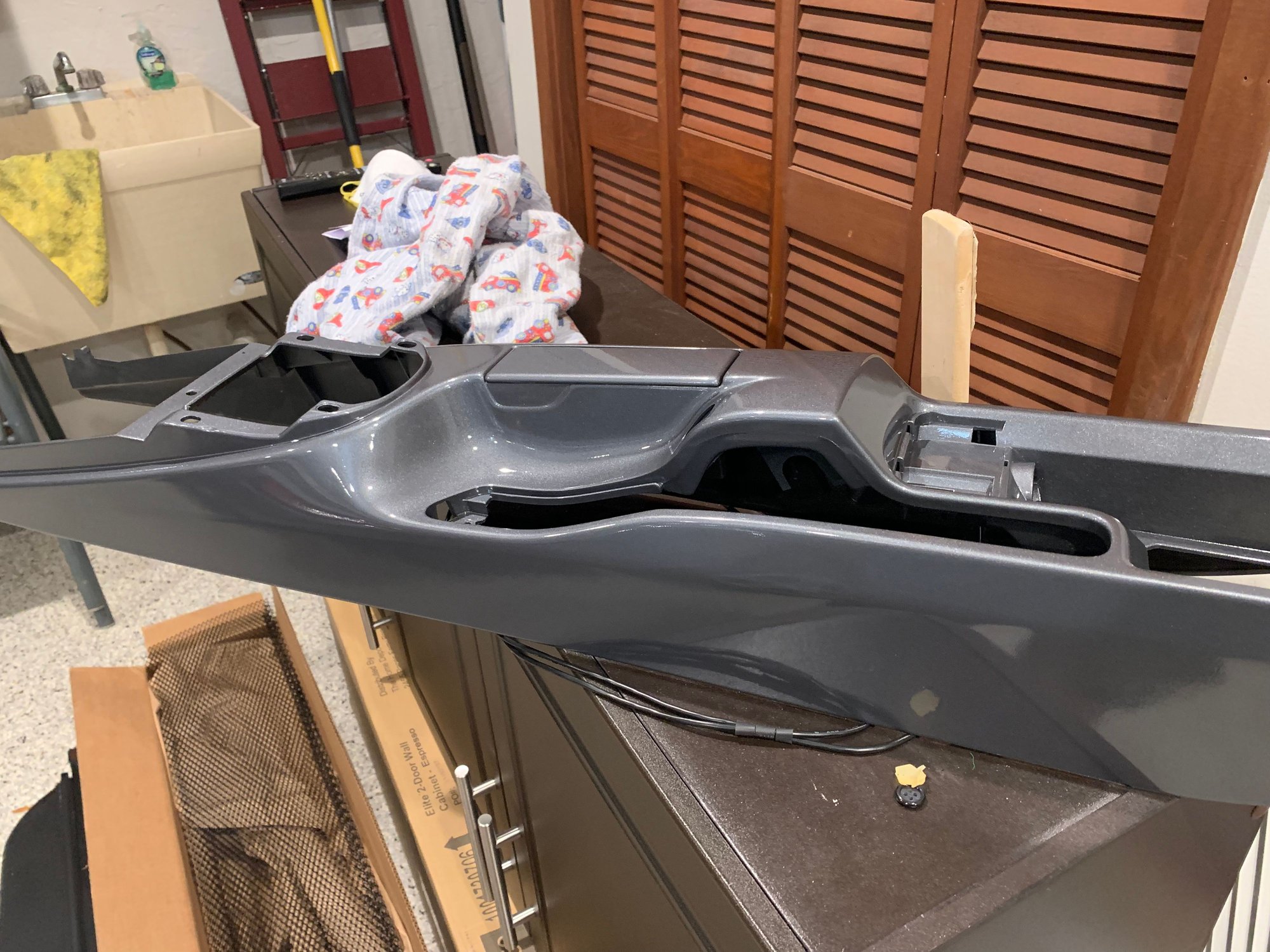
i replaced my shifter cables ~2 probably closer to 3 month ago and while I was "there", I took my interior apart to get it painted.
Over several weeks I sanded the pieces free from scratches and the peeling black color.
Alcohol wet towels helped a lot, sanding and a lot of water rubbing (just in water with hand rubbing, color comes good off) helped a lot.
I bought the USB extension from eBay. LINK
While the housing was to tall to look good, I took a saw and shortened the housing to sit flush in the console.
The location of the USB/ Aux was crucial to me, while there is a rounded area next to the cigarette lighter, I rounded the housing of the USB plug with my dremmel.
For the hole in the console, I made a drawing on paper, Cut it out and sticked it on the console. To get the location right, I drilled the four corners and cut it out with a dremmel tool.
This is how it sits right now since I want to have the console and pieces PPF protected before they go in.
I guess, like I have found, is that there is no easy way to remove that silly soft touch paint porsche used. Just takes time, elbow grease, and lots of patience!! I see you matched your exterior color too, that's gonna look great when ppf'd. With the center console usb/aux jack upgrade, new paint, and BT hookup... it's gonna feel like a having a new updated car when all done. Sometimes simple mods can make a huge difference in how we find new reasons to enjoy our Porsches even more! Great insight/info. thanks!
PLS HELP...while using bluetooth to make/receive calls, everyone tells me they can barely hear me and cannot make out what im saying...they tell me I sound "faint", "far away", "muffled". Turning volume up either on center console ****, steering wheel, or iphone makes zero difference.
Then, the next second I tap speaker on iphone or handheld whomever im talking to can immediately hear me perfectly. Install perfomed by very reputable shop, mic located at top of steering column area like others have mentioned.
Every other function works seamlessly, I can hear other caller perfectly, and all volume controls function, stream music perfectly, contacts etc download, calls listed on screen....
Car is early build date 207 997.1TT, with Bose, navigation,..
Try a different microphone or microphone location. It is possible to get a bad one. And also make sure the mic is fully plugged in (ask me how I know...).
Try a different microphone or microphone location. It is possible to get a bad one. And also make sure the mic is fully plugged in (ask me how I know...).
this ^^ Also, if you have another phone line you can leave a voice mail on... call that number from your car and leave a test message. I did that a few times where I called my office and left a voicemail on my office phone. Then was able to listen back to it to make sure that the mic was working and sound quality was ok. I admit the voice sounds from car mic were not the greatest, a bit of static and breakup, but the I could hear the volume loud and understand what I was saying. car mic's in general and phone calls from other people inside cars have always sounded like junk to me anyway. So it should sound just good enough. No volume or constant static is not good. So check your connections. I may try a different mic as well at a later date. good luck and keep us posted on how your resolve the problem!
Good evening,
This morning I moved mic from the top of steering column and put on far right tachometer covering fuel level gauge.....tested it by calling my wife and a friend of mine. Both of them
said it was improved but still not great.
I did notice when I moved the mic there was very little slack...so indeed it may be the wire got slightly disconnected at some point.
I will try the suggestion to call and leave voice mail.
Will report back and thanks again for replies!!
This is too awesome - may i ask how you were able to get both 12v sockets removed? I cant the them out and i am wishing to get this lower console painted cobalt blue while my techart rear spoiler gets painted as well. i have tried the rubber mallot method with no luck
Originally Posted by Zettinger
Thanks mate!
i replaced my shifter cables ~2 probably closer to 3 month ago and while I was "there", I took my interior apart to get it painted.
Over several weeks I sanded the pieces free from scratches and the peeling black color.
Alcohol wet towels helped a lot, sanding and a lot of water rubbing (just in water with hand rubbing, color comes good off) helped a lot.
I bought the USB extension from eBay. LINK
While the housing was to tall to look good, I took a saw and shortened the housing to sit flush in the console.
The location of the USB/ Aux was crucial to me, while there is a rounded area next to the cigarette lighter, I rounded the housing of the USB plug with my dremmel.
For the hole in the console, I made a drawing on paper, Cut it out and sticked it on the console. To get the location right, I drilled the four corners and cut it out with a dremmel tool.
This is how it sits right now since I want to have the console and pieces PPF protected before they go in.
The cigarette lighter next to the ash tray is just pressed. HIt it with the mallet from the back and it will move out.
The other one in the cubby had two white clips to press.
Originally Posted by myw
This is too awesome - may i ask how you were able to get both 12v sockets removed? I cant the them out and i am wishing to get this lower console painted cobalt blue while my techart rear spoiler gets painted as well. i have tried the rubber mallot method with no luck
Just finished installing the LAPower device and it went without problem - fiber optics work and so does power (connected to red/green positive and brown negative). Unit's blue monitor light is on and phone pairs unit's bluetooth. Moreover, the unit appears to be correctly integrated into the fiber optic network between radio and amp. NOTE-my boxster is not equipped with CD changer. And now for the problem:
1. The bluetooth feature doesn't seem to work - called into phone connected to the unit and phone behaves as it when not connected.
2. The USB cable when connect between the unit and phone doesn't do anything.
3. The analog connection between and ipod and the unit does not respond.
I recognize that one has to press the radio's "CD" button to toggle between, say FM radio, and analog ipod music, however, pressing that button once, twice or even three times does nothing except for the radio to display "NO CD"
Any ideas what my problem might be and please don't say I must take it to the Porsche dealer for reprogramming of car's pcm unit..
Just finished installing the LAPower device and it went without problem - fiber optics work and so does power (connected to red/green positive and brown negative). Unit's blue monitor light is on and phone pairs unit's bluetooth. Moreover, the unit appears to be correctly integrated into the fiber optic network between radio and amp. NOTE-my boxster is not equipped with CD changer. And now for the problem:
1. The bluetooth feature doesn't seem to work - called into phone connected to the unit and phone behaves as it when not connected.
2. The USB cable when connect between the unit and phone doesn't do anything.
3. The analog connection between and ipod and the unit does not respond.
I recognize that one has to press the radio's "CD" button to toggle between, say FM radio, and analog ipod music, however, pressing that button once, twice or even three times does nothing except for the radio to display "NO CD"
Any ideas what my problem might be and please don't say I must take it to the Porsche dealer for reprogramming of car's pcm unit..
Hey TEF,
send a pic of your pcm in the "CD List" Screen or NO CD screen
I would trouble shoot by simplifying first. From the Mr12Volt unit unplug the usb and Aux jack if you plugged those in. So only connect with one source... Try BT first. Connect bluetooth to the Carkit and play some music. You may not hear it , but you at least want to see it playing the music on your phone.
Now double check your fiberoptic connections. You should have had an existing fiberoptic connection in to the back of your pcm. That connection should be running to your amplifier. The connections should be fairly simple. Are you sure you removed all packaging that could be blocking your fiberoptic signal. There were a couple plastic caps I think in the packaging protecting the cables. One plug clearly goes into the Mr12Volt. The other end plug into the back of your radio/pcm unit. The third plug runs into your amplifier pcm connector that use to run into the back of your radio.
If the BT signal is not picked up by stereo you may want to try the Aux jack plug. Turn off your Bluetooth first. Then plug in an Aux stereo jack and run it in to the Mr12Volt. Make sure music is playing on your phone. Turn off car and wait a minute. Turn car back on and wait for radio to boot up. You are hoping to see some sort of CD connection. Once you see a CD connection you will see it List CD's and at the bottom of the list you will see "Change mode" option. That is what you will chose to change modes between BT , AUX , USB and or Flash drive.
I hope you can get this sorted. Maybe there is a member in your area who has done this and can help you trouble shoot. One of my PCM units had NO CD changer and it automatically picked up the Mr12volt signal and made CD Changer available automatically. No dealer required. keep us posted.
To clarify a few things, my Boxster S is equipped with a CDR23 radio with a rudimentary display, so there is not much to photograph. However, after pressing the CD button, the display reads "No CD". Nevertheless, the CDR23, per the manufacturer's website, is compatible with a Mr12v. As for the optical cable, the newer Mr12v's arrive with an idiot proof harness. No more does one have to disconnect on leg of the optical pair and connect it to the corresponding leg of the Mr12v. The new system comes with three plugs (one female and two males) that connect as follows: one unplugs the male optical plug on the back of the PCM unit and this goes into the female plug of the supplied harness. Then one of the male plugs on the supplied harness goes into the back of the PCM and the other male plug (on the longer leg of the harness) goes into the Mr12v. Since this is all prepared by the manufacturer, I am thinking there is not much chance of goofing up this circuit.
The power circuit seems simple enough: the red (positive) connects to the red/green wire while the black (negative) goes to the brown wire. The Mr12v's blue power light is on and the entire radio/amp combo does not function when the power plug is removed from the Mr12v. Therefore, I don't see a problem is this area..
Following your suggestions, I tried outputting music from my phone via blue tooth into the Mr12v without success. Secondly, I tried turning the radio off and on and still not luck. I did not have a chance to try the analog connection, but neither this or the USB connection worked yesterday. While I loath to say this, perhaps my only option is to have a Porsche dealer activate my CDR23, so it recognizes a CD deck (or in my case, the Mr12v). Aside from the cost, it is a 160 mile round trip for this process. The manufacturer's website does say that some cars without a CD deck may require this procedure. In your case, you seemed to have lucked out.
Should you or anyone else have any suggestions, it would be appreciated.
To clarify a few things, my Boxster S is equipped with a CDR23 radio with a rudimentary display, so there is not much to photograph. However, after pressing the CD button, the display reads "No CD". Nevertheless, the CDR23, per the manufacturer's website, is compatible with a Mr12v. As for the optical cable, the newer Mr12v's arrive with an idiot proof harness. No more does one have to disconnect on leg of the optical pair and connect it to the corresponding leg of the Mr12v. The new system comes with three plugs (one female and two males) that connect as follows: one unplugs the male optical plug on the back of the PCM unit and this goes into the female plug of the supplied harness. Then one of the male plugs on the supplied harness goes into the back of the PCM and the other male plug (on the longer leg of the harness) goes into the Mr12v. Since this is all prepared by the manufacturer, I am thinking there is not much chance of goofing up this circuit.
The power circuit seems simple enough: the red (positive) connects to the red/green wire while the black (negative) goes to the brown wire. The Mr12v's blue power light is on and the entire radio/amp combo does not function when the power plug is removed from the Mr12v. Therefore, I don't see a problem is this area..
Following your suggestions, I tried outputting music from my phone via blue tooth into the Mr12v without success. Secondly, I tried turning the radio off and on and still not luck. I did not have a chance to try the analog connection, but neither this or the USB connection worked yesterday. While I loath to say this, perhaps my only option is to have a Porsche dealer activate my CDR23, so it recognizes a CD deck (or in my case, the Mr12v). Aside from the cost, it is a 160 mile round trip for this process. The manufacturer's website does say that some cars without a CD deck may require this procedure. In your case, you seemed to have lucked out.
Should you or anyone else have any suggestions, it would be appreciated.
Your CDR23 is listed as compatible with Mr12Volt so it should work. That's frustrating. Many of us purchased ours from ebay from this seller: leica4lifeus
I would try contacting that seller and maybe he can have a quick response for you.
On PCM1, how do you answer incoming phone call? The on/off button Ends calls, but the only way I’ve found to answer is thru the phone itself. Is there a way using the head unit??? (No + - buttons). 2005.5 C2S w Bose. Everything else works perfectly!
Thank you so much for posting this. I've read through and watched all the videos and will be attempting the install tonight on my 06 Cayman S.
One thing I did not see, if I plan on tapping the passenger AUX power, do I need to disconnect the battery or fuse (if so which one) before tapping the wire?
Thanks!
Also, this is my first post so my apologies in advance if I did not follow any of the new member etiquette.
One Q: How do I pause a track/podcast? The forward/back buttons below the number pad skip forward and back fine, but I need to use my phone to pause. I’m sure I’m missing something super simple.
Stunning Porsche 356A Super GT Speedster Auction Fails to Meet Reserve
Slideshow: One of the rarest Porsche 356 Speedsters ever built has resurfaced, offering a glimpse into a little-known chapter of the model's competition history.
Theon Goes Full Carbon Fiber With Stunning New Build
Slideshow: Built around a carbon-bodied 964 and a naturally aspirated 4.0-liter flat-six, this bespoke commission highlights how far the restomod formula has evolved.
Tuner Is Converting Porsche 911s Into Shooting Brakes
Slideshow: A Polish Porsche specialist is moving ahead with one of the most unusual 911 conversions in recent memory: a shooting brake version of the 991-generation sports car.
This Coachbuilt Creation Is A Modern Take on the Legendary Porsche 917
Slideshow: A Porsche Carrera GT has been transformed into a one-off coachbuilt machine that blends analog supercar engineering with styling inspired by the legendary 917 race cars.