When you click on links to various merchants on this site and make a purchase, this can result in this site earning a commission. Affiliate programs and affiliations include, but are not limited to, the eBay Partner Network.
I have the same issue on my 07 957 S with PCM 2.1, can anyone provide some specific information on powering off the DVD navi? There is no fuse for the DVD navi in my 957.
I have the same issue on my 07 957 S with PCM 2.1, can anyone provide some specific information on powering off the DVD navi? There is no fuse for the DVD navi in my 957.
Just pull the MOST cable behind the DVD in the frunk. You just need to pull it out about half way, leave the plug in the slot for easy plug back in after you are done adjusting the clock. Your DVD can still be powered, without MOST cable, your DVD is invisible to the PCM.
When your PCM does not see the DVD, you will see the Date adjustment active again in the PCM.
Just pull the MOST cable behind the DVD in the frunk. You just need to pull it out about half way, leave the plug in the slot for easy plug back in after you are done adjusting the clock. Your DVD can still be powered, without MOST cable, your DVD is invisible to the PCM.
When your PCM does not see the DVD, you will see the Date adjustment active again in the PCM.
Okay, thanks, my DVD is underneath the passengers seat, but I guess that the same method applies. I will notify here If it turns out to be a success.
Btw, does that mean if I want to use the navi, the map DVD has to be inserted all the time or PCM 2.1 has its own hard drive where it stores map data?
Okay, thanks, my DVD is underneath the passengers seat, but I guess that the same method applies. I will notify here If it turns out to be a success.
Btw, does that mean if I want to use the navi, the map DVD has to be inserted all the time or PCM 2.1 has its own hard drive where it stores map data?
correct, same principle. Look for the orange MOST plug and pull it out, and then reset the date. The 997.1 has a DVD based system, so your map has to be inside the DVD drive all the time. By “storing map data”, are you referring to the location memories? Those are stored inside the PCM. Everything else related to the map and POIs are in the DVD.
Thanks, by "storing map data" I meant a hard drive that just copies files from the DVD so that the whole map will be stored in an internal PCM hard drive and the Navi DVD will be no longer needed.
Do you also know anything about DVD formats that are supported by the DVD navi in Porsche? Can this be DVD-R or DVD+R?
Last edited by DARIOcaptain; Jun 20, 2022 at 01:49 PM.
I have a .2 with PCM3 so probably won't be much help, but just wondering if changing the format to 24 hour time would spur it into action. If so, the Germans are most likely still pissed about the bombing of Dresden.
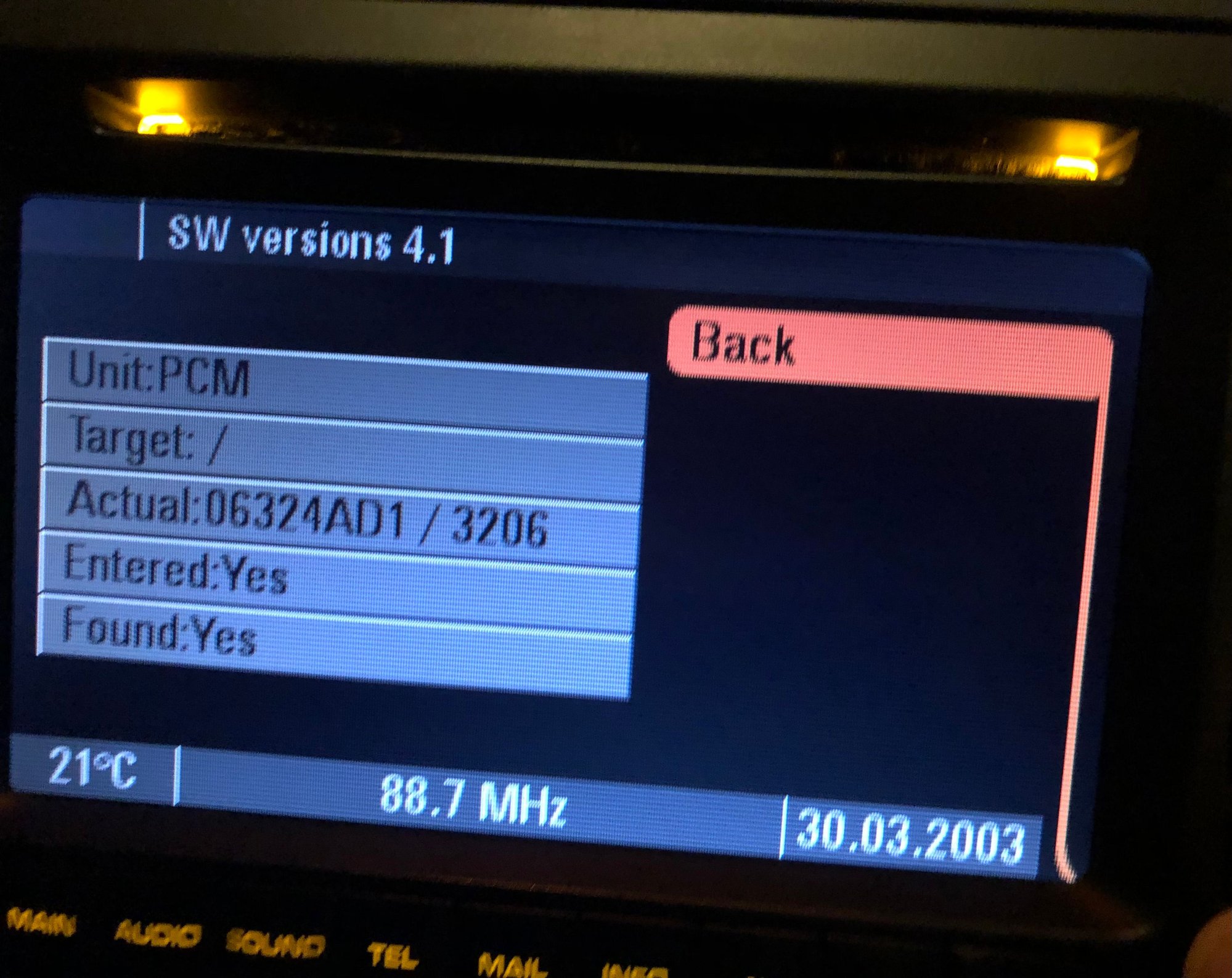
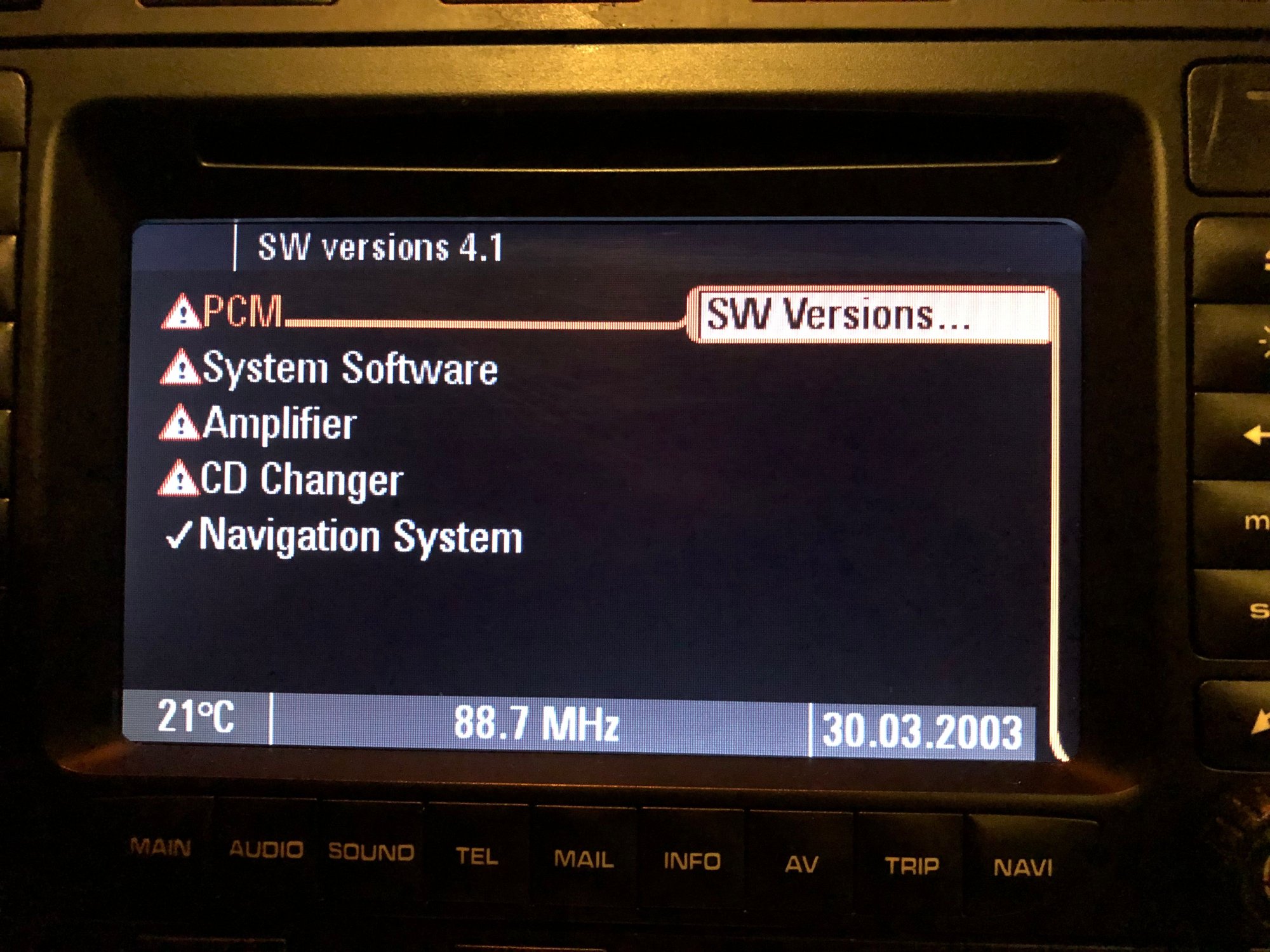
Just checked my PCM firmware version, and there seem to be some errors. Should I be worried and visit the service?
The PCM firmware version seems to be even higher than model C, however, the target section in CD Changer, Amplifier, PCM, and SW section is completely blank as you can see in the image below.
I have an old OEM 05.2007 navi DVD inserted, but it's unreadable.
Just checked my PCM firmware version, and there seem to be some errors. Should I be worried and visit the service?
The PCM firmware version seems to be even higher than model C, however, the target section in CD Changer, Amplifier, PCM, and SW section is completely blank as you can see in the image below.
I have an old OEM 05.2007 navi DVD inserted, but it's unreadable.
Your PCM looks different than other 2007 997s. To answer your other question, I bought my 2015 version map from dealer. That contains PCM firmware updates as well. That seems to be the latest map for the 997.1 PCM 2.1 cars.
It looks different, because it's a 2007 957 S, but I didn't want to create a new thread since this topic is already here.
Have you installed those updates that came with maps DVD? If so, can you please tell me what is your navigation system version? I've noticed that my navigation system may be outdated in comparison to my PCM firmware which is the latest version for PCM 2.1 system.
It looks different, because it's a 2007 957 S, but I didn't want to create a new thread since this topic is already here.
Have you installed those updates that came with maps DVD? If so, can you please tell me what is your navigation system version? I've noticed that my navigation system may be outdated in comparison to my PCM firmware which is the latest version for PCM 2.1 system.
The install is automatic once you install the new DVD. It will look at your firmware version and if it’s older, the new version will apply. I recall that there is a prompt to ask you if you want to apply the new firmware.
Just pull the MOST cable behind the DVD in the frunk. You just need to pull it out about half way, leave the plug in the slot for easy plug back in after you are done adjusting the clock. Your DVD can still be powered, without MOST cable, your DVD is invisible to the PCM.
When your PCM does not see the DVD, you will see the Date adjustment active again in the PCM.
Thanks for this. I was able to do this and for anyone trying this it is the cable on the back upper left side of the dvd that you loosen. There is a clip on the plug to loosen the wire. There is also another cable on the upper right and I tried that initially and it wasn’t the one. Years later and finally a fix!!
Last edited by motosport3; Jun 25, 2022 at 11:54 PM.
Thanks for this. I was able to do this and for anyone trying this it is the cable on the back upper left side of the dvd that you loosen. There is a clip on the plug to loosen the wire. There is also another cable on the upper right and I tried that initially and it wasn’t the one. Years later and finally a fix!!
Can you share how you would remove the plastic DVD nav cover in order to reach the unit? I don't see can clips or screws? Is it simple a friction clip?pull up or towards?
Can you share how you would remove the plastic DVD nav cover in order to reach the unit? I don't see can clips or screws? Is it simple a friction clip?pull up or towards?
Hi,
If you have the 957:
I've tried grabbing the plastic parts from every angle, but no luck.
The easiest way I think is to lift the seat all the way up and then reach the DVD nav from behind by going into the backseat. Just stick your hand under the seat and disconnect the fiber optic cable, it's easy to see there.
Haven't tried it yet on my own.
Can you share how you would remove the plastic DVD nav cover in order to reach the unit? I don't see can clips or screws? Is it simple a friction clip?pull up or towards?
You pull up on the cover and it should flip open very easily. The wire you see in the picture below on the upper left on the back of the dvd is the one you want to loosen.
Last edited by motosport3; Jul 15, 2022 at 02:20 AM.