


Thinkdiag Magic


Racer
Joined: Nov 2023
Posts: 322
Likes: 155

No. If you make any change with PIWIS in the PCM, your PCM screen might go dark and go to Production Mode. To get the screen back to normal you need to disable Production Mode after you apply your changes. I have seen this on 80% of the car that I coded. It might be different with X431 or ThinkDiag
Racer
Joined: Nov 2023
Posts: 322
Likes: 155


Advanced
Joined: Feb 2023
Posts: 77
Likes: 76
From: Florida Keys
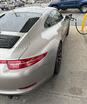
I just successfully coded the passenger's side mirror to tilt downwards when I select Reverse. Not much tilt, but it helps. (I have seats without the Memory/14 way package).
Info here: https://rennlist.com/forums/718-gts-...e-request.html
Still amazed by this gadget. Here is the revised list of what I was able to do with the Thinkdiag. All settings are working on my 2019 991:
Info here: https://rennlist.com/forums/718-gts-...e-request.html
Still amazed by this gadget. Here is the revised list of what I was able to do with the Thinkdiag. All settings are working on my 2019 991:
- · Overrev Report accessed (ranges 4-6 =0!)
- · Brake lights EBD enabled, g-values (-0.65g/-0.35g), speeds (15kph/1kph) and timing (1 sec.) set
- · Remapped Coolant Gauge Curve to real (sensor) values
- · Set Auto Start/Stop to “remember last setting”
- · Comfort Key FOB opening/closing for windows and sunroof
- · Wiper Teardrop Function ON
- · Turn light one-touch set to 5x (instead of 3x)
- · Front DLR 4-point LEDs always on, even when headlights on
- · Cluster Lights (Speedometer/RPMs) always on ("non-Scandinavian" solution)
- · Seatbelt Chime off after 4x (Warning still in Cluster Display)
- · Spoiler extend/retract speed reduced by 15kph/10kph (90kph/60kph)
- · Expert Menu permanently enabled
- · Performance Menu (Torque/Power) permanently enabled
- · Oil Fill Level displayed in 4 segments instead of one
- · HVAC Setting to “Driver Memory” from Basic (key-coded memory)
- · Automatically tilt the Passenger’s Mirror when in Reverse
Last edited by Frankfurt1470; Jan 4, 2024 at 10:17 PM.


Racer
Joined: Nov 2023
Posts: 322
Likes: 155
I just successfully coded the passenger's side mirror to tilt downwards when I select Reverse. Not much tilt, but it helps. (I have seats without the Memory/14 way package).
Info here: https://rennlist.com/forums/718-gts-...e-request.html
Still amazed by this gadget. Here is the revised list of what I was able to do with the Thinkdiag. All settings are working on my 2019 991:
Info here: https://rennlist.com/forums/718-gts-...e-request.html
Still amazed by this gadget. Here is the revised list of what I was able to do with the Thinkdiag. All settings are working on my 2019 991:
- · Overrev Report accessed (ranges 4-6 =0!)
- · Brake lights EBD enabled, g-values (-0.65g/-0.35g), speeds (15kph/1kph) and timing (1 sec.) set
- · Remapped Coolant Gauge Curve to real (sensor) values
- · Set Auto Start/Stop to “remember last setting”
- · Comfort Key FOB opening/closing for windows and sunroof
- · Wiper Teardrop Function ON
- · Turn light one-touch set to 5x (instead of 3x)
- · Front DLR 4-point LEDs always on, even when headlights on
- · Cluster Lights (Speedometer/RPMs) always on ("non-Scandinavian" solution)
- · Seatbelt Chime off after 4x (Warning still in Cluster Display)
- · Spoiler extend/retract speed reduced by 15kph/10kph (90kph/60kph)
- · Expert Menu permanently enabled
- · Performance Menu (Torque/Power) permanently enabled
- · Oil Fill Level displayed in 4 segments instead of one
- · HVAC Setting to “Driver Memory” from Basic (key-coded memory)
- · Automatically tilt the Passenger’s Mirror when in Reverse

Rennlist Member
Joined: Mar 2022
Posts: 1,242
Likes: 674
I just successfully coded the passenger's side mirror to tilt downwards when I select Reverse. Not much tilt, but it helps. (I have seats without the Memory/14 way package).
Info here: https://rennlist.com/forums/718-gts-...e-request.html
Still amazed by this gadget. Here is the revised list of what I was able to do with the Thinkdiag. All settings are working on my 2019 991:
Info here: https://rennlist.com/forums/718-gts-...e-request.html
Still amazed by this gadget. Here is the revised list of what I was able to do with the Thinkdiag. All settings are working on my 2019 991:
- · Overrev Report accessed (ranges 4-6 =0!)
- · Brake lights EBD enabled, g-values (-0.65g/-0.35g), speeds (15kph/1kph) and timing (1 sec.) set
- · Remapped Coolant Gauge Curve to real (sensor) values
- · Set Auto Start/Stop to “remember last setting”
- · Comfort Key FOB opening/closing for windows and sunroof
- · Wiper Teardrop Function ON
- · Turn light one-touch set to 5x (instead of 3x)
- · Front DLR 4-point LEDs always on, even when headlights on
- · Cluster Lights (Speedometer/RPMs) always on ("non-Scandinavian" solution)
- · Seatbelt Chime off after 4x (Warning still in Cluster Display)
- · Spoiler extend/retract speed reduced by 15kph/10kph (90kph/60kph)
- · Expert Menu permanently enabled
- · Performance Menu (Torque/Power) permanently enabled
- · Oil Fill Level displayed in 4 segments instead of one
- · HVAC Setting to “Driver Memory” from Basic (key-coded memory)
- · Automatically tilt the Passenger’s Mirror when in Reverse
Rennlist Member
Joined: Mar 2022
Posts: 1,242
Likes: 674
Rennlist Member
Joined: Jan 2024
Posts: 103
Likes: 108
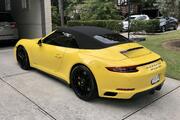
This is great. I just got a 991.1S convertible and I've been reading non-stop on upgrades and diag tools for two weeks. I just ordered a unit from the thinkcar website that was listed here. I was just about to order a smart top module so I'm hoping coding can get me most of what I'm looking for which is top up/down from keyfob. I'll also try to add anything else I find once I get this up and running.
Question for the members that have already used this. Does the IOS app have a limited number of functions for the same Thinkdiag hardware when compared to the andriod app?
Question for the members that have already used this. Does the IOS app have a limited number of functions for the same Thinkdiag hardware when compared to the andriod app?


Racer
Joined: Nov 2023
Posts: 322
Likes: 155
The thread doesn't have alot of detail of what is needed to enable this. I only have PLDS. However, Ii you have PLDS+, wouldn't you already have this so no coding would be necessary?
Rennlist Member
Joined: Mar 2022
Posts: 1,242
Likes: 674
If you look at the video in my coding thread, you will see the difference. I had PLDS+ on my car and this was not enabled. I found only one setting to enable this but never tested.
Racer
Joined: Nov 2023
Posts: 322
Likes: 155
I thought this feature was part of PLDS+ so I incorrectly assumed that it was to enable this feature on non-PLDS+ cars. Thank you for the explanation.


Racer
Joined: Dec 2023
Posts: 459
Likes: 151
From: Miami Fl.
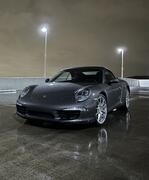
Looks like Ken718b posted a pdf on this thread and shows the commands to control the top with the remote. Look for a his post and downlaod the PDF he shared. I ordered a unit and that one of the first things I'm going to try.
Racer
Joined: Nov 2023
Posts: 322
Likes: 155
Correct. The pdf also explains how to set the top to go down by touching and releasing (rather than holding) the control switch in the car.