When you click on links to various merchants on this site and make a purchase, this can result in this site earning a commission. Affiliate programs and affiliations include, but are not limited to, the eBay Partner Network.
In PIWIS 3 there is a P mode or Production mode that I believe is used to test or fine tune modules. From all who've tinkered with PIWIS the consensus is you should mostly work in V (or dealer) Mode and occasionally in E or Engineering mode. Never in P mode.
Having always heeded Mars' advice I never delved there.
siberian
Ahhhh ok. I know there are changes among versions. PIWIS 4 is definitely set up differently.
Ahhhh ok. I know there are changes among versions. PIWIS 4 is definitely set up differently.
If you have PIWIS 4, could you navigate to DME (or ECM, seems Porsche is not consistent with their terms) and see if there are any menu concerning start/stop ? for 992.1
If you have PIWIS 4, could you navigate to DME (or ECM, seems Porsche is not consistent with their terms) and see if there are any menu concerning start/stop ? for 992.1
I’m not home at the moment, but like @siberian said, *** is mentioned in and has parameters in so many different modules. I can check for you when I get back from my mini road trip. I’m a relative newbie to PIWIS use having only used it to code the AeroKit, euro taillights, etc., so if the veteran users couldn’t figure it out, I won’t be of much help.
Last edited by M3Inline6; Oct 21, 2025 at 05:53 PM.
If you have PIWIS 4, could you navigate to DME (or ECM, seems Porsche is not consistent with their terms) and see if there are any menu concerning start/stop ? for 992.1
The start and stop is hard code. There is one that say activating start and stop which you can change, but setting it from last known will not work. You will need to get the car tune and ask your tuner to change it as it is hard coded in the DME
Right now I am trying to get the shift light to work on the a 992. I got it to show up in the cluster but it doesn't do anything. So right now there got to be a way to adjust the RPM down as the shift light only work at 6500 on the GT3
Has anyone found if there's a setting for brake system type? There should be some setting for different sizing, wondering if PCCB is also an option in there.
Has anyone found if there's a setting for brake system type? There should be some setting for different sizing, wondering if PCCB is also an option in there.
i think it is mechanical thou isn't it? I am upgrading my brake to brembo bbk on my 992 with 6 pot front and 4 pot rear and bigger rotors
i think it is mechanical thou isn't it? I am upgrading my brake to brembo bbk on my 992 with 6 pot front and 4 pot rear and bigger rotors
Sure. What I meant is that the ABS and PSM may be calibrated differently for each brake system. There's no way for the car to know you changed the brake hardware if you don't update the coding.
Found the answer to my own question, this document shows the coding for PCCB retrofit (calls out 992 GT3 - unclear what the difference might be - use at own risk).
Hi everyone, long time lurker first time poster. Thank you for this and all the other related threads, they have me, at least, inspired to the tune of buying everything including one of these awesome 120A power supplies.
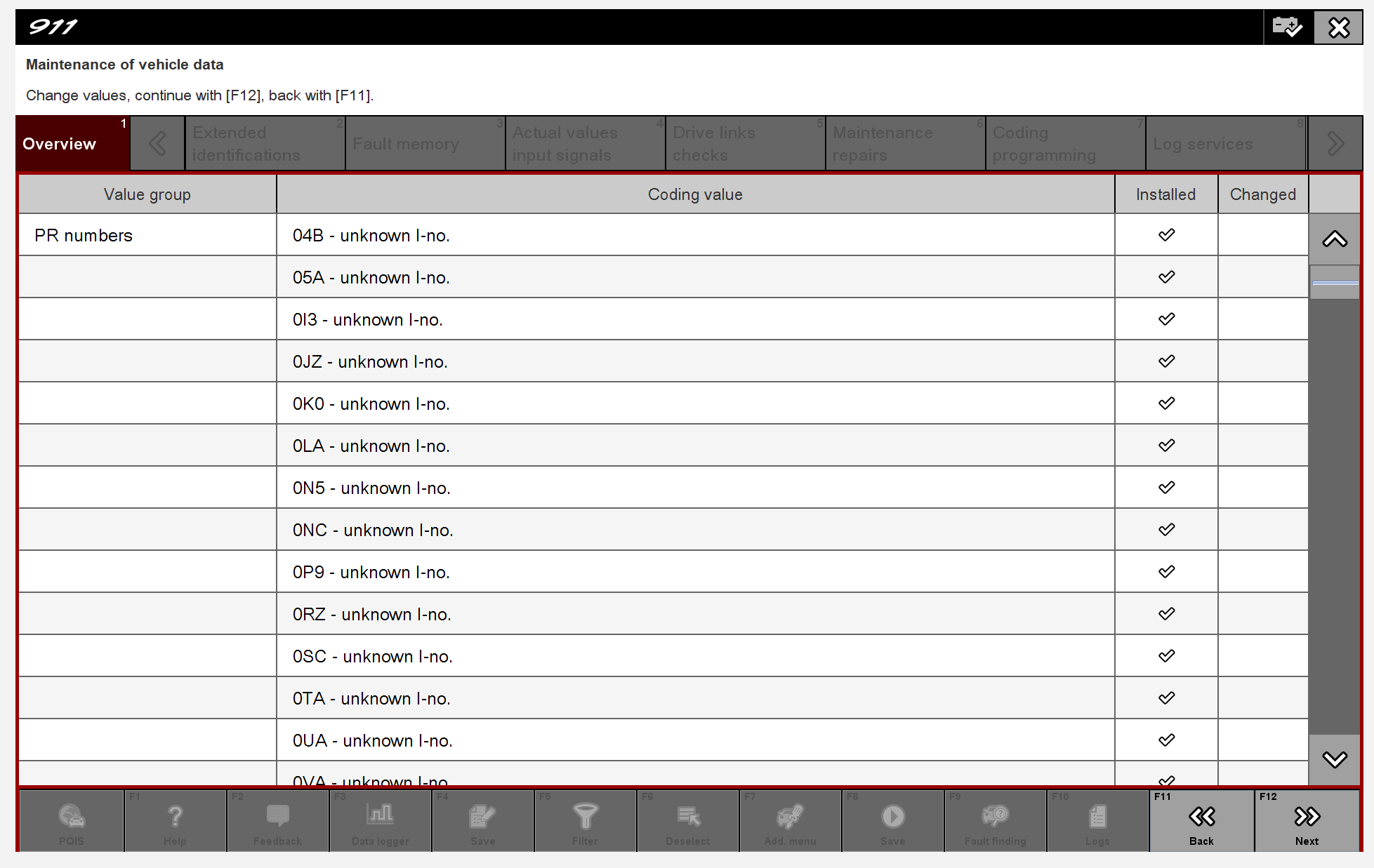
I've got piwis 41.500 + diag 38.250 up and running and talking to my 2025 992.1 Turbo S. Things more or less seem to be working fine until I get to the F7 - Add. Menu area. Once that loads up everything is listed under value group "PR Numbers" and the coding values (e.g. 0P9) are all enumerated there except that they are all "unknown I-no.". If I go scrolling for the control values related to matrix headlights I can see the expected US values. But, unlike in simulation mode, there's no dropdown menu. It's as though piwis has no idea what these coding values are and especially what the options might be.
The piwis image I have was originally in E mode. I switched it to P mode and started getting prompted to create a val. I said yes to this but after ~30 minutes being hung on, iiirc, "finalizing report" I gave up and aborted it (which also hung and I simply rebooted everything).
Is this as simple as not having a new enough version of piwis? Or have I missed a step somewhere?
Hi everyone, long time lurker first time poster. Thank you for this and all the other related threads, they have me, at least, inspired to the tune of buying everything including one of these awesome 120A power supplies.
I've got piwis 41.500 + diag 38.250 up and running and talking to my 2025 992.1 Turbo S. Things more or less seem to be working fine until I get to the F7 - Add. Menu area. Once that loads up everything is listed under value group "PR Numbers" and the coding values (e.g. 0P9) are all enumerated there except that they are all "unknown I-no.". If I go scrolling for the control values related to matrix headlights I can see the expected US values. But, unlike in simulation mode, there's no dropdown menu. It's as though piwis has no idea what these coding values are and especially what the options might be.
The piwis image I have was originally in E mode. I switched it to P mode and started getting prompted to create a val. I said yes to this but after ~30 minutes being hung on, iiirc, "finalizing report" I gave up and aborted it (which also hung and I simply rebooted everything).
Is this as simple as not having a new enough version of piwis? Or have I missed a step somewhere?
if it is 2025 which is a 992.2 it won’t work with this. If it is a 992.1 then you need verison 42.950 which this free verison won’t work
Porsche 911 GT3 Artisan Edition Pays Homage to Japanese Culture
Slideshow: Porsche has created a Japan-only 911 GT3 Artisan Edition that blends track-ready hardware with design cues inspired by traditional Japanese craftsmanship.
Porsche Reveals Coupe Variant of the Electric Cayenne With a Fresh Look
Slideshow: Porsche's latest electric Cayenne Coupe blends dramatic styling with supercar acceleration, turning the brand's midsize SUV into a 1,139-horsepower flagship.