When you click on links to various merchants on this site and make a purchase, this can result in this site earning a commission. Affiliate programs and affiliations include, but are not limited to, the eBay Partner Network.
Hello folks. New 2017 Cayenne owner (coming from BMW). Love how the Cayenne drives and its looks and practicality. However, I truly miss the programmable buttons that BMW has. In the BMW, there are preset buttons on the dash that can be programmed to perform different functions like tune the radio or satellite to a specific channel, start navigation to a specific address, call a certain telephone number, and so on. And all these can be set uniquely for each driver's key.
Is there something like this in the 2017 Cayenne? I feel like doing those things I mentioned to be harder to do on the Cayenne. I know it is easier when using Apple Carplay but sometimes I don't connect my phone to the USB cable while driving especially when driving short distances.
Do you guys have tips or shortcuts on doing simple stuff like tuning to a favorite radio channel, calling home, telling Navigation to give directions to go home. I feel like it's hard to do all these from the PCM especially while driving.
Do you guys have tips or shortcuts on doing simple stuff like tuning to a favorite radio channel, calling home, telling Navigation to give directions to go home. I feel like it's hard to do all these from the PCM especially while driving.
Thanks.
Do you have the optional voice recognition? ALL of what you've asked for can be done with it - and your eyes never have to leave the road. Works better/safer than more buttons.
Do you have the optional voice recognition? ALL of what you've asked for can be done with it - and your eyes never have to leave the road. Works better/safer than more buttons.
Mine doesn't have it. I didn't have my Cayenne built to order. I just bought it off the lot new - with a good discount. That's okay if it doesn't have it. I'll just have to remember to plug my phone to the USB cable before driving. This way I have Apple CarPlay and use Siri.
Do you have the optional voice recognition? ALL of what you've asked for can be done with it - and your eyes never have to leave the road. Works better/safer than more buttons.
Do you HAVE the voice recog option? Because I do, and the words "works better" really don't belong anywhere near it. It's a throw-back to 90's era "know the syntax exactly" voice recog systems. I suppose it's "better than nothing" but not by much...
I took voice recognition for granted and assumed it comes standard in a Porsche. It came standard with the BMW years ago.
It's not a problem though. I'm loving Apple Carplay with my Cayenne anyhow and I can easily call on Siri through the same voice command button. All is good. For my next Porsche I won't even bother to get the Navigation option if I could.
Do you HAVE the voice recog option? Because I do, and the words "works better" really don't belong anywhere near it. It's a throw-back to 90's era "know the syntax exactly" voice recog systems. I suppose it's "better than nothing" but not by much...
Actually I do - and it doesn't respond to cursing.
I did take the time to run through the training session with it, which actually seemed to make very little difference.
Is it Google or Amazon that's coming out with a car based voice Siri sort of thing? Something else to spy on us (sound of black helicopters circling overhead..) That'll be the answer for us Android phone users..
Actually I do - and it doesn't respond to cursing.
I did take the time to run through the training session with it, which actually seemed to make very little difference.
Is it Google or Amazon that's coming out with a car based voice Siri sort of thing? Something else to spy on us (sound of black helicopters circling overhead..) That'll be the answer for us Android phone users..
Android Auto is the response to Apple's car play. I used both briefly when I left the Cayenne world to waft around in a new GM. It really makes my 958 voice control system seem super dated, but then there was a 6-yr difference in model year.
I was very glad the 958 I landed on has voice control though, even if you must state things very specifically.
Do you have the optional voice recognition? ALL of what you've asked for can be done with it - and your eyes never have to leave the road. Works better/safer than more buttons.
You've obviously not owned a BMW with this system. Far better than voice command.
As a long time BMW owner thinking of jumping to a cayenne, the programmable memory buttons get used may more frequently than voice commands in my cars. They are super convenient for various frequently used functions like navigating home, calling the wife, pulling up music menu, etc...
I kind of assumed most cars had a similar feature these day so, it's a bit sad to hear the cayenne doesn't and that voice recognition is an option (kind of used to things like that already with BMW). Of course I'd happily trade 6 buttons for steering feel and handling at this point.
Hello folks. New 2017 Cayenne owner (coming from BMW). Love how the Cayenne drives and its looks and practicality. However, I truly miss the programmable buttons that BMW has. In the BMW, there are preset buttons on the dash that can be programmed to perform different functions like tune the radio or satellite to a specific channel, start navigation to a specific address, call a certain telephone number, and so on. And all these can be set uniquely for each driver's key.
Is there something like this in the 2017 Cayenne? I feel like doing those things I mentioned to be harder to do on the Cayenne. I know it is easier when using Apple Carplay but sometimes I don't connect my phone to the USB cable while driving especially when driving short distances.
Do you guys have tips or shortcuts on doing simple stuff like tuning to a favorite radio channel, calling home, telling Navigation to give directions to go home. I feel like it's hard to do all these from the PCM especially while driving.
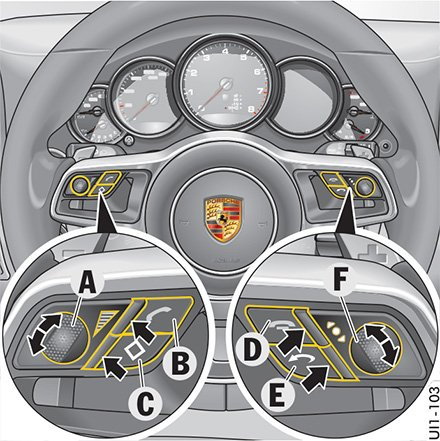
Not even remotely the same. The BMW has 8 of these buttons and they can be configured to almost any command. A favorite radio station. Call your bookie. Split the nav screen. Zoom to map level 1 mile. Show the radio presets. Bring up the sat radio time delay. Shut off the screen. Open the climate submenu. Etc.
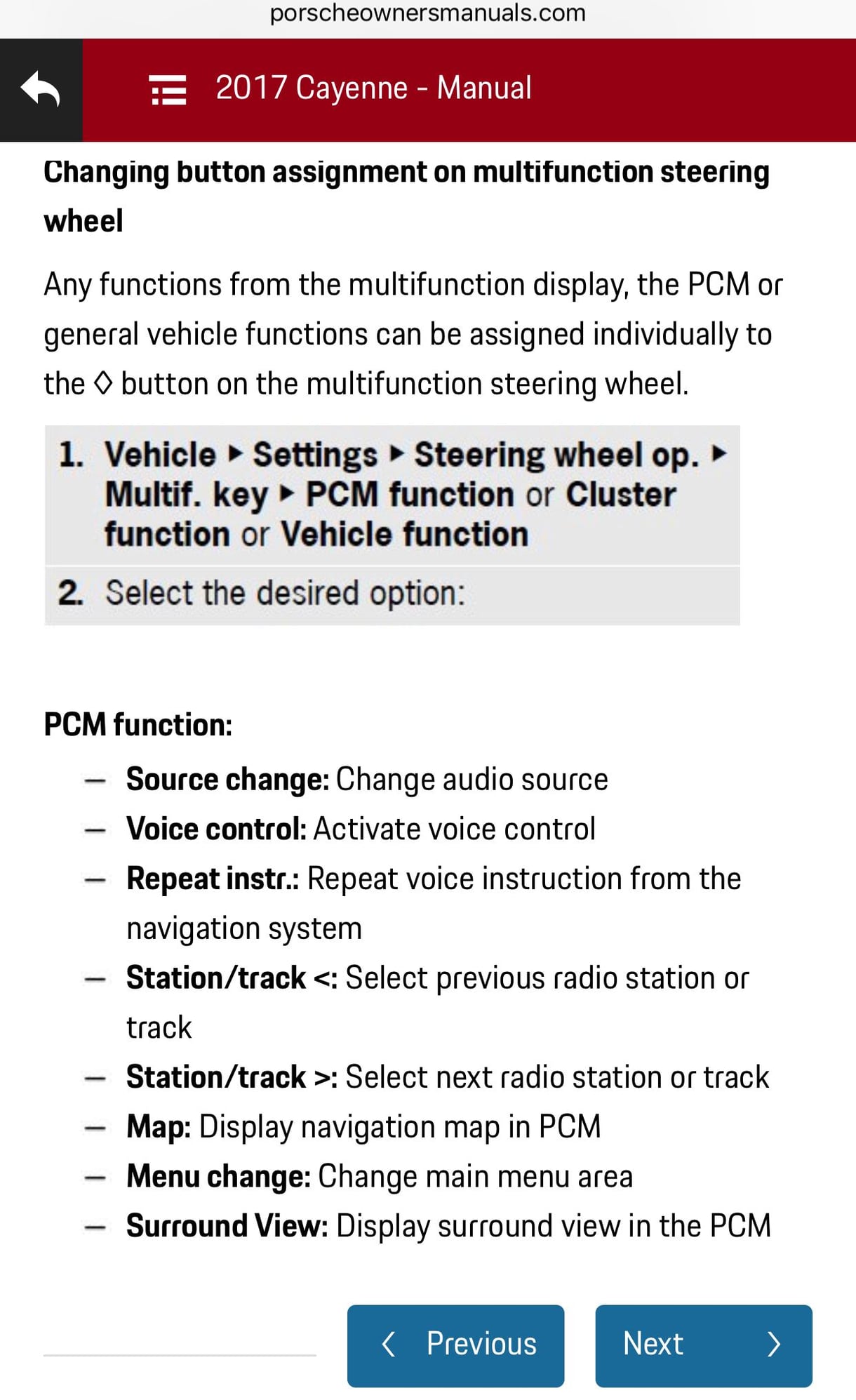
Essentially if it's a command you can click on in iDrive, you navigate there and press and hold the button, and that will store that shortcut. The joker button has maybe 12 functions, all very limited.






 Miss my BMW programmable buttons