When you click on links to various merchants on this site and make a purchase, this can result in this site earning a commission. Affiliate programs and affiliations include, but are not limited to, the eBay Partner Network.
I saw a quick pop up showing the new features when I logged into the mobile app, but when the pop up went away I could not find the Monroney link info.
Also, the PC app looks like it also changed... the My Porsche portion once logged in no longer contains any "My Garage info".
Not to be a Debbie downer, but it was added the update before last. If I am recalling correctly a specific area for the production milestones with the photos was added as well.
Last edited by RatherJaded; Dec 11, 2024 at 11:04 PM.
I saw a quick pop up showing the new features when I logged into the mobile app, but when the pop up went away I could not find the Monroney link info.
Also, the PC app looks like it also changed... the My Porsche portion once logged in no longer contains any "My Garage info".
Click the "Car in the Garage" icon at top right of opening screen
Click "More Details" on next screen under "My Garage"
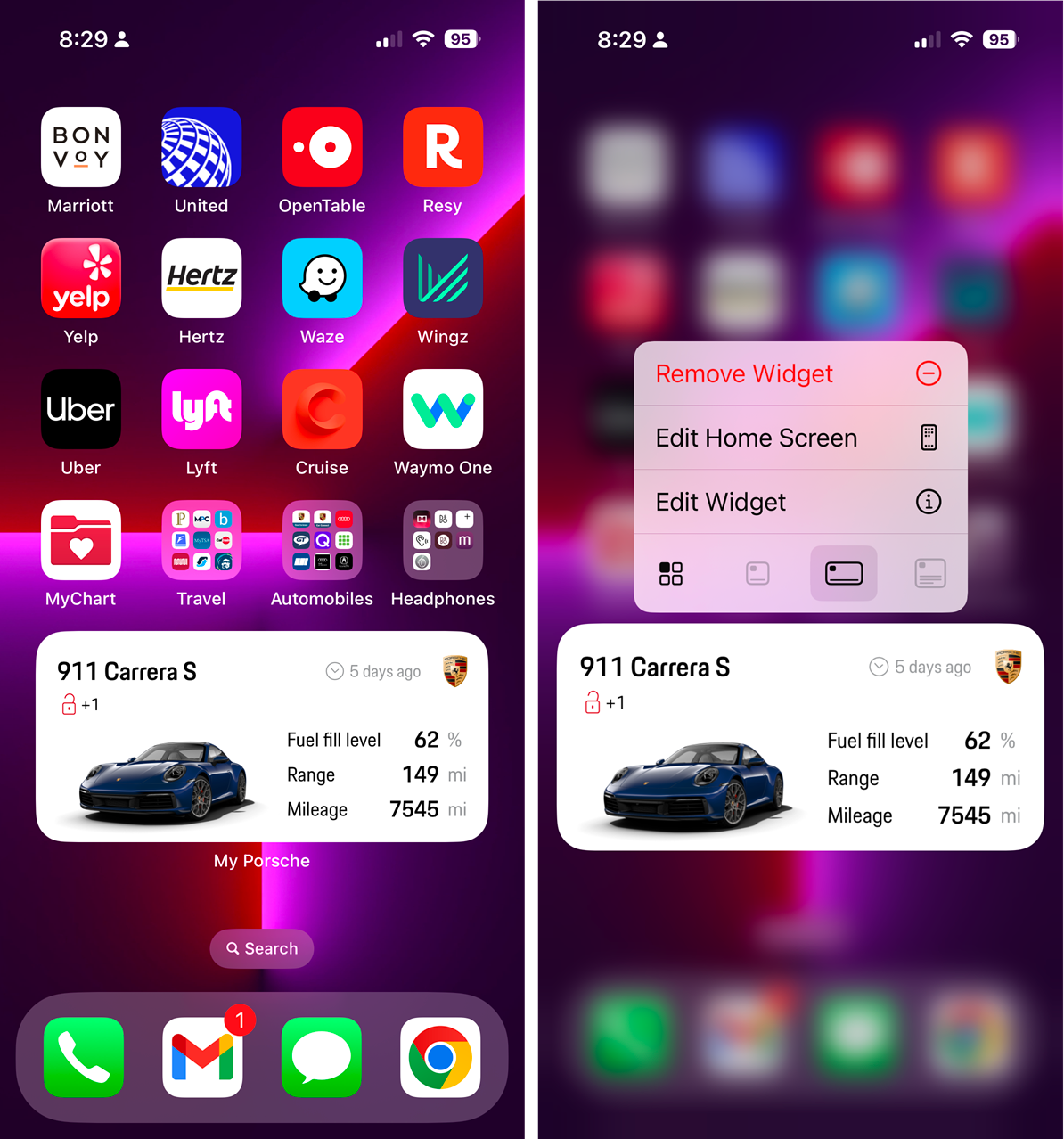
Thanks for calling out the app improvements. The iPhone app also lets you select a large widget size that displays stats on your homescreen (long press the app to see the widget options).
The “My Porsche” app has been updated and has some new features.
One feature some owners may find useful is the ability to download the Monroney Label for your vehicle.
You can also change the background color of the app icon to the color of your car.
I have the updated app, and can see the option to change the background colour of the app to the colour of my car, however, when I chose this option I get a ✔️ mark against the chosen app colour, but when I close the app, the background colour remains black? 🤔
Do you have to save the colour change and, if so, how do you do this?
My Porsche is a Macan, so don’t know if this makes a difference?
Thanks for calling out the app improvements. The iPhone app also lets you select a large widget size that displays stats on your homescreen (long press the app to see the widget options).
I never knew you could do this with app icons! Thanks! So many apps support it - Starbucks lets you quick pay from a long press, weather in a large format is super useful. A whole new world to explore thanks to this tip!
I have the updated app, and can see the option to change the background colour of the app to the colour of my car, however, when I chose this option I get a ✔️ mark against the chosen app colour, but when I close the app, the background colour remains black? 🤔
Do you have to save the colour change and, if so, how do you do this?
My Porsche is a Macan, so don’t know if this makes a difference?
It’s a bummer that Porsche decided to remove web access to My Porsche. This change means it’s no longer accessible from an iPad or web browser. Hopefully, they’ll bring the web version back, and even better than before—especially with features like access to owner’s manuals. Not being able to read the manuals on a tablet feels like an obvious oversight.





 Updated My Porsche App