When you click on links to various merchants on this site and make a purchase, this can result in this site earning a commission. Affiliate programs and affiliations include, but are not limited to, the eBay Partner Network.
I have found how you can display channels and the artist/track that is playing. It is completely customizable to sort by artist or track. You can also filter out categories you don't like to limit the amount of data displayed. Works very nicely.
oops..haha I posted a reply to you in other thread as well. Just in case, will put my post here as well to get the thread back on track...
I was going to post this as I have it in my Cayenne and assumed same in Macan. The issue with this is the implementation is virtually worthless in everyday use as it will not allow you to sort the "whats on list" by station number order or by just your list of selected favorite stations. Instead the only sorting options are artist or track name so you are stuck scrolling through countless stations that you would not otherwise want. The category filter is a joke (if you want a particular news or talk channel for example, the category filter then forces you to scroll through all the news or talk channels). This is really stupid and makes no sense that you cannot sort in a more logical manner. Audi does a far superior job of this in their MMI as it simply shows whats on every channel no matter how you view.
I'm wondering if this might be the solution to the issue:
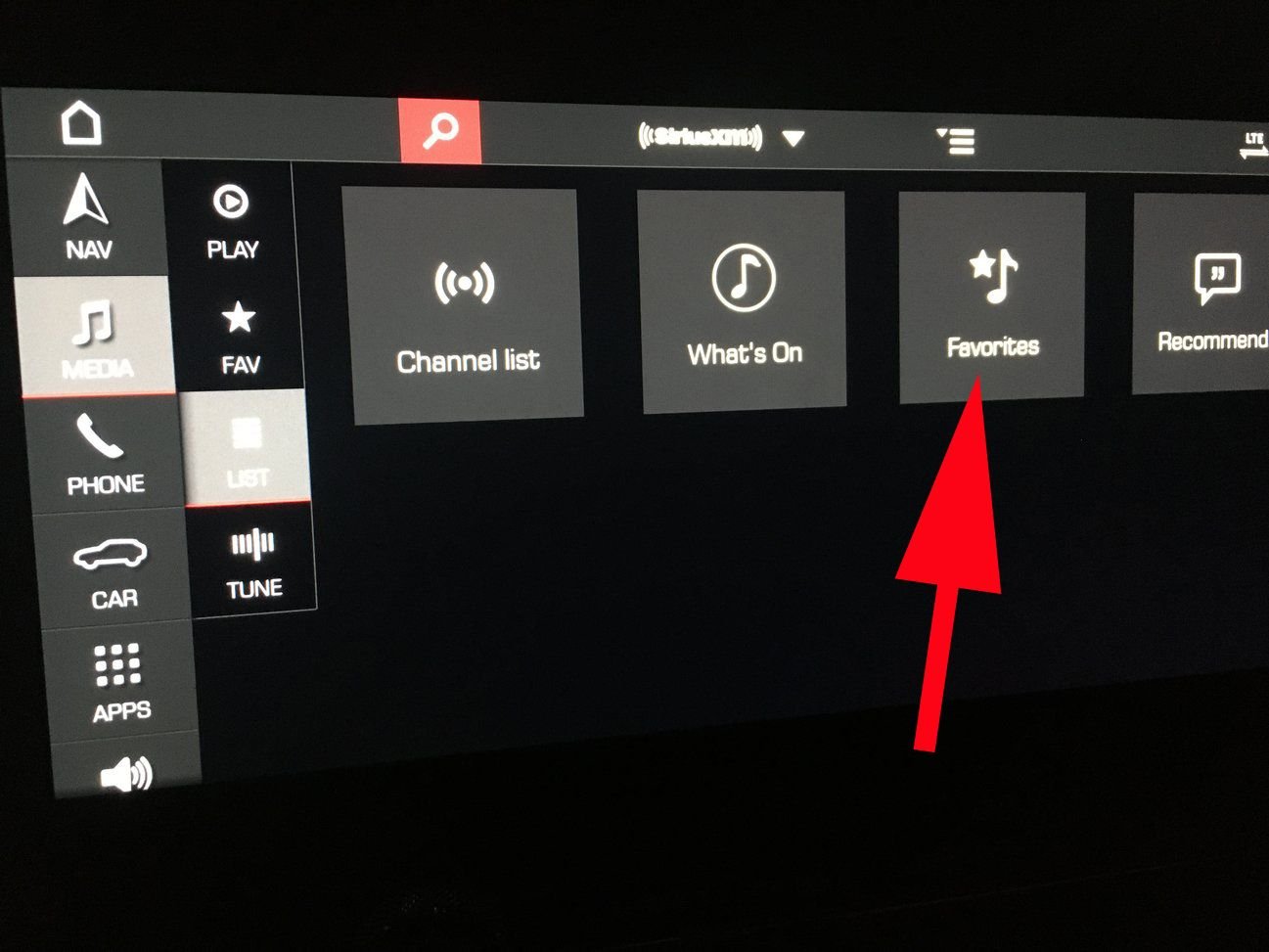
When I click on Favorites in this view, nothing shows up, despite my having a bunch of Favorites. How do we add Favorites to this list view?
There are Favorite channels and Favorite Artist/Titles. Favorite channels are denoted by the star icon. Favorite artist/titles are denoted by the musical note with the small star (the one you pointed to in your pic).
Go to the main Play screen. Look towards the bottom of the screen. You'll see the small button to designate a title/artist as a favorite. On the same little row as the Live button.
There are Favorite channels and Favorite Artist/Titles. Favorite channels are denoted by the star icon. Favorite artist/titles are denoted by the musical note with the small star (the one you pointed to in your pic).
Go to the main Play screen. Look towards the bottom of the screen. You'll see the small button to designate a title/artist as a favorite. On the same little row as the Live button.
Yes, if you designate artists or tracks as favorites as they are playing, they will be displayed with a red star or on this list.
Porsche 911 GT3 Artisan Edition Pays Homage to Japanese Culture
Slideshow: Porsche has created a Japan-only 911 GT3 Artisan Edition that blends track-ready hardware with design cues inspired by traditional Japanese craftsmanship.
Porsche Reveals Coupe Variant of the Electric Cayenne With a Fresh Look
Slideshow: Porsche's latest electric Cayenne Coupe blends dramatic styling with supercar acceleration, turning the brand's midsize SUV into a 1,139-horsepower flagship.