



911 worshiper
Thread Starter
Advanced
Joined: Apr 2012
Posts: 65
Likes: 0
From: New Zealand

I can't post pics because I don't have a rennlist member number. They tell me I'll have it in a 'few days'. That was a few days ago. Once I have that you'll be saying, "enough pics already"!
Thread Starter
Advanced
Joined: Apr 2012
Posts: 65
Likes: 0
From: New Zealand
Rennlist Member

Joined: Apr 2007
Posts: 8,570
Likes: 1,114
From: Florida
As others have said, you bought yourself excitement and sickness that doesn't fade away overnight. Tosca looks like he already knows that. Not happy knowing he'll never get to ride.
Off topic: First New Zealand contribution I recall so I have to ask of curiosity.....would you drink this or do we get the crumbs that fall off the table? Mostly red for me but when it has to be white this is one of my favorites as long as it's young.
Off topic: First New Zealand contribution I recall so I have to ask of curiosity.....would you drink this or do we get the crumbs that fall off the table? Mostly red for me but when it has to be white this is one of my favorites as long as it's young.
Thread Starter
Advanced
Joined: Apr 2012
Posts: 65
Likes: 0
From: New Zealand
Re Tosca. You're right, he doesn't look happy!. He was numero uno until the 911 came along (not really true but try and tell him that!).
Re Cloudy Bay. yes, would drink it in a heart beat. Actually, you guys get the good stuff, it's us that get the crumbs. The export market is much bigger than the local.
Re Cloudy Bay. yes, would drink it in a heart beat. Actually, you guys get the good stuff, it's us that get the crumbs. The export market is much bigger than the local.
Newbies Hospitality Director
Lifetime Rennlist
Member
Lifetime Rennlist
Member
Joined: Apr 2005
Posts: 18,084
Likes: 43
From: Winston-Salem, NC
OK, I'll remove that excuse!

Here are my "can't miss" instructions for posting a pic. These instructions have NEVER failed to help someone post pics, so the pressure is on YOU to keep my string alive!

All words shown in BOLD indicate buttons. If you are just doing a "Quick Reply" you will have to click on Go Advanced button. Then follow the steps below:
Down below the part of the screen where you type the text and below the Submit Reply and the Preview Post buttons, there is a Miscellaneous Options section followed by an Attach Files section.
In the Attach Files section, click on the Manage Attachments button.
You will now get a pop-up window. There are 3 buttons Browse, Upload, and at the bottom of the window, the Close this Window.
If the pics are on your computer, click on one of the Browse buttons and now (in a new pop-up window) you can search on your PC to locate the pic you want to attach. Click on the name of the file you want and then click the Open button. If you want to upload some additional pics, repeat the above process. Now click on the Upload button. After the files have been uploaded, click on the Close this Window button.
If the pics are in a url (web site), in the boxes supplied, type in the addresses where the pics are located. Then click on the Upload button. After the files have been uploaded, click on the Close this Window button.
After you click on the Close this Window, you will be back to the original "message" screen. Your pic file should be listed just above the Manage Attachments button.
If you are finished typing the text, you can click on the Submit Reply button and everyone will be able to see your great looking P-car!
If your pics are too large, you can resize them with MS Paint, or PhotoShop software, or you can do it online at this web site. http://www.resize2mail.com/
Advanced
Joined: Mar 2011
Posts: 87
Likes: 8
From: Boston, MA, US
https://rennlist.com/forums/members/...lbums-911.html
Gorgeous car, congrats!
Here are the pics:


Rennlist Member
Joined: Jul 2009
Posts: 5,970
Likes: 114
From: Vancouver, BC
Yes they uploaded to your album:
https://rennlist.com/forums/members/...lbums-911.html
Gorgeous car, congrats!
Here are the pics:
https://rennlist.com/forums/members/...lbums-911.html
Gorgeous car, congrats!
Here are the pics:
Speaking of your color... I do not think it's Meteor Gray, mine looks different (at least from pics posted)? Maybe it is indeed Slate Gray one as you initally said?
Rennlist Stories
The Best Porsche Posts for Porsche Enthusiasts
9 Features and Characteristics That Only Porsche People Understand
Verdad Gallardo
I've Written 500 Rennlist Articles: Here's How Porsche Has Changed Along the Way
Joe Kucinski
10 Most Unnecessary Porsches Ever Built (And Why We Love Them)
Verdad Gallardo
Porsche 911 GT3 S/C vs 718 Spyder RS: 10 Categories, One Winner
Joe Kucinski
This Builder Is Turning Heads With Its Slantnose 911 Creation
Verdad Gallardo
Porsche 911 GT3 Artisan Edition Pays Homage to Japanese Culture
Verdad Gallardo
Porsche Reveals Coupe Variant of the Electric Cayenne With a Fresh Look
Verdad Gallardo
10 Porsche Colors That Have More Personality Than Most People
Verdad Gallardo
Guntherwerks' Final Speedster Creation Is the Ultimate Porsche Restomod
Verdad Gallardo
Thread Starter
Advanced
Joined: Apr 2012
Posts: 65
Likes: 0
From: New Zealand
Rob,
OK, I'll remove that excuse!
Here are my "can't miss" instructions for posting a pic. These instructions have NEVER failed to help someone post pics, so the pressure is on YOU to keep my string alive!
All words shown in BOLD indicate buttons. If you are just doing a "Quick Reply" you will have to click on Go Advanced button. Then follow the steps below:
Down below the part of the screen where you type the text and below the Submit Reply and the Preview Post buttons, there is a Miscellaneous Options section followed by an Attach Files section.
In the Attach Files section, click on the Manage Attachments button.
You will now get a pop-up window. There are 3 buttons Browse, Upload, and at the bottom of the window, the Close this Window.
If the pics are on your computer, click on one of the Browse buttons and now (in a new pop-up window) you can search on your PC to locate the pic you want to attach. Click on the name of the file you want and then click the Open button. If you want to upload some additional pics, repeat the above process. Now click on the Upload button. After the files have been uploaded, click on the Close this Window button.
If the pics are in a url (web site), in the boxes supplied, type in the addresses where the pics are located. Then click on the Upload button. After the files have been uploaded, click on the Close this Window button.
After you click on the Close this Window, you will be back to the original "message" screen. Your pic file should be listed just above the Manage Attachments button.
If you are finished typing the text, you can click on the Submit Reply button and everyone will be able to see your great looking P-car!
If your pics are too large, you can resize them with MS Paint, or PhotoShop software, or you can do it online at this web site. http://www.resize2mail.com/
OK, I'll remove that excuse!
Here are my "can't miss" instructions for posting a pic. These instructions have NEVER failed to help someone post pics, so the pressure is on YOU to keep my string alive!
All words shown in BOLD indicate buttons. If you are just doing a "Quick Reply" you will have to click on Go Advanced button. Then follow the steps below:
Down below the part of the screen where you type the text and below the Submit Reply and the Preview Post buttons, there is a Miscellaneous Options section followed by an Attach Files section.
In the Attach Files section, click on the Manage Attachments button.
You will now get a pop-up window. There are 3 buttons Browse, Upload, and at the bottom of the window, the Close this Window.
If the pics are on your computer, click on one of the Browse buttons and now (in a new pop-up window) you can search on your PC to locate the pic you want to attach. Click on the name of the file you want and then click the Open button. If you want to upload some additional pics, repeat the above process. Now click on the Upload button. After the files have been uploaded, click on the Close this Window button.
If the pics are in a url (web site), in the boxes supplied, type in the addresses where the pics are located. Then click on the Upload button. After the files have been uploaded, click on the Close this Window button.
After you click on the Close this Window, you will be back to the original "message" screen. Your pic file should be listed just above the Manage Attachments button.
If you are finished typing the text, you can click on the Submit Reply button and everyone will be able to see your great looking P-car!
If your pics are too large, you can resize them with MS Paint, or PhotoShop software, or you can do it online at this web site. http://www.resize2mail.com/
Thread Starter
Advanced
Joined: Apr 2012
Posts: 65
Likes: 0
From: New Zealand
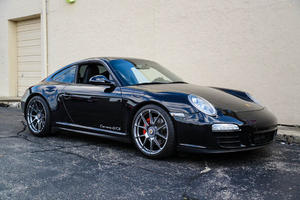
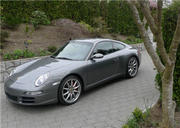
Gorgous car... yours is almost like mine! Those wheels are the best wheels offered and specially look amazing on a Gray car.
Speaking of your color... I do not think it's Meteor Gray, mine looks different (at least from pics posted)? Maybe it is indeed Slate Gray one as you initally said?
Speaking of your color... I do not think it's Meteor Gray, mine looks different (at least from pics posted)? Maybe it is indeed Slate Gray one as you initally said?
Rennlist Member
Joined: Jul 2009
Posts: 5,970
Likes: 114
From: Vancouver, BC
http://www.automotivetouchup.com/cho...del=Cayman%20S

Intermediate
Joined: Mar 2012
Posts: 37
Likes: 2
For removing the emblem there are two different kinds of floss, a round one which is a lot thicker, which probably won't work. They also make flat floss, which is what I used, with a hair dryer to remove mine. I'm sure you can find this type of floss somewhere around.
Nordschleife Master
Joined: Feb 2011
Posts: 6,343
Likes: 1,368
From: Vancouver, BC, Canada
As others have said, you bought yourself excitement and sickness that doesn't fade away overnight. Tosca looks like he already knows that. Not happy knowing he'll never get to ride.
Off topic: First New Zealand contribution I recall so I have to ask of curiosity.....would you drink this or do we get the crumbs that fall off the table? Mostly red for me but when it has to be white this is one of my favorites as long as it's young.
Off topic: First New Zealand contribution I recall so I have to ask of curiosity.....would you drink this or do we get the crumbs that fall off the table? Mostly red for me but when it has to be white this is one of my favorites as long as it's young.

Rennlist Member
Joined: May 2006
Posts: 6,222
Likes: 0
From: sydney
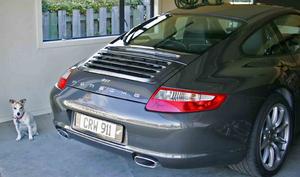
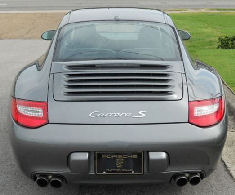
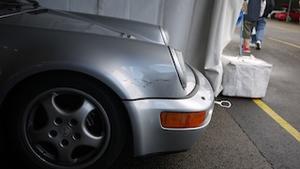
Well some progress with a pic. My first question on this forum is how to remove the Carrera 4 enblym. I want to replace it with a simple '911' as per the 911 badge that appears on the 991. I've read about dental floss and a hairdryer but it seems NZ floss isn't strong enough. Anyone have any suggestions? Thanks in advance

joking! congrats, nice car.
