When you click on links to various merchants on this site and make a purchase, this can result in this site earning a commission. Affiliate programs and affiliations include, but are not limited to, the eBay Partner Network.
I will be testing the HVAC devices in my '95. Anyone know the fault codes for all of the servo motors, the rear fans and associated sensors.
I bought the Durametric scanner new. It wont work until it's connected to my car. My car is parked in an underground garage. Wifi and internet will not work below grade.
Can I scan the car for faults without internet available?
Thank you for your help.
I bought the Durametric scanner new. It won't work until it's connected to my car.
With the software downloaded and installed on your laptop, I seem to recall one can pass through the warning that the cable is not connected and the main menu comes up. When unplugged from the car one can still look at the activity log which records the results of the last time the software was connected to your car. Can I scan the car for faults without the internet available?
Yes, all the software functions work without an internet connection.
It sometimes takes more than one try to get the OBDC connection to work.
Also, I understand if one has connection to the car problems sometimes it helps to power the laptop with a wall plug during use to improve the reliability of the connection through the car cable.
Check and make sure you have the latest version of the software from durametric.com on your machine before using the cable.
Hope this helps,
Andy
Last edited by pp000830; Apr 26, 2020 at 05:02 PM.
I bought the Durametric scanner new. It won't work until it's connected to my car
Check and make sure you have the latest version of the software from durametric.com on your machine before using the cable.
Hope this helps,
Andy
Thanks Andy,
Very helpful!
I am unable to verify if the latest version of the Durametric 6 Software is installed on my laptop, inside my residence, at which I have internet. The Durametric 6 progam will not open without the cable installed in my car. I will be connecting the cable in an underground garage without any available internet. How do I verify the latest software version installation?
Thanks in advance.
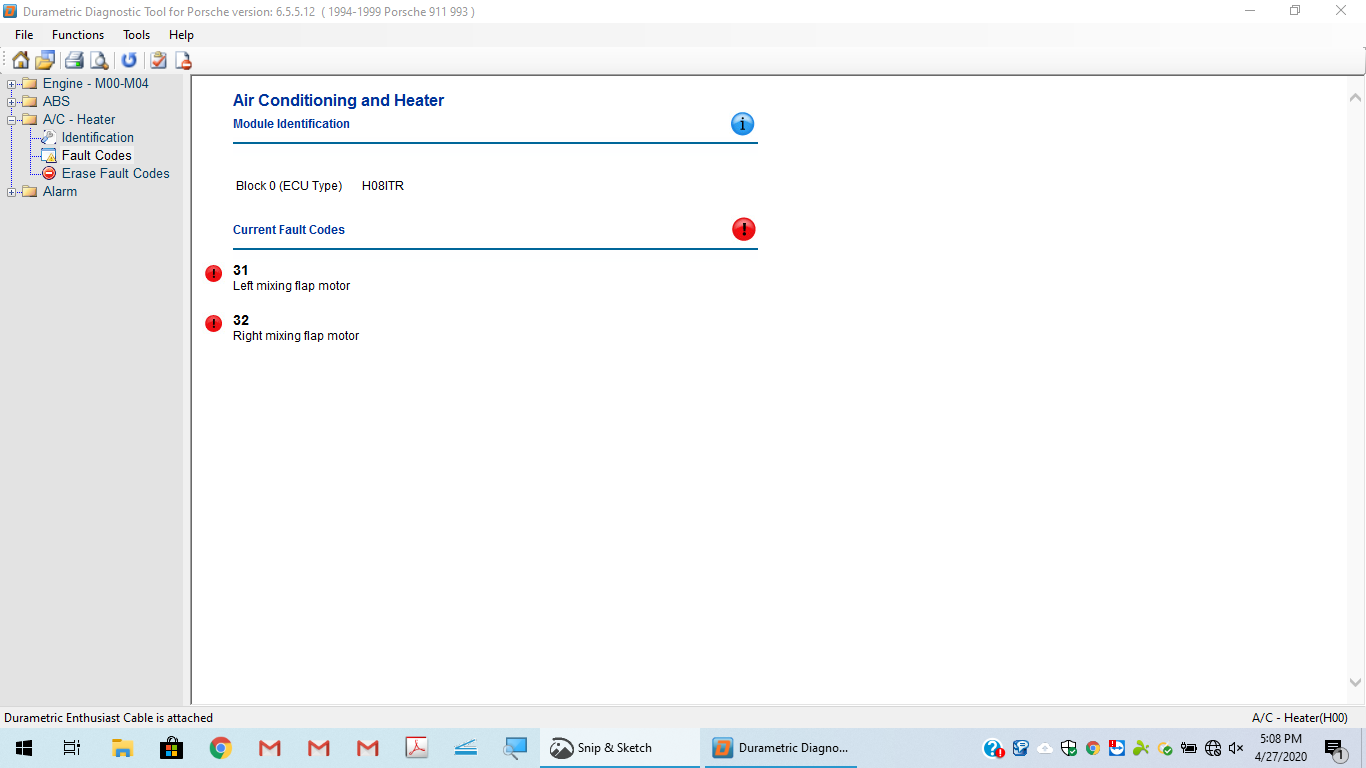
I scanned my HVAC in my car today utilizing the Durametric device. I found two faults. Fault number 31, left mixing flap motor; and fault number 32, right mixing motor. I have attached a screenshot for your review.
Is it safe to conclude that the servo motors are located in the driver and passenger footwells?
I apppreciate your help thus far and I'm looking forward to your continued assistance.
WIth your cable not installed you should be able to look up the version on your computer
Click on the Durametric Icon on your Windows desktop with or without the cable to your car attached.
Windows 10 will ask you if it is OK for the program to make changes to your computer, select "Yes"
Durametric software will open and the select vehicle window appears
Close (X in the upper right-hand corner of the vehicle selection window) the select vehicle window.
Click on the "Help" item in the upper left of the Durametric program window frame
It will open and on the drop-down list pick "About"
This will display the version you presently have installed
The current version is 6.5.5.12
If you don't have this version installed the latest version can be downloaded at Durametric Download Page,
Be sure to uninstall the previous version on your computer before installing this updated version.
Andy
Thanks Andy.
I followed your direction without the cable installed several times. When I click the Durametric icon, my computer takes me back to my home screen. Apparently, the program won't open without the cable installed. As a seperate but related issue, what is the probability that both servo motors failed? Seems odd. I am suspicious.....
Thanks for your continued help.
/
I am attaching additional screenshots that were taken while the Durametric scanner was connected to my car today.
I am attaching an additional screenshot taken today with my cable attached to my car and the Durametric device.
You may be able to command the servos to move through the drive links section. I know on the PIWIS I can do this. otherwise, you can raise or lower the temperature. Strange that both mixing valves would go at the same time. There is one common wiring harness for both.
You may be able to command the servos to move through the drive links section. I know on the PIWIS I can do this. otherwise, you can raise or lower the temperature. Strange that both mixing valves would go at the same time. There is one common wiring harness for both.
I agree that it was strange that both mixing valves reported fault codes. I disconnected the cable from my car and and increased and decreased the temperature several times, moved both sliders from left to right several times and connected the cable and began and completed a new scan with the same results.....
Last edited by Twilightblue28A; Apr 28, 2020 at 11:49 AM.
Theon Goes Full Carbon Fiber With Stunning New Build
Slideshow: Built around a carbon-bodied 964 and a naturally aspirated 4.0-liter flat-six, this bespoke commission highlights how far the restomod formula has evolved.
Tuner Is Converting Porsche 911s Into Shooting Brakes
Slideshow: A Polish Porsche specialist is moving ahead with one of the most unusual 911 conversions in recent memory: a shooting brake version of the 991-generation sports car.
This Coachbuilt Creation Is A Modern Take on the Legendary Porsche 917
Slideshow: A Porsche Carrera GT has been transformed into a one-off coachbuilt machine that blends analog supercar engineering with styling inspired by the legendary 917 race cars.
Is This Convertible Cayenne A Steal, Or A Returnless Investment?
Slideshow: A heavily modified Porsche Cayenne convertible with faux wood trim and a long list of flaws recently sold at auction for surprisingly little money.
Porsche's Top 5 Most Questionable Naming Decisions
Slideshow: For a company obsessed with engineering precision, Porsche has occasionally named its cars in ways that left even loyal enthusiasts scratching their heads.
Pogea Racing's 964 Porsche 911 Reimagination Stands Out in a Crowded Field
Slideshow: Pogea Racing's latest Porsche 964 project blends carbon-fiber construction, modern chassis upgrades, and up to 500 horsepower while keeping the air-cooled 911 experience firmly analog.





 HVAC Fault Codes on Durametric' Scanner