When you click on links to various merchants on this site and make a purchase, this can result in this site earning a commission. Affiliate programs and affiliations include, but are not limited to, the eBay Partner Network.
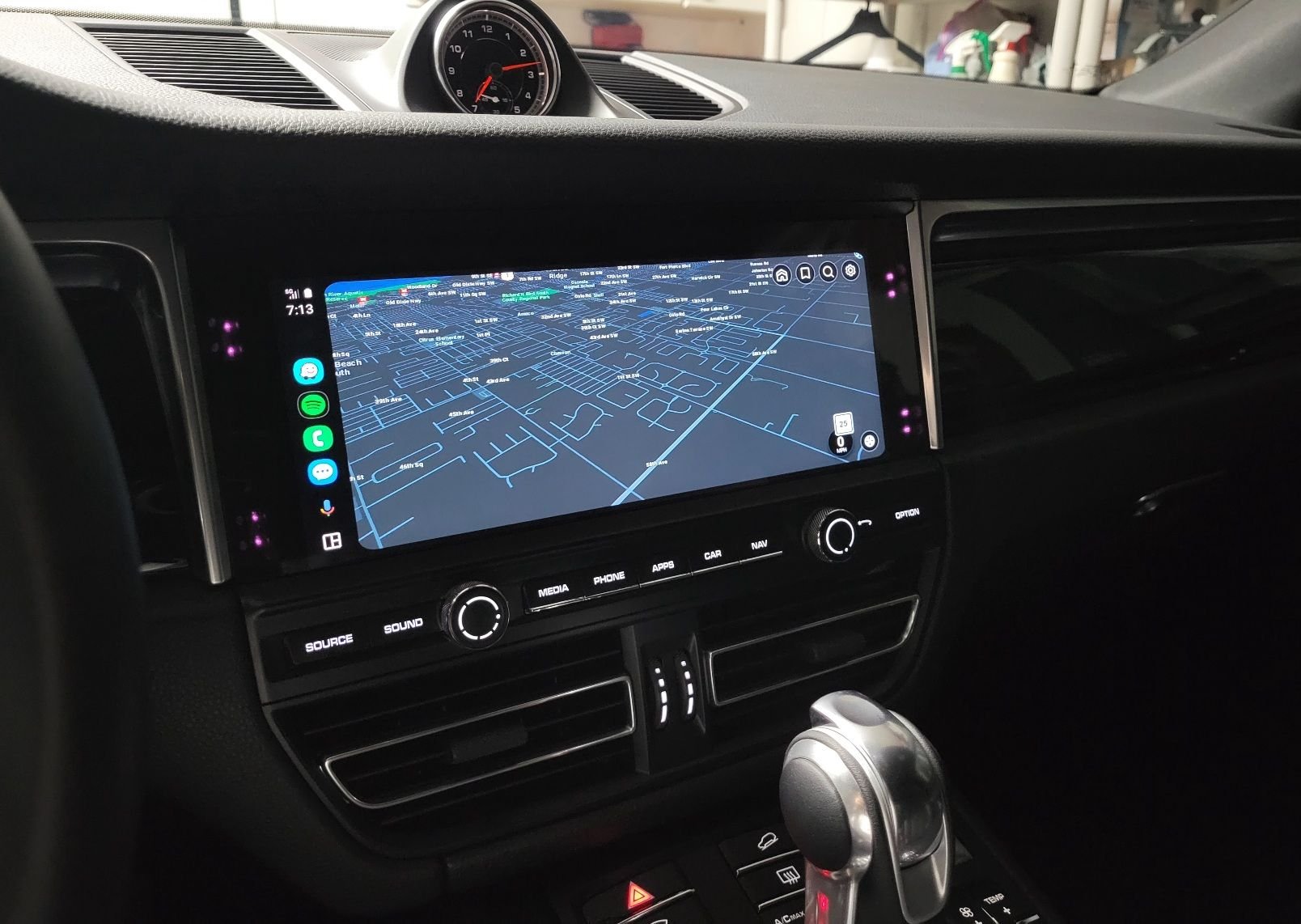
Just completed this effortlessly on my '21 GTS, thank you to everyone who helped make this possible. Sending out my SD card to @ilovemaui to pay it forward!
Just completed this effortlessly on my '21 GTS, thank you to everyone who helped make this possible. Sending out my SD card to @ilovemaui to pay it forward!
Thank you sir. I will post when I have installed and will pass forward to someone that promises to do the same.
Thought I was going mad with the install... Full screen would not recognise CarPlay. Windowed version would. Just spotted the new troubleshooting section on the download page. I guess that my 2019 Macan is an unsupported PCM version.
Does anyone know if it's possible for Porsche to update the PCM version when it goes in for its next service? My PCM version also doesn't have wireless CarPlay even though other 2019's sound like they do - hoping that this could be sorted too.
I just pushed an update for the "true" full screen mod that allows it to work on these older PCM versions!
Originally Posted by ThomasShawn
What buttons take you back to the porsche native screen?
I know the app works but if physical buttons work too that would be cool.
I have a 2020. Buttons everywhere!!!
Originally Posted by DiscoWagon
Just completed this effortlessly on my '21 GTS, thank you to everyone who helped make this possible. Sending out my SD card to @ilovemaui to pay it forward!
That's the spirit! Let's help the community instead of ripping everyone off!
I pushed a few buttons and got back to main screen. But it wasn't reproducible. So I use the exit button to get back to main screen.
But I used an AA external device and it ran AA FULL-SCREEN.!!!!
Can't wait for native AA because I think it will be cleaner but for anyone who wants to use the external devices the mod does stretch it to full screen.
To answer my own question, it worked just fine in about 5 minutes. I can't believe how easy this was. Once you insert the SD card, everything happens automatically and it takes 5 minutes.
I plugged in my wireless Android Auto box (that runs through the Car play input) and it automatically connected and came up to a perfect full screen. If I push any button below the screen, it seamlessly transitions to the OE interface. When I press the diamond button to summon surround view, it overlays immediately as it would stock.
I want to personally thank you @CarmineS for making this self-service mod so easy to follow compared to anything before this. Saved me hundreds of dollars not having to pay someone for similar service!! YOU ARE AMAZING!! This is the result of my 2020 Porsche Cayenne. I compared the sample images of the windowed mode vs. full screen and decided to go with the later as the icons are much bigger, closer to what a PCM6 would look like. Note I performed this on my MacOS w/ BlueHarvest to cleanup the. files as recommended.
I want to personally thank you @CarmineS for making this self-service mod so easy to follow compared to anything before this. Saved me hundreds of dollars not having to pay someone for similar service!! YOU ARE AMAZING!! This is the result of my 2020 Porsche Cayenne. I compared the sample images of the windowed mode vs. full screen and decided to go with the later as the icons are much bigger, closer to what a PCM6 would look like. Note I performed this on my MacOS w/ BlueHarvest to cleanup the. files as recommended.
I have a question for those who have done this upgrade (and second the thanks to CarmineS!).
What happens when you shift into reverse, which brings up the rear view camera (and surround if equipped), and then shift into a forward gear? In my unmodified PCM, this kicks me out of CarPlay and I have to tap the CarPlay left menu item to get back into CarPlay mode. Does the PCM revert to full-screen CarPlay automatically after a parking event?
I have a question for those who have done this upgrade (and second the thanks to CarmineS!).
What happens when you shift into reverse, which brings up the rear view camera (and surround if equipped), and then shift into a forward gear? In my unmodified PCM, this kicks me out of CarPlay and I have to tap the CarPlay left menu item to get back into CarPlay mode. Does the PCM revert to full-screen CarPlay automatically after a parking event?
On my 2021, If the surround view screen summons on its own and then goes away on its own, such as in a reverse gear event, The full screen carplay fully resumes itself.
If I summon surround view using my steering wheel diamond button, and I subsequently x out of the surround view application, then, CarPlay does not automatically resume. If I do the same but start to move above the speed threshold, where the surround view application would close itself, then CarPlay does resume.
On my 2021, If the surround view screen summons on its own and then goes away on its own, such as in a reverse gear event, The full screen carplay fully resumes itself.
If I summon surround view using my steering wheel diamond button, and I subsequently x out of the surround view application, then, CarPlay does not automatically resume. If I do the same but start to move above the speed threshold, where the surround view application would close itself, then CarPlay does resume.