When you click on links to various merchants on this site and make a purchase, this can result in this site earning a commission. Affiliate programs and affiliations include, but are not limited to, the eBay Partner Network.
Team. I have installed the unit and it appears to be working well except for 1. the noted volume issue when connected to bluetooth. 2. I can't access the 6 band equalizer on the unit. All the shows when I select equalizer is the bass and treble. Any ideas? The manual does state I can choose from various presettings like jazz, pop, etc. But neither of them appear on the screen
Team. I have installed the unit and it appears to be working well except for 1. the noted volume issue when connected to bluetooth. 2. I can't access the 6 band equalizer on the unit. All the shows when I select equalizer is the bass and treble. Any ideas? The manual does state I can choose from various presettings like jazz, pop, etc. But neither of them appear on the screen
DO NOT DM ME WITH QUESTIONS, USE THE FORUM DISCUSSION THREAD !!
Please note, I did not figure this out all by myself I will try to give props to those who help, but This is a dynamic page new things get added almost daily now and it is near impossible for me to thank everybody in detail.
Consider this article a collective effort by all.
And also note, I take no responsibility for any kind of mishap to your PCCM or Porsche if by chance anything goes wrong with custom hack wiring for functionality that Porsche did not intend nor document.
All information is provided, as is. No guarantees, use it at your own risk.
Q No FM
A either buggered up your antennas (but unlikely to have 2 broken ones)
orrrrrr, forgot to install the coupler in STEP 4
Q the CAR setion shows no trip data, or outside temperature
and the PCCM does not start with the ignition of the car
A Forgot to plug in the yellow green adapter cable
Q PCCM is hard to remove again
Several people reported issues with bent clamps on the PCCM frame
The alternative, what I did.. is to simply remove the top clamp/spring crap completely.
the console sides put pressure on the PCCM when installed and it really doesn't wiggle or move in my car
Q Daylight Running Lights function settings do not work
Nor does the door lock setting..
Good question, I have no idea, perhaps its a 997 only thingie.. or my car(987c) has an odd version of the control boxes
or its a bug in the PCCM+, no idea.
still looking for info on that, awaiting supplier for feedback
If anybody has this working on 987 (I already got confirmation it does seem to work on 997) do let me know
Q PCCM+ does not start or power off with the car key
That happens with the canbus connection.. you need both yellow and green connector to be installed
Quite often they are not seated properly and that causes the powerup/poweroff to not work properly
Q Can't get PCCM+ out again !!
A PCCM+ does not use the allen key locks but has 4 lock tabs
the top ones are hard to see , but obviously it won't come out unless you push all 4 of them
(I've been informed that there are screws you can screw in to push the detents instead, need to confirm that myself)
Q PCCM does not show the MP3 files in the right order, or plays albums mixed from various directories
A Make sure all your MP3 files have correct MP3 tags and album names filled in.
On Initial read , PCCM reads all the tags, and those tags are used to figure out which tunes need to be played.
It also displays the file names, and sorts em on the file name
So for ease of use:
1 Put all files from same album in same directory
2 Make sure each file in that directory, has the same album name filled in via the tag
I used this tool : https://www.mp3tag.de/en/download.html
3 Use decent filenames that make sense, since PCCM displays the filenames, not the mp3 tag (unfortunately)
good example
Johnnycash \001 Johnny Cash - Ring of fire.mp3
Johnnycash \002 Johnny Cash - Folsom Prison Blues.mp3
80ies mix\001 Phil Collins - Into the Air.mp3
80ies mix\002 Queen - One vision.mp3
i used triple digits format because that allows me to put multiple albums from 1 artist, or a mix directory combined
1xx Off the Wall ...
2xx Thriller..
3xx Bad ...
Note, PCCM does not like changing tags after it has read the files already, it will not update properly
Solution : Change the volume name of the USB stick and then it will read it as a new USB stick and see all the updates.
Q PCCM shows no album art despite picture in the directory
A The album art is read from the MP3 file, its in the tags, use MP3tag to update the album art
It sets the tags and lets you put in the album art , in the file
Q I want a rear accessible USB port to keep my PCCM front clean
A (courtesy of dph928) Yes You can ! But only for USB charging or MP3, it does not work with Apple or Android phone apps.
Option 1 (expensive) Get the USB box for the 996 PCCM+ , note, only the "PHONE" port will work, and only for charging or MP3
Option 2 Get the Subaru USB cable (Brown plug) see Connection Diagram in post below https://rennlist.com/forums/997-foru...l#post18602773
Q Some US states do not show up on the Built in Sat Nav
A No solution as of yet, suspected firmware problem, the issue has been sent to Porsche Classic, awaiting feedback
Q My USB stick is Not recognized
A I've experienced this myself, a working usb stick, after some experment with new cable , somehow got zapped.
it works in my pc
now it works everywhere except on the PCCM.
Formatting did not help
Only Solution so far is to get another , different, USB drive
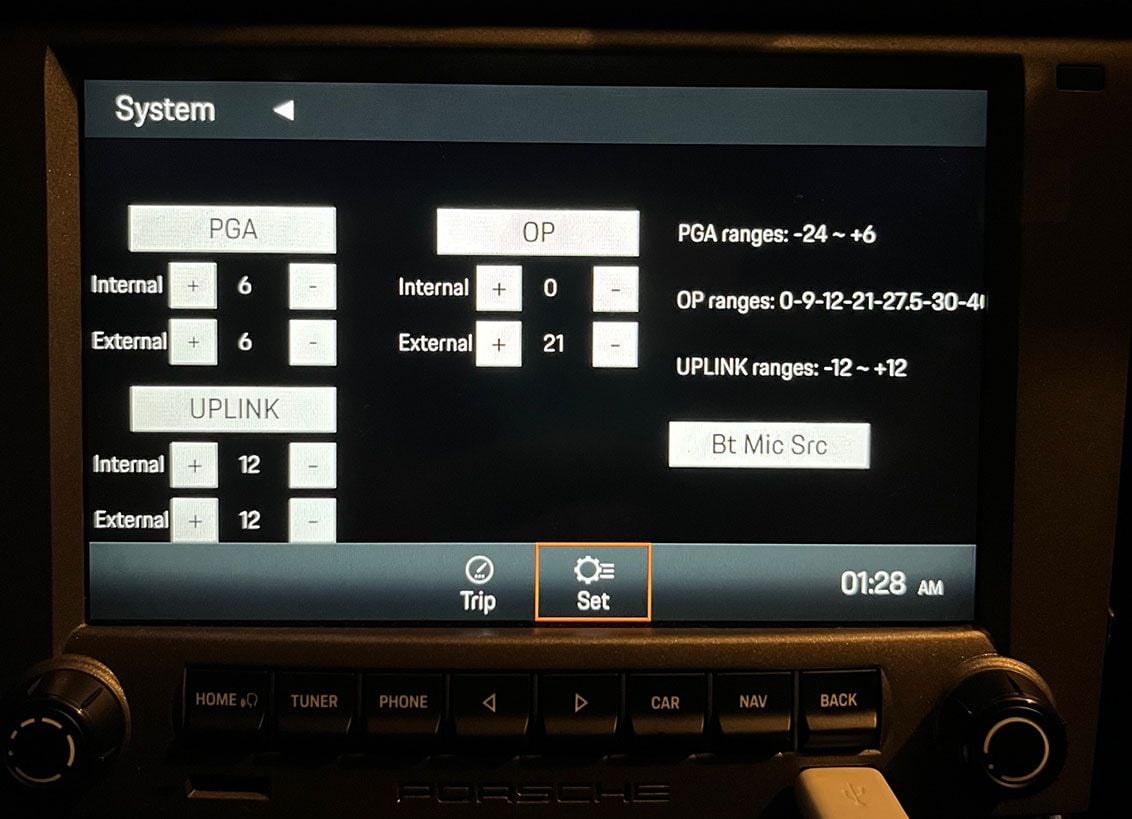
Q When calling, the microphone level is low
A Courtesy of Steve W
Change values to this :
Thanks for this. Any idea on what the different values mean? PGA, OP and Uplink?
Team. I have installed the unit and it appears to be working well except for 1. the noted volume issue when connected to bluetooth. 2. I can't access the 6 band equalizer on the unit. All the shows when I select equalizer is the bass and treble. Any ideas? The manual does state I can choose from various presettings like jazz, pop, etc. But neither of them appear on the screen
Found out. The equalizer is only available of the Non bose models. It activates when the brown speaker harness is connected to the rear of the PCCM. I don't believe those with non Bose are having issues with the volume as it not going through the MOST Unit.
I did bring my car to porsche and they hooked it up and ran it through diagnostics and did the auto config and such, they found nothing wrong.
Question. Since we have replaced the PCM with the PCCM Plus, is there a need to keep the NAV unit in the frunk? I am planning to replace the bose amp with a quality amp/dsp and most adapter. If the nav is removed along with the BOSE AMP, it would provide the necessary room to mount the new equipment. Thoughts?
My Install of the PCCM+ was almost seamless. AM-FM-XM and Apple Car Play working perfectly. Then, noticed while driving after the install that my headlights are working irregularly. Switch in Off position main headlamps are on. Switch in "Home" position, headlamps are on. Switch in fog lamp position headlamps are off but driving bulb is on, pull out and Fog lamps are on, rear on as well. Switch in headlamp position working correctly and HIGH beams work as designed and flash with toggle.
It's the OFF and Home positions that have me baffled...
Any help would be appreciated, Thanks in advance!
Last edited by PatB18436; Jul 10, 2023 at 09:25 PM.
I just installed the PCCM plus replacing a CDR-24 and have the same issue. Can you elaborate what you mean by "swapping the antenna connector ends"? Do you mean connect the antenna wire to the tan connector?
thanks
Update....on another thread someone posted the antenna cable from the factory is backwards. I swapped the ends and now it works!
If anyone else runs into this swap the antenna connector ends and then you will be good.
I just installed the PCCM Plus replacing a CDR24 and have the same issue with no FM or AM reception. Can you clarify what you mean by "swapping the antenna connector ends"?
Apologies if covered elsewhere (or a stupid question...)
I reviewed the videos / instructions and have removed the old stereo. Before I install I still cannot see any reference to these parts. What are they and do I need them? (US 997.1)
Apologies if covered elsewhere (or a stupid question...)
I reviewed the videos / instructions and have removed the old stereo. Before I install I still cannot see any reference to these parts. What are they and do I need them? (US 997.1)
I believe these are radio antennas, which you need to change for EU models but not US/CA models. They were not included in my package (I'm in Canada).
Thanks, that is why I was confused. I am in the US and as such assumed they shipped a US version. Has anyone else in the US received these?
I need to see if mine came with the Sirius XM connector that the US specification defines...
Thanks
Sam
Phone Call microphone Quality issues on PCCM+ in Car Play and Bluetooth
Hello,
I looked at the above values in this thread and they did nothing. I moved the microphone to the top of the drivers a-pillar it’s very close. Much closer than steering wheel.
bluetooth seems slightly better. CarPlay is the worst connection for the other end. But not far off blue tooth. Tried various cables and makes a bit of a difference but not much.
anyone having similar issues with this? How did you solve it?
I had my PCCM+ replaced under warranty for a few issues and the second unit has identical PCCM+ Call Quality issues.
Theon Goes Full Carbon Fiber With Stunning New Build
Slideshow: Built around a carbon-bodied 964 and a naturally aspirated 4.0-liter flat-six, this bespoke commission highlights how far the restomod formula has evolved.
Tuner Is Converting Porsche 911s Into Shooting Brakes
Slideshow: A Polish Porsche specialist is moving ahead with one of the most unusual 911 conversions in recent memory: a shooting brake version of the 991-generation sports car.
This Coachbuilt Creation Is A Modern Take on the Legendary Porsche 917
Slideshow: A Porsche Carrera GT has been transformed into a one-off coachbuilt machine that blends analog supercar engineering with styling inspired by the legendary 917 race cars.
Is This Convertible Cayenne A Steal, Or A Returnless Investment?
Slideshow: A heavily modified Porsche Cayenne convertible with faux wood trim and a long list of flaws recently sold at auction for surprisingly little money.
Porsche's Top 5 Most Questionable Naming Decisions
Slideshow: For a company obsessed with engineering precision, Porsche has occasionally named its cars in ways that left even loyal enthusiasts scratching their heads.
Pogea Racing's 964 Porsche 911 Reimagination Stands Out in a Crowded Field
Slideshow: Pogea Racing's latest Porsche 964 project blends carbon-fiber construction, modern chassis upgrades, and up to 500 horsepower while keeping the air-cooled 911 experience firmly analog.






 Equalizer function issues