When you click on links to various merchants on this site and make a purchase, this can result in this site earning a commission. Affiliate programs and affiliations include, but are not limited to, the eBay Partner Network.
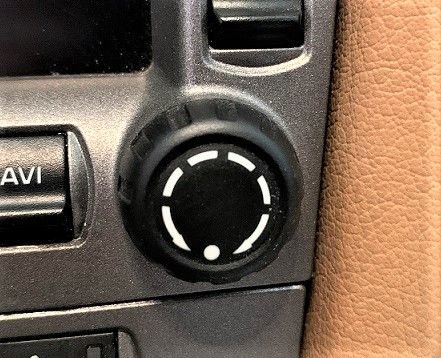
Purell was my magic solution! Just cleaned them, no removal.
I did that and it removed the rubber coating on the *****. I also tried isopropanol and it also made it worse.
I bought new ones from Suncoast..... haven't put them on yet.
Actually, mine were OK until the mechanic at the dealer drove my car after servicing with dirty, greasy rubber gloves! Part of the service involved using the ***** for adjusting some settings.
Nevermind replacing the buttons, take advantage of this situation to upgrade your system to an Apple Carplay /Android auto device. Awesome to have an up-to-date system with the ability to drive with Waze, sirius XM, Spotify and everything else.
Had a similar issue on my 997.2 and someone on this forum had suggested using alcohol wipes - worked liked a charm. Hope it can the same result on 997.1 buttons.
Don't waste your money on new *****. After I saw this thread, I gave it a try on my 997.1 ***** with hand sanitizer (don't have any rubbing alcohol). It works perfect.
I took off the buttons (for a 997.1 they are a snap fit and pop off) and used Simple Green and a toothbrush to clean off the slime. I let them sit in Simple Green in a tiny cup and let them soak while I got a cup of coffee. Like the pics above, it took off the slime, the black paint is rock hard and the white arrows brightened up considerably. And to think, I was about to buy a set when a simple cleaning solved the sticky buttons.
The AC controls seem to be a different matter, as the paint has worn off in places, so either they need to be cleaned then painted (I think Testors flat black was suggested in a post elsewhere) or just replaced. Future project.
BTW, the TEMP and FAN switches are being sold on Amazon. Dunno what the quality of these parts are. Anyone know?