When you click on links to various merchants on this site and make a purchase, this can result in this site earning a commission. Affiliate programs and affiliations include, but are not limited to, the eBay Partner Network.
Yes I very much appreciate what Martin did and expressed my thanks Read post 11. It was incredibly helpful in getting everything unplugged. Again THANK YOU Martin.
So Again OTHER than the update, do I have to configure the module AFTER the update confirmation or can I just unplug from my computer and plug it into my car. That is the basic question I'm asking.
I don't really have any interest in installing the SmartTOP, kinda lame that US regulations prevents Porsche from including this as OEM functionality similar to our Euro brethren. BUT, I wanted to give a quick shoutout @MartinHines for the INCREDIBLE writeup. Just props all around for the detailed photos, notes, etc. Appreciate even getting an in-depth view of what's behind that panel.
You want to ensure the SmartTop module/device has the latest firmware before you put it in your car.
For each SmartTop product there are TWO documents for you to read/reference and print out:
1. INSTALLATION CONVERTIBLE or INSTALLATION TARGA (these are the install instructions)
2. OPERATION AND PROGRAMMING (configuration settings and description of functions).
Before installation in your car, as mentioned in the OPERATION AND PROGRAMMING manual online, you can use the “M4connect” software to “configure and activate your favorite module settings”, but you can change the function settings after the module is installed in your car.
With my install I just made sure the module had the most current firmware before I installed it behind the back seat. I did the configuration later, after install.
As described in the OPERATION AND PROGRAMMING manual, you can change the default settings at any time (after the product is installed) by putting the SmartTop in “Programming Mode”.
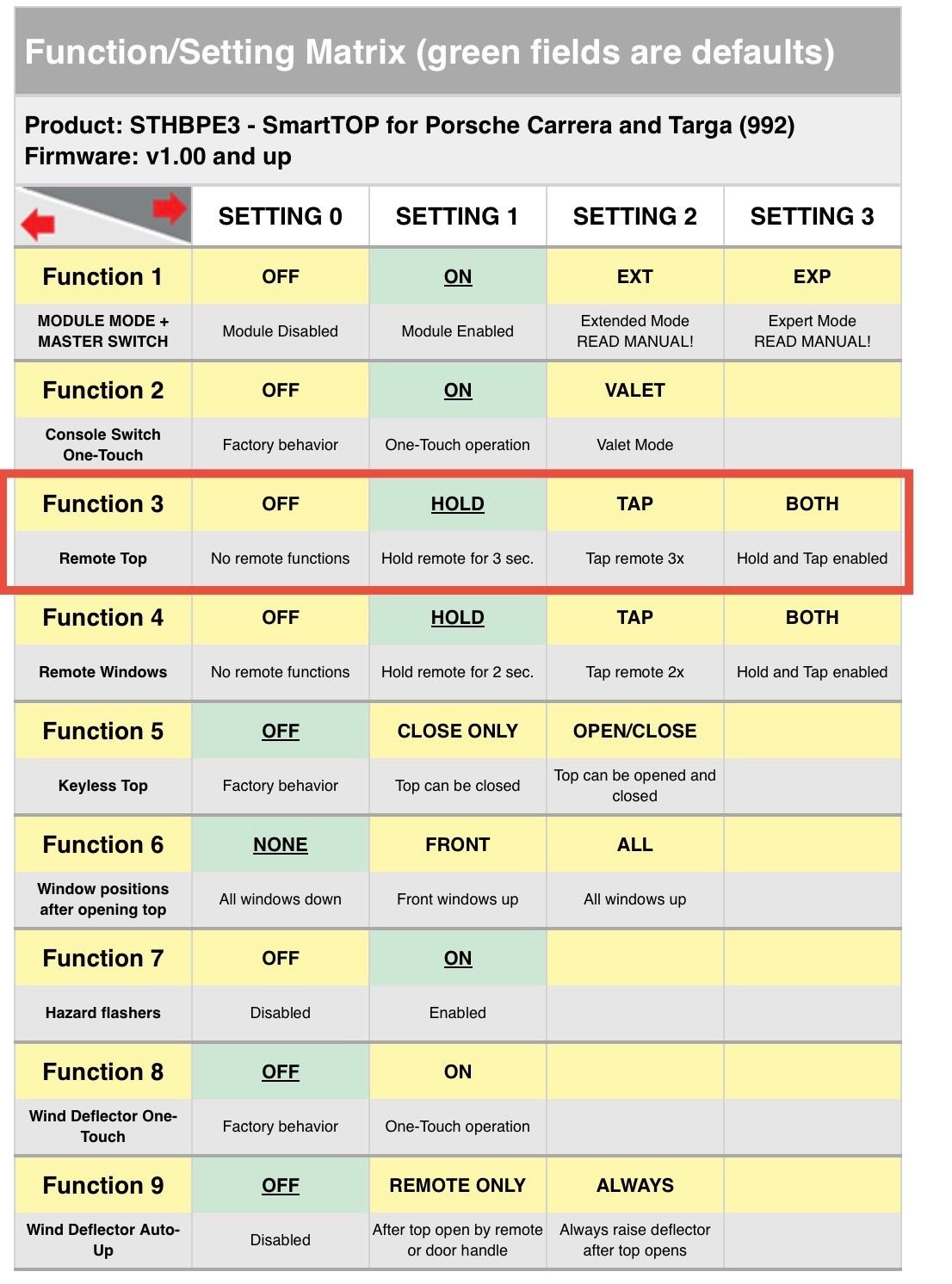
Everything the SmartTop can do is configured with NINE different “Functions”, (Function 1, Function 2, etc.)
The default settings are shown in the Matrix photo below in green.
As an example, “Function 3” controls the operation of the Remote Top. There are four settings choices:
— Setting 0, Off
— Setting 1, HOLD (this is the default setting, because it is in green)
— Setting 2, TAP
— Setting 3, BOTH
This means you can control the opening or closing of the Targa top by (Setting 1) holding the appropriate key fob button for three seconds, OR (Setting 2) tapping the key fob button three times, or (Setting 3) both
SmartTop Function matrix
The OPERATION AND PROGRAMJING manual can be confusing, but if you read it enough times you can understand how everything works.
A few days after I installed my SmartTop, I spent one hour in my driveway, in my car, a printout of the Operation and Programming doc in my lap, teaching myself how to change the settings.
Done...again many thanks to Martin for his incredibly informative write up. Not allot of room to plug in that tie in cable on a Targa. Used dental picks to get the red tab unplugged. Great not to not have to hold the button the whole time while the top opens.
This Builder Is Turning Heads With Its Slantnose 911 Creation
Slideshow: A small Polish tuner has reimagined the Porsche 911 Slantnose for the modern era, blending 1980s nostalgia with widebody tuning culture and serious performance upgrades.
Porsche 911 GT3 Artisan Edition Pays Homage to Japanese Culture
Slideshow: Porsche has created a Japan-only 911 GT3 Artisan Edition that blends track-ready hardware with design cues inspired by traditional Japanese craftsmanship.
Porsche Reveals Coupe Variant of the Electric Cayenne With a Fresh Look
Slideshow: Porsche's latest electric Cayenne Coupe blends dramatic styling with supercar acceleration, turning the brand's midsize SUV into a 1,139-horsepower flagship.