When you click on links to various merchants on this site and make a purchase, this can result in this site earning a commission. Affiliate programs and affiliations include, but are not limited to, the eBay Partner Network.
Exporting individual laps from AIM RaceStudio2 to GoogleEarth
AIM RaceStudio's ability to export lap data to a KML file for viewing in Google Earth is a great feature. However the export function currently insists on exporting the *entire* database of laps which greatly reduces its usefulness when dozens of laps are all overlayed on top of each other on the Google Earth map. I want to be able to select a few choice laps to display so I can compare the lines in detail. I cannot find a way to do this in RaceStudio (I tried disabling laps but that didn't help either - it always exports all laps).
Has anyone figured out a way to get a few choice laps out of RaceStudio in KML format?
Sorry but the Race Studio2 software only exports an entire session as a .kml file, we do not currently have the ability to export single laps in the .kml format. This enhancement is planned for future releases.
We can export single laps in the .xls format but not with all of the location information needed to convert into a useful .kml file.
Matt, you may have seen the results of an edited .kml file I sometime use to highlight several laps with different colors in a GPS location discussion. I am pretty sure I have always given the disclaimer that I had to edit the .kml file but I could have forgot in the session you attended.
Until we get the Race Studio software enhancement implemented, the .kml files are easily edited (simple text files) to remove the laps you do not want to show. If anybody wants some quick directions on how to do this, drop me a note at roger@aimsports.com
Rennlist Hoonigan which cost no drachmas Lifetime Rennlist Member
Rennlist Site Sponsor
Joined: Dec 2001
Posts: 12,996
Likes: 1,190
From: Manchester, NH
I remember you showing the difference in two laps (maybe from different days detailing the GPS shift) at Laguna Seca. You probably gave the disclaimed and I was busy imagining what it would be like to drive the Corkscrew!
LH - do you think you can view the line better in goog than in RS2 when zoomed in?
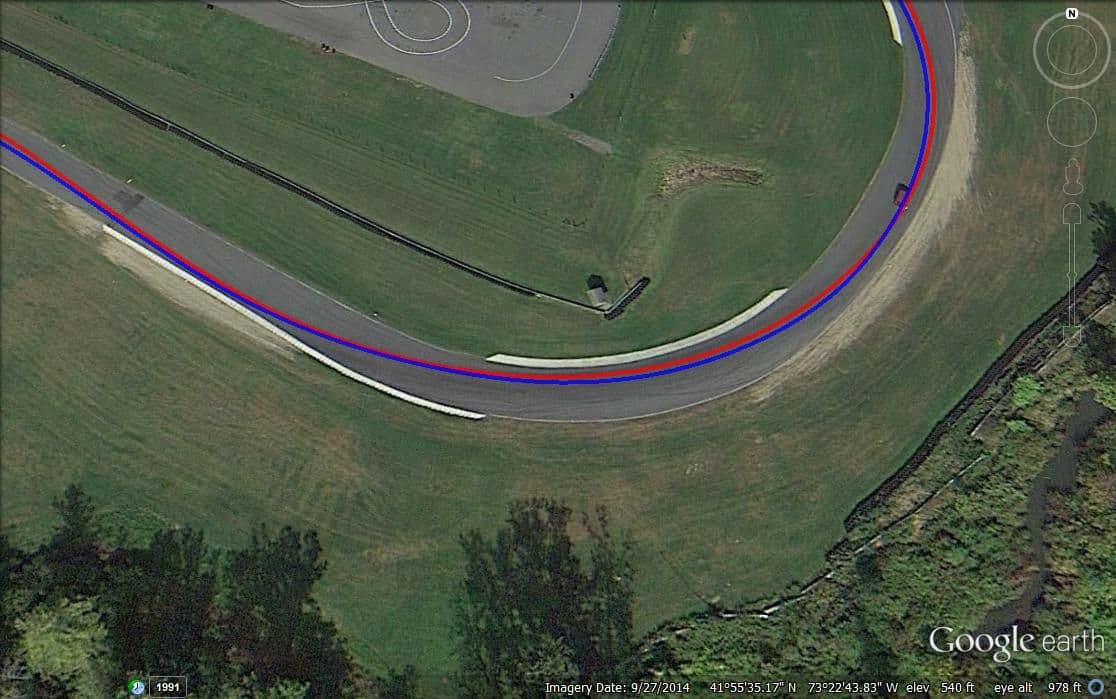
I'm still new to RS2, but here is a comparison of what I can see in RS2 versus GoogleEarth/KML (I found a one lap session that I exported as a test).
In GE, I can clearly see the seams in the asphalt, markers on the curbing, etc. To me, that is amazingly helpful. In RS2, I see a slight green versus
red overlay when I plot two laps against each other. Maybe RS2 can do more, but I don't see anything in the manual about that?
Last edited by longhorn911; Oct 30, 2012 at 03:09 PM.
Oh wow! I see your point! Thanks!
RS2 can't show you the limits of the track (yet - sure they'll allow for import of Satelite pics soonish)
Nice line by the way
From: Durham, NC and Virginia International Raceway
Originally Posted by longhorn911
I'm still new to RS2, but here is a comparison of what I can see in RS2 versus GoogleEarth/KML (I found a one lap session that I exported as a test). In GE, I can clearly see the seams in the asphalt, markers on the curbing, etc. To me, that is amazingly helpful.
Awesome!
__________________ -Peter Krause www.peterkrause.net www.gofasternow.com
"Combining the Art and Science of Driving Fast!"
Specializing in Professional, Private Driver Performance Evaluation and Optimization
Consultation Available Remotely and at VIRginia International Raceway
I will download GPS prune. Looks like a good tool. However, What we really need is the ability to export two laps that are being overlayed in RS 2. I work with AIM and Motec. Motec will export two laps being compared in I2 Pro to a KML. This is how you can tell if the gain/loss in the compared laps is due to a different line. Let's hope that AIM can make this happen.
amso3...Imagine if you could scub along the measures graphs with time difference at the bottom and actually be locked to a red and blue dot running along those lines and and you see a gain or loss in the reference graph...almost better than video but I do know there are errors based on when the background images were made but the 2 laps referenced against themselves are correct.




 Exporting individual laps from AIM RaceStudio2 to GoogleEarth


 - sure they'll allow for import of Satelite pics soonish)