When you click on links to various merchants on this site and make a purchase, this can result in this site earning a commission. Affiliate programs and affiliations include, but are not limited to, the eBay Partner Network.
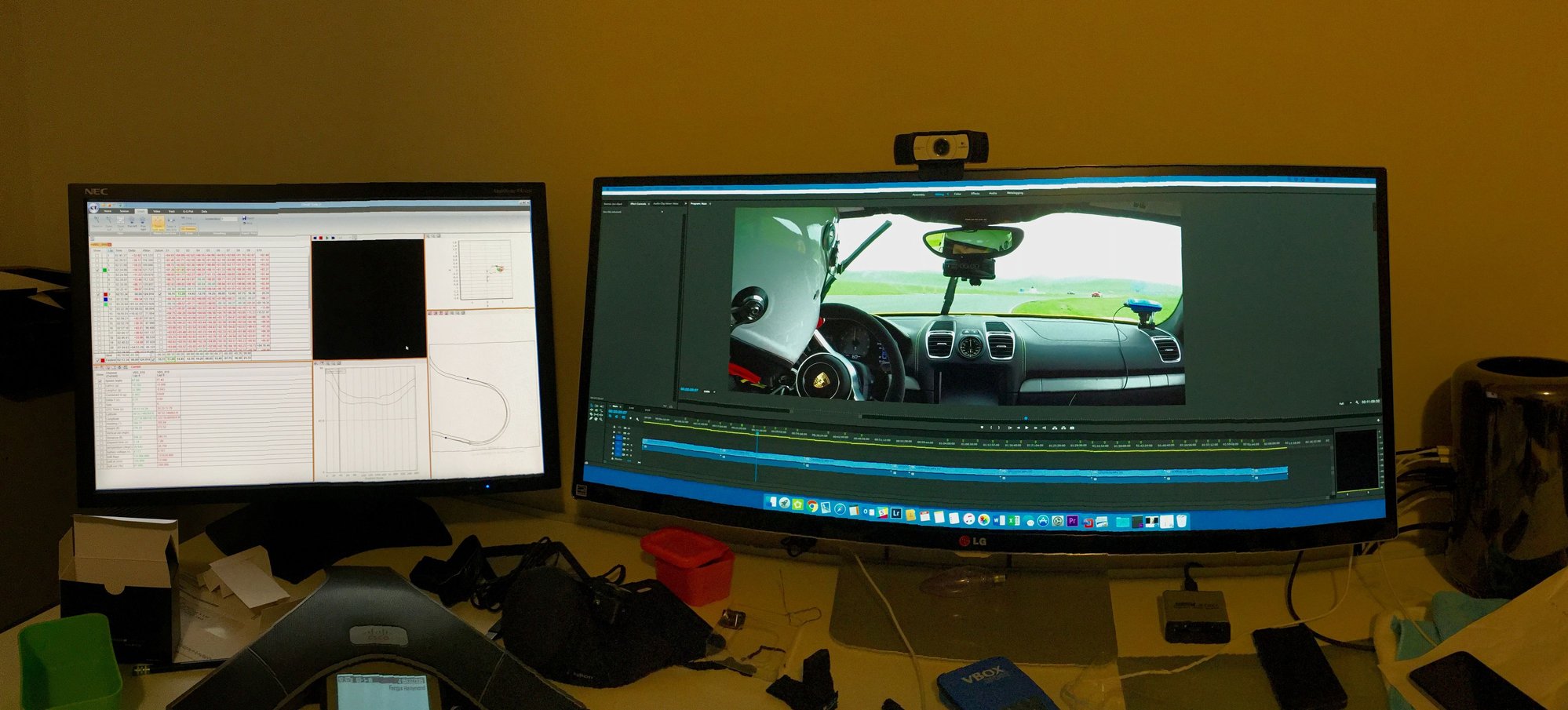
After putting a few hours of GoPro video into Premiere running on one screen, while VMware runs Circuit Tools on another (and tying to chop a single lap out of an 18 Mb .vbo file to use in RaceRender), I'm really looking forward to having a single solution for video and data capture and analysis.
That's what really worked for me with vbox. I can now zero in to my fastest lap in seconds on the vbox streams. Extract and share and all done.
For additional geekiness, I also use a couple of GoPros for interesting angles and HD video. Knowing the fastest lap from vbox means I can also zero in on the right footage on the GoPro streams fairly shortly too....and integrate the whole lot much more quickly
Of course, in additional to all the above there is the lap analysis capability where you and say a friend can compare your fastest laps side by side in great detail.
That's what really worked for me with vbox. I can now zero in to my fastest lap in seconds on the vbox streams. Extract and share and all done.
For additional geekiness, I also use a couple of GoPros for interesting angles and HD video. Knowing the fastest lap from vbox means I can also zero in on the right footage on the GoPro streams fairly shortly too....and integrate the whole lot much more quickly
Of course, in additional to all the above there is the lap analysis capability where you and say a friend can compare your fastest laps side by side in great detail.
That's interesting: I'd planned to get the dual-camera version of the Vbox HD2 but perhaps I'll get the single camera version for now and use my GoPro for another angle.
How easy do you find it is to sync up the video and data from the Vbox with what you get from the GoPro? How do you do it? My current process is pretty painful:
1. Get the start and end time of the lap I'm interested in from Circuit Tools (expressed in UTC time in hundredths of a second).
2. Open the .vbo file from that session and delete everything before the start time and delete everything after the end time, then save the file as a new .vbo file
3. In Premiere, trim the video to start just before I go over the start/finish line and end at the same place a lap later.
4. Import the trimmed video and data into RaceRender. The syncing is all done, so I just put in the overlay and I'm done.
I had a lot more data from the Vbox Sport than I did GoPro video from my last track day, so I used the clock on the dash of my car to roughly get a match. Doing so, I realized that having a bigger clock screen, showing UTC time to hundredths - or even tenths - of a second would make matching the video to the data much easier. I looked around on the Web and didn't find anything 'though.
I like the side by side. I can actually do that with AIM, but without the detailed data - I have the data in the video though. Just a simple matter of opening 2 videos and starting playback at the same time (easy on a mac).
This vbox system - is the data overlay realtime like the AIM? I can't get over that simplicity. But I like having throttle brake steering input data alongside the video that is nice.
I'm over post track day edits, using video tools and that, too time consuming. Using as a training/coaching tool is my goal. So realtime and simplicity is KEY.
What is cost all in for:
data collector, dash display, camera, cables, etc?
I'm over post track day edits, using video tools and that, too time consuming. Using as a training/coaching tool is my goal. So realtime and simplicity is KEY.
Agreed. I just bought the SoloDL/SCam setup and am getting a dedicated laptop and pelican case for the track. Come off, do tire temps and get right into the data because I will remember where things were good or bad and I want to associate that to numbers as its fresh in my mind to try to burn in the ideas of what I need to do next time...etc. I think doing some analysis right at the track is key. Thats why I think most of these software developers are missing the boat by not having a good iOS app that people can use on their iPads. We need simpler to use but powerful analysis tools.
I use traqmate screen thing w go pro 2 sync. Camera is a bit outdated but works great still. I can extract specific lap out of a session of a video in 1 min or so.
I can look at these data and video and see where i can improve.... but i just need more ***** to go faster at the end.
I'm almost done my GT4 overlay. It's a vector based drawing (nights of fire and wine during spring break), so when the HD2 comes out, it will look even better.
I like the side by side. I can actually do that with AIM, but without the detailed data - I have the data in the video though. Just a simple matter of opening 2 videos and starting playback at the same time (easy on a mac).
This vbox system - is the data overlay realtime like the AIM? I can't get over that simplicity. But I like having throttle brake steering input data alongside the video that is nice.
I'm over post track day edits, using video tools and that, too time consuming. Using as a training/coaching tool is my goal. So realtime and simplicity is KEY.
What is cost all in for:
data collector, dash display, camera, cables, etc?
The Lite and HD2 are realtime overlays. Same as AIM.
I'm guessing for an HD2 it will be 2500-3000 for a 2 camera system with OLED display. Not on the market yet - maybe Peter can comment.
For the Lite it's about 2K for 2 cameras and OLED display.
That's interesting: I'd planned to get the dual-camera version of the Vbox HD2 but perhaps I'll get the single camera version for now and use my GoPro for another angle.
How easy do you find it is to sync up the video and data from the Vbox with what you get from the GoPro? How do you do it? My current process is pretty painful:
1. Get the start and end time of the lap I'm interested in from Circuit Tools (expressed in UTC time in hundredths of a second).
2. Open the .vbo file from that session and delete everything before the start time and delete everything after the end time, then save the file as a new .vbo file
3. In Premiere, trim the video to start just before I go over the start/finish line and end at the same place a lap later.
4. Import the trimmed video and data into RaceRender. The syncing is all done, so I just put in the overlay and I'm done.
I had a lot more data from the Vbox Sport than I did GoPro video from my last track day, so I used the clock on the dash of my car to roughly get a match. Doing so, I realized that having a bigger clock screen, showing UTC time to hundredths - or even tenths - of a second would make matching the video to the data much easier. I looked around on the Web and didn't find anything 'though.
Thanks
Given the learning you will have already done on Premier and other tools, the vbox will greatly reduce your process.
Basically the vbox video has the data all already overlayed on the video stream. Ensure one of the data items on the vbox 'scene' is fastest lap (see ShakNBake's scene above). Finding your fastest lap in a whole day video is then a 3-5 min exercise of just scanning through the vid feed and zeroing in on the fastest lap.
The good thing is that you will immediately know which session is was, and perhaps recognise for example this was the lap behind a red car in front. You can then scan through your GoPro videos and also within 5min or so have identified the part of the GoPro video you are looking for.
Then I integrate the whole lot on premier. Sort out the relative timing (you can also honk the horn at the start/end of a session to act as a sound sync point).
There is no racerender step needed as the vbox feed already has the data on it. Sometime I show the full vbox video as posted above, other times I may only show one part of it...
E.g. below where the main videos are GoPro outputs and the vbox stream is partially hidden behind and showing data (in this example the CAN cable was not plugged in)
All the above probably sounded a bit long winded...and to be honest for 90% of people the native vbox output is good enough and nothing else needed. I just happen to fiddle with more GoPro as well.
I'm almost done my GT4 overlay. It's a vector based drawing (nights of fire and wine during spring break), so when the HD2 comes out, it will look even better.
The Lite and HD2 are realtime overlays. Same as AIM.
I'm guessing for an HD2 it will be 2500-3000 for a 2 camera system with OLED display. Not on the market yet - maybe Peter can comment.
For the Lite it's about 2K for 2 cameras and OLED display.
Here are the HD2 prices I got direct from Racelogic. I got these in January and confirmed them today with Racelogic in the US
HD2 single camera $2,395
HD2 two camera $2,795
HD2 single cam + OLED display $2,745
HD2 two cam + OLED display $3,145
RLACS182-L Clip on CANBus Interface $280
Given the learning you will have already done on Premier and other tools, the vbox will greatly reduce your process.
Basically the vbox video has the data all already overlayed on the video stream. Ensure one of the data items on the vbox 'scene' is fastest lap (see ShakNBake's scene above). Finding your fastest lap in a whole day video is then a 3-5 min exercise of just scanning through the vid feed and zeroing in on the fastest lap.
The good thing is that you will immediately know which session is was, and perhaps recognise for example this was the lap behind a red car in front. You can then scan through your GoPro videos and also within 5min or so have identified the part of the GoPro video you are looking for.
Then I integrate the whole lot on premier. Sort out the relative timing (you can also honk the horn at the start/end of a session to act as a sound sync point).
There is no racerender step needed as the vbox feed already has the data on it. Sometime I show the full vbox video as posted above, other times I may only show one part of it...
E.g. below where the main videos are GoPro outputs and the vbox stream is partially hidden behind and showing data (in this example the CAN cable was not plugged in)
All the above probably sounded a bit long winded...and to be honest for 90% of people the native vbox output is good enough and nothing else needed. I just happen to fiddle with more GoPro as well.
Sounds good! I hadn't thought of using a horn hook as a sync; brilliant! I'm glad you're a Premiere user. (You're helping pay for my driving hobby; I work at Adobe )
That comparison setup is nice and makes my AIM solo/race render combination look pedestrian.
Do you have a more granular speed vs distance graph from your cup2 run, or a csv file? Looks like I am very slow through T3 and T16-T18 compared to your run.
Talos Takes Your 991 Porsche 911 GT3 to the Next Level for a Cool $1.13 Million
Slideshow: Talos Vehicles has transformed the Porsche 911 GT3 RS into a carbon-bodied, race-inspired machine that costs well over $1 million before the donor car is even included.
9 Vehicles Porsche Helped Engineer that Aren't Porsches
Slideshow: Long before engineering consulting became trendy, Porsche was quietly helping other automakers build everything from supercars to economy hatchbacks.
9 Features and Characteristics That Only Porsche People Understand
Slideshow: Some brands build cars. Porsche builds traditions, obsessions, and a few habits that stopped making sense decades ago but somehow became part of the charm.
This Builder Is Turning Heads With Its Slantnose 911 Creation
Slideshow: A small Polish tuner has reimagined the Porsche 911 Slantnose for the modern era, blending 1980s nostalgia with widebody tuning culture and serious performance upgrades.
Porsche 911 GT3 Artisan Edition Pays Homage to Japanese Culture
Slideshow: Porsche has created a Japan-only 911 GT3 Artisan Edition that blends track-ready hardware with design cues inspired by traditional Japanese craftsmanship.
Porsche Reveals Coupe Variant of the Electric Cayenne With a Fresh Look
Slideshow: Porsche's latest electric Cayenne Coupe blends dramatic styling with supercar acceleration, turning the brand's midsize SUV into a 1,139-horsepower flagship.












 )
)