When you click on links to various merchants on this site and make a purchase, this can result in this site earning a commission. Affiliate programs and affiliations include, but are not limited to, the eBay Partner Network.
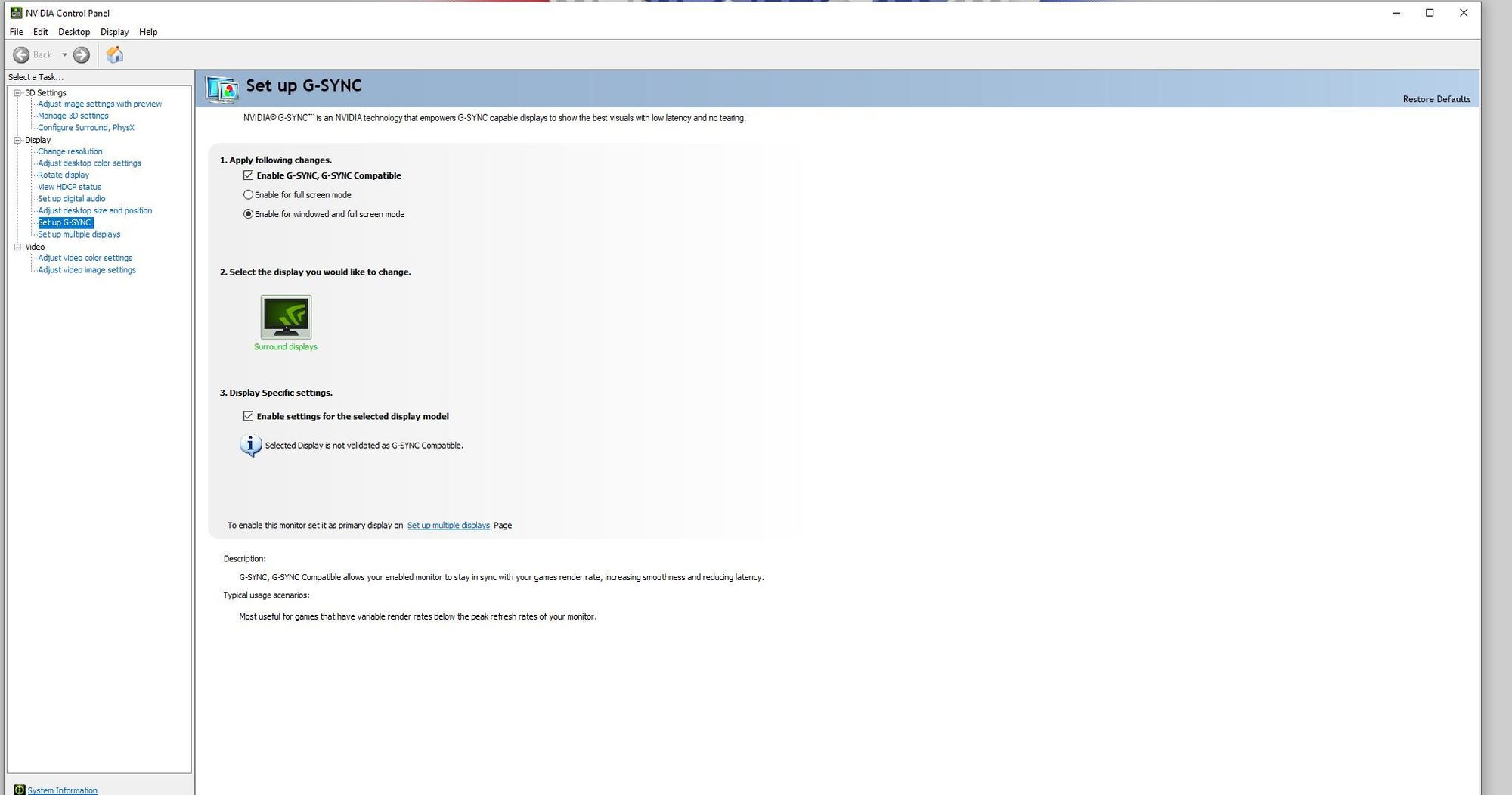
Ok. I had some free time today so I tried to learn a little more about my new set up. I have 3 new Samsung G5 monitors. I set them up using the Windows only method and was perfectly happy with them. Last week I figured out how to turn on FreeSync and then use the Nvidia Control panel to get them to use G-Sync, but I didn't like how Nvidia put the triple monitors into Fullscreen mode so I went back to Windows only control.
Anyways, today I put the monitors back into FreeSync and ran 2 races with them in that way. To my eye I can not see any difference, but the FPS went from 90-144 to a solid 144 constant the whole race.
Question: Is that the only change? Should I notice some other difference? Is my system being top endish making even the non-G-Sync play just as good as G-Sync?
Just wondering what folks think.
EDIT: Interesting. I just ran the benchmark program, Heaven, and it displays the note, G-Sync ON, but again I can't notice any difference in the picture - just the FPS improves.
So . . . file this away in the "what NOT to try" category.
I wanted to try a RaceLab overlay and read on the iRacing forum that some people had trouble installing an overlay while using G-Sync. I installed RaceLab, and couldn't get the overlay to appear so assumed it was as suggested in conflict with G-Sync. I turned G-Sync off thru the Nvidia Control panel enable/disable feature, but still couldn't get the RaceLab overlay. I then uninstalled Nvidia Control panel. When I restarted my computer the Task Bar was on top, couldn't be moved and I couldn't access the Command Line via the Task Bar so I decided to try and restore what I had just messed up. Ultimately, the only solution I found that worked was a System restore to a point one week ago . . . then I found out iRacing does not work if you use System restore . . . so I tried to do what iRacing said and download the necessary data to return my system to normal working order. That did not work . . . so . . . I uninstalled iRacing and then re-installed. That worked and everything went back to what it was except I had to re-download Crew Chief and have yet to try and re-install RaceLab. Somewhere in all that trial and error I did briefly figure out how to get RaceLab to work, but now I'm hesitant to start that process over, given the headache it caused.
I'll see if I can untangle some of this. The need to set your monitors up in surround depnds on the games you plan to play. There is abosolutely zero need to do so for iRacing. The ability to run in borderless windowed mode and still do the individual drawing of the side screens to get the correct FOV is well done in iRacing. Games like Raceroom however barely do a reasonable job with triples. They require the use of surround to even offer you up the correct resolution to span the 3 screens. It still requires some additional command line options to get the side monitor angles correct. If you do other things on this machine besides sim racing then running in surround all the time may not be an option as well. Treatng 3 screens as one large one doesn't make for the best desktop use. If you plan to use a fourth montior for running some other racing related tools like Atlas or Motec to analyze telemtetry then you can do so if not running the triples on surround on a single card but would require a second video card if the triples are setup in Surround. Running in full screen or borderless window mode also has an impact on how Racelab overlays behave. When running in full screen if you drag an overlay on to the iRacing window it often causes iRacing to drop out of full screen and into a smaller window. Running in borderless windowed mode resolves that issue.
The taskbar popping up at the top of the screen is a bug in the current drivers as mine does this on occassion. You have to unlock the taskbar before you can move it down to where it should be or you prefer it and the relock it. I do believe this to be an Nvidia driver bug as it was not a problem for me until I moved to the current driver release.
I'll see if I can untangle some of this. The need to set your monitors up in surround depnds on the games you plan to play. There is abosolutely zero need to do so for iRacing. The ability to run in borderless windowed mode and still do the individual drawing of the side screens to get the correct FOV is well done in iRacing. Games like Raceroom however barely do a reasonable job with triples. They require the use of surround to even offer you up the correct resolution to span the 3 screens. It still requires some additional command line options to get the side monitor angles correct. If you do other things on this machine besides sim racing then running in surround all the time may not be an option as well. Treatng 3 screens as one large one doesn't make for the best desktop use. If you plan to use a fourth montior for running some other racing related tools like Atlas or Motec to analyze telemtetry then you can do so if not running the triples on surround on a single card but would require a second video card if the triples are setup in Surround. Running in full screen or borderless window mode also has an impact on how Racelab overlays behave. When running in full screen if you drag an overlay on to the iRacing window it often causes iRacing to drop out of full screen and into a smaller window. Running in borderless windowed mode resolves that issue.
The taskbar popping up at the top of the screen is a bug in the current drivers as mine does this on occassion. You have to unlock the taskbar before you can move it down to where it should be or you prefer it and the relock it. I do believe thi to an Nvidia driver bug as it was not a problem for me until I moved to the current driver release.
Thanks for the input!
Pretty much this rig is 100% for iRacing with a tiny bit of internet watching of iRacing coaches so I think NOT running in surround is going to be the best solution as you suggest. Honestly, I just liked the idea of running G-Sync 'cuz it sounded "cool", but I never noticed any change in what I see if there was any to begin with. I get that G-Sync matches refresh rate to frame rate thus eliminating tearing, but given that I never saw evidence of tearing to begin with, I'm not sure I see a benefit to G-Sync for iRacing. Perhaps if I was into FPS (First Person Shooter) games I'd notice something. Anyways, I'll turn off Surround today and go back to running without G-Sync. Thanks again for the info.
One brief aside . . . the Task Bar issue really had me flummoxed. The lock/unlock feature did nothing in my case. I found a 6 or seven step repair for the issue online that included things like restarting Window's Explorer, and running various commands like scn /scannow, but the only suggestion that worked was the restore. I think the moral of the story for me is to set up iRacing and then leave it alone. Hah, easier said than done for a guy that loves to tinker with new stuff, but I'll try
Shut off surround and g-sync, and the Task Bar went wonky again. This time I could move it left and right but not top to bottom and the command line was in it's proper place. Fortunately getting it back only took a restart and not a restore. I also got RaceLab working no problem. I'm thinking I'll race in the Formula Renault at Watkins Glen this week. Tried a few laps this morning and I was up to pace pretty much right away. What a difference it makes if you know a track plus the modeling physics for that car are pretty much like glue on the tires. Almost zero understeer even in the uphill left hander at the end.
If G-Sync is working all you should notice is that there is no stuttering or tearing of the images being displayed at any framerate. If it is working as expected all you should notice is the absence of stutters and screen tearing. It's not a whiz bang feature that is in your face and immediately apparent when it is working.



 Any computer geeks here know much about G-Sync.