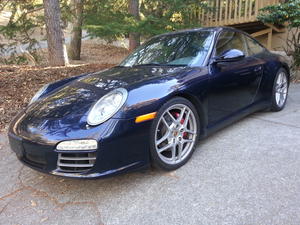
I think as @Rig.Stunts says, part of the complexity is the each HU does things a little differently so there may be variations in what you get through Pasar. @Rig.Stunts covers Pioneer and Kenwood, my installation is with Alpine. On my wheel, which looks like @Ottomatic, my left dial is volume up/down or push for mute, right is track or channel up/down depending on mode and push to change modes. The two phone buttons pick up or hand up as expected. I do not think I get anything from the other two.
Here are some pictures and a video clip if I can upload everything.
Again apologies for how dirty the car is -- outside and in -- it drives right, but I did not get around to washing this weekend. Also, the radio bezel should sit flush on the bottom edge. The installer was in there a while back and did not pack all the cables in efficiently enough to seat it properly. Not functional, but definitely delicate work that takes some patience. I still have optical cable (not using them but did not cut them) and my converter from the factor plug to the Alpine unit is NOT what anyone would call compact, plus there are SiriusXM cables and box in there, the Pasar box and I still have the old MOST box in there (which did not work for me because it cut too much volume and sound quality and I am really not that finicky) which is chunky too. To properly seat the bezel, you need to patiently fold and poke cables into every available recess behind the head unit (which itself is only single DIN behind the screen), but this takes trial and error and patience and a little elbow grease in the end to do it right.
OK, here are some front pictures to give you an idea of where I mounted the camera and how much (or how little it extrudes):
Side -- barely noticeable. Front from eye level -- have to know what you are looking for. Get down low and you can see it pretty welll
Here is a picture of the rear camera -- more noticeable, but still where you would see factory cameras:
Rear camera above license plate.
Here is a link to a short video (I think) showing how it looks through the Alpine head unit:
Can you elaborate on why SC is a gotcha on full audio system replacement?
There are many settings in the OE HU which are lost with replacement. As I don't have SC, you'll have to look at your owner's manual. I believe various preference settings . . .
Quote: Also, can you describe what is possible with the Paser and SWC? Specifically, I have the wheel as shown attached. Below the volume wheel is a bottom that can be assigned to a few different features in the OEM PCM. On the right is another wheel that can scroll and select things in the OEM PCM.
If you have similar controls, how are they handled with the Paser device? Clearly, volume up/down is something that would be expected, but I'm curious what what I can get working. Track up/down would be great, and anything else a bonus.
Confirm your HU is on Paser's list.
I like my controls now on Pioneer HU:
Lefthand 'Volume wheel' takes many large scrolls to adjust volume - worst feature, but functions.
HU has no volume **** . . . a 'Gotcha'!
Volume wheel press attenuates - good
Righthand 'Select wheel' press changes input - brilliant. Input options selected in my HU.
Radio and CarPlay only, Radio works with Waze, CarPlay active.
Select wheel scroll changes track - perfect
All I need, and all I use. Phone controls not applicable as I use CarPlay, however they might work.
I would like to try installation myself. My husband is more cautious that we might break something, so still TBD. I think it will depend on whether we go with a board update or aftermarket full unit and how complicated it might be. We were thinking about a rear license plate camera, so we wouldn't have to drill.
How are you going to route wiring from the camera to the HU if you aren't going to drill a hole in the bumper?
How are you going to route wiring from the camera to the HU if you aren't going to drill a hole in the bumper?
Unsure, and it may not be possible. The car is in transport, so we are going to investigate more once it gets here. And then we might need to weigh the value in having the front camera for parking blocks vs not drilling into a freshly repainted bumper. If that's the choice, I feel like the latter will win out. But we're going to poke around and see what may be possible, maybe with a clamp or some kind of double-sided adhesive. We really don't know. We're just discussing options.
Thank you @natstalgia for sharing photos. That install and HU integration looks super clean.
There is a slightly off center rear cameras housing that replace one of the license plate light which can hold a camera — that might be an option then no drilling necessary. If your wires are already by the plate lights, you should be able to follow that to find a path inside the cabin. I got my wires to where the cabriolet top is stored and ran parallel to other wires going into the cabin. No drilling there.
Someone had asked about an amp that fits in the factory location under the passenger seat and has enough channels to tune and power each speaker (except the sub) individually?
My installer put in a 600 watt MUSWAY D8v2 that measures 127mm x 37mm x 205mm. It fits and sounds great. Each channel can be tuned individually which is important with the Bose speakers because each speaker has different resistance (ohms). Usually you build a balanced system where each speaker has the same resistance, but Bose is smarter than most of us and forged their own path. I do plan to replace the factory speakers at some point, probably with Focal, but for now the system is working well enough for my DD.
There is a slightly off center rear cameras housing that replace one of the license plate light which can hold a camera — that might be an option then no drilling necessary. If your wires are already by the plate lights, you should be able to follow that to find a path inside the cabin. I got my wires to where the cabriolet top is stored and ran parallel to other wires going into the cabin. No drilling there.
No affiliation but what I have bought from this guy was high quality and his customer support is great. Just giving some options.
There are two holes behind the license plate that can be used, the bigger one is about 1 inch diameter. No need to drill the bumper depending on the camera. I originally installed one of the light replacement cameras but didnt like the offset on the screen and how it impacted backing up, so I 3d printed a little mount that sits directly in the center above the license plate and is held in place with 3M double sided automotive tape.
We're looking at a license plate mount for the rear plate - there are a few options out there that don't look too bad. And I figured we could wire through existing holes - I saw some YT videos on that.
We won't have a plate in the front, so that's where we'll have to explore.
for the rear, if you dont want to drill into the bumper just buy the rear camera that replaces the licence plate light. It may look more obvious tho, I had one of those before and didnt like the look - but the new ones im sure will be more discreet.
for the front bumper, there MAY be enough room inside the front duct behind the retaining frame - MAYBE. it may be possible to drill in there - but have to factor in the curvature of the front duct as well.
Quote:
Originally Posted by laine
Unsure, and it may not be possible. The car is in transport, so we are going to investigate more once it gets here. And then we might need to weigh the value in having the front camera for parking blocks vs not drilling into a freshly repainted bumper. If that's the choice, I feel like the latter will win out. But we're going to poke around and see what may be possible, maybe with a clamp or some kind of double-sided adhesive. We really don't know. We're just discussing options.
Thank you @natstalgia for sharing photos. That install and HU integration looks super clean.
There are two holes behind the license plate that can be used, the bigger one is about 1 inch diameter. No need to drill the bumper depending on the camera. I originally installed one of the light replacement cameras but didnt like the offset on the screen and how it impacted backing up, so I 3d printed a little mount that sits directly in the center above the license plate and is held in place with 3M double sided automotive tape.
That larger hole is a great place to route your emergency hood release cable through, coiling the extra cable with a tie strap and tucking it in behind the license plate mounting bracket.
That larger hole is a great place to route your emergency hood release cable through, coiling the extra cable with a tie strap and tucking it in behind the license plate mounting bracket.
Engine compartment. There is a hole just below the latch that you can feed the cable through to get it down to the hole behind the license plate. I've done this on both 997.1 and 997.2 cars.
Otherwise the emergency release cable resides behind the left taillight which creates a Catch 22 ... Open the lid so you can remove the taillight to access the cable so you can open the lid.
Slideshow: One of the rarest Porsche 356 Speedsters ever built has resurfaced, offering a glimpse into a little-known chapter of the model's competition history.
Slideshow: Built around a carbon-bodied 964 and a naturally aspirated 4.0-liter flat-six, this bespoke commission highlights how far the restomod formula has evolved.
Slideshow: A Polish Porsche specialist is moving ahead with one of the most unusual 911 conversions in recent memory: a shooting brake version of the 991-generation sports car.
Slideshow: A Porsche Carrera GT has been transformed into a one-off coachbuilt machine that blends analog supercar engineering with styling inspired by the legendary 917 race cars.
Slideshow: A heavily modified Porsche Cayenne convertible with faux wood trim and a long list of flaws recently sold at auction for surprisingly little money.