When you click on links to various merchants on this site and make a purchase, this can result in this site earning a commission. Affiliate programs and affiliations include, but are not limited to, the eBay Partner Network.
My previous “PDK repair on the CHEAP” post mentioned I was looking into ultra low-cost PDK calibration options. Anything we can do to make this repair (and others) easy and affordable is on the table. I recently chatted with a 991 owner who was quoted $9k for a distance sensor replacement job (including parts). This crooked racket really has to stop.
Well I found one, you can put together a full-fledged PIWIS 3 for about $75. Much of this stuff I didn’t figure out out but stumbled across and put it all in one place in a (hopefully) easy to follow format.
It can calibrate the PDK along with doing everything else an offline PIWIS 3 can do including module software updates, recoding new modules, changing programming, reading sensors, and running special tests. What it cannot do is stuff that requires an online Porsche connection such as adding purchased options specific to your VIN.
To get the $75 PIWIS 3 running you’ll need these things:
.
Computer that meets the minimum requirements below (not a dedicated computer but available when needed to run PIWIS. I use my daily laptop.)
VAS 6154 clone interface unit with version 1.6.6 firmware ($33)
External 256 GB solid-state drive ($27) – optional, see below
PIWIS 3 software configured for a virtual machine ($13)
VMware Workstation Pro virtual machine software (free online download)
The computer will requirea minimum display resolution of 1920 x 1080, if lower PIWIS won’t fit on your screen. To keep it from bogging an i5 (or higher) processor and 8 GM of RAM (16 GB is better) is needed.
If you are really a tightwad and have a lot of free space on your computer’s hard drive (200 GB) you can load it directly on it and save the $26 on the external drive. I like having it on a separate external drive so it’s only there when I need it and not taking up hard drive space.
This procedure has a lot of steps but it’s not at all difficult if you follow the instructions closely. Don’t deviate without good reason as it’s easy for things to go sideways.
VAS 6154 clone interface unit with version 1.6.6 firmware
This is the interface between the car’s OBD2 port and the host computer. It’s important that the unit contains version 1.6.6.0 firmware, later versions will not work with this setup. Don’t worry about the included software as you won’t be using it. You can find them on Aliexpress for around $30-40.
Here’s the one I bought that I have confirmed works (it’s now showing for $36 and the price seems to fluctuate). It took about eight days to arrive from China so you’ll want to get it ordered and on the way. They accept Paypal. There are some general reports of reliability issues with these units but I wonder how much of that is FUD as I have not have any problems.
Get the external drive running next so you can download the PIWIS 3 files directly to it. You’ll want an SSD rather than a traditional hard drive or USB stick to speed up PIWIS. There are plenty of inexpensive SSD drives out there such as this 256 GB model that comes in an aluminum case for $27:
Make sure you get over 200 GB capacity (256 GB is good) as you’ll need it when installing PIWIS 3.
If your computer doesn’t recognize the drive you’ll need to initialize it and assign it a drive letter using Windows disk management tool (type “disk management” in the Windows search bar). Important – it needs to be set up for NFTS file system as the compressed PIWIS files are too large for FAT32.
PIWIS 3 software configured for a virtual machine
There are several sites that offer this PIWIS software, it’s typically labeled as “PIWIS 3 WIN10 41.500 + 38.250 VMWARE”. This is a compressed image containing the Windows 10 operating system and PIWIS software specifically configured for a VMware virtual machine.
If you hunt around you may find this for free but I bought it from this site for $13:
I used them as they have a bunch of different automotive VMs, a thorough description/info, and they accepted Paypal as I did not want to give these guys my credit card number.
After payment you’ll immediately receive a text file with a link to the download site. Downloading can be PAINFUL as their connection is slow and it’s 56 GB of files. If you have issues with the download read the site’s FAQ as it has helpful information.
When done you will have have thirteen files named “PIWIS 3 WIN10 41.500+38.250 VMWARE.partXX.rar” with the numbers 01 through 13 replacing the XX at the end.
.
Files 1-12 will have the exact same size of 4,588,544 KB each
File 13 will be 1,509,939 KB
If any of the files don’t match this then it means the file was corrupted in download. Delete just that file then restart the download for just it.
Next off is extracting the thirteen files. If you are using an existing drive, perform a disk defragmentation before extraction or PIWIS may have problems loading (if it’s a new drive there’s no need). The FAQ is emphatic that since these are RAR files you must use Winrar as an extraction tool even if other tools seem to work. I followed their advice and recommend you do also. You can find Winrar at the link below and there’s a free trial and no sign up is required.
After Winrar is installed, you’ll have access to its utilities by right clicking your mouse. Navigate to where you stored the downloaded PIWIS files in file explorer and right click on the first compressed file (...part01.rar) and select “open in winrar” which will open the Winrar tool.
When using an external hard drive it will dramatically speed things up by setting Winrar to put all the temporary files also on the external SSD. Create a folder called “temporary” on your external SSD. Then in Winrar select “options” → “settings” → “paths” then under “folder for temporary files” click browse and find and select the “temporary” folder you just created.
At this point start Winrar using the “extract to” button. Set the external SSD directory location and it will automatically step through all 13 ...partXX.rar files and takes between 30 to 60 minutes to decompress them.
Note: I had extraction errors when the external drive was connected through a USB hub, connected directly to the computer worked fine. Also, if the computer sleeps it will pause the decompression, so disable this if needed. When extracted the files total 106 GB.
Setting up the Virtual Machine
For those who aren’t familiar, VMware (like Virtual Box) allows your computer to run an emulated operating system (OS) that is segregated from every thing else on your computer. The PIWIS files are specifically configured for VMware. When discussing this below, “host” refers to your computer’s OS, “guest” refers to the emulated OS in VMware.
You can download VMware from Broadcom directly free for personal use but will need to register. Easier, you can download it from this site without needing to register.
Installing VMware is intuitive, just make sure you select for personal use.
Once installed, launch VMware and it first needs to be configured for proper screen resolution. Navigate in the top toolbar to “edit” → “preferences” and a window will pop up. Select “display” and make sure the “autofit guest” box is unchecked. If you don’t do this, PIWIS won’t fit properly on the screen.
Click Ok and VMware will be back at its start up window. Now it’s time to open the guest OS, click on “open a virtual machine” and navigate to the external drive. Click on the appropriate folder where PIWIS was extracted. The correct files have a “vmx” extension and VMware will only show those. Select the vmx file and it will open a console view of the guest OS shown below. (Note the vmx filename is shown at the bottom below if you need it for reference.)
A few changes need to be made specific to this guest OS. First off, click on “memory” on the left and a new window will appear that lets you set how much RAM the guest OS uses. The more it can use the better it runs, though you need to leave enough for the host OS to use. I have 16 GB of RAM available so I set it to 8 GB.
Next, click on “processors” to configure processor use. I have an older i7 so I set it for 1 processor with 2 cores. This is probably correct for most people.
Now the display needs to be set to properly display PIWIS, this is important. Click on “display” and at the bottom right unclick “automatically adjust user interface size in the virtual machine” (this keeps the guest screen resolution the same as the host). Then click “stretch mode” and select “free stretch” (this will slightly compress PIWIS vertically as needed to account for the added VMware toolbars when not in full screen mode).
It’s time to start the VM, do this with the VAS 6154 interface disconnected from the computer for now. PIWIS has a simulation mode so we can check things out before setting up the link. Click on the green arrow “power on the virtual machine” and it will start to load up.
IMPORTANT – the first time you load the VM a window may pop up asking about the file origination with the choices “I moved it” and “I copied it”. Always select “I moved it” (even if you copied it) or else PIWIS will lose the authorization imprint.
You may get a couple of warnings here but just continue and don’t worry about them. When fully loaded, you’ll see a desktop like below. This is the emulated guest OS desktop (Windows 10) that is running in VMware. You should not make changes in the guest OS without good reason as it risks losing the authorization imprint. You can make changes in the PIWIS application which we’ll get to next.
Now it’s time to start PIWIS. Right click on the PIWIS icon (bottom one on left) and select “open”. PIWIS will load up but disconcertingly, the menus will be in Cyrillic. On the lower left are buttons to change the language and keyboard to US English. When done you’ll see this:
You can toggle between full screen and compressed view with VMware’s toolbars using the button at the top of the screen (hover over to find the right one). If the display is too large or cutting off the bottom part of the PIWIS menus then the display settings I discuss above weren’t set right or your computer screen resolution is lower than the 1920 x 1080 minimum.
Test PIWIS by clicking Diagnostics 38.250. Since we don’t have a link to the car, it will need to be manually told what car to simulate. The instructions are intuitive. After loading it will attempt to link to the car and return a failure message asking if you’d like to enter simulation mode. Follow the instructions and you’ll end up with this window (I’m simulating a 997.2).
So far so good. Close the Diagnostics window with the X in the upper right corner. Close the PIWIS application with the power button at the bottom left. You shouldn’t close it now, but when needed you can also close the VM using the VMware tool bar “VM” pullown menu → “power” → “shut down guest”.
Setting up the VAS 6154 link
Next up is to get the link to the VAS 6154 up and running. The software instructions have this ominous message:
Never and under any circumstances DON’T start the VCI driver with computer connected to the Internet and VAS6154 connected to it, as this will immediately remove the license from VAS6154.
If the license is removed the VAS 6154 wont work anymore, so disconnect your computer from the internet before proceeding (pull out the network cable or turn off wifi). I suggest putting a large label on the VAS 6154 to remind yourself of this. I’m working on a fix as I can guarantee people will forget sooner or later.
At this point you should be back on the guest OS desktop with PIWIS closed. Connect the VAS 6154 to the car’s OBD2 port with they key on ignition. Wait a few seconds until the VAS 6154 has initialized. Connect the cable from VAS 6154’s data connector to a free USB port on your computer. This interface is USB 2.0 but higher speed USB ports should be backward compatible and work fine.
The computer should sense the USB connection and VMware ask if you’d like to connect to the host or the virtual machine. Select “connect to a virtual machine”, click to highlight the name of the VM in the white box, select “remember my choice and don’t ask again” and hit OK. Another informational window will pop up after this, click okay.
If for some reason the VMware doesn’t recognize the VAS 6154 try another USB port if you have one. If you still have issues it may be a problem with your VAS 6154 (wrong firmware version) or some sort of driver conflict. The VAS 6154 I bought and linked above worked right off the bat.
There are some things you can do to troubleshoot the connection if it doesn’t recognize the VAS 6154. I’ll put some follow up instructions in the comments. After the VAS 6154 has been recognized for the first time, you can check its status in the pulldown menu “VM” → “external devices”.
At this point you are ready to go!! Open up PIWIS as before and start Diagnostics 38.250. Note that the VAS 6154 icon in the lower left of PIWIS may show that the device is disconnected. That’s OK! It still works. PIWIS should identify your car and initiate a connection.
(Note - I grabbed this picture and the one above it off the internet as I forgot to get screengrabs. On my car it said "model line 997 recognized".)
The Diagnostics screen will load and the instructions are intuitive. For information on how to use PIWIS check out some of jjrichar’s great videos. If you are using this for PDK calibration see the linked post at the top of this post for videos on how to do it.
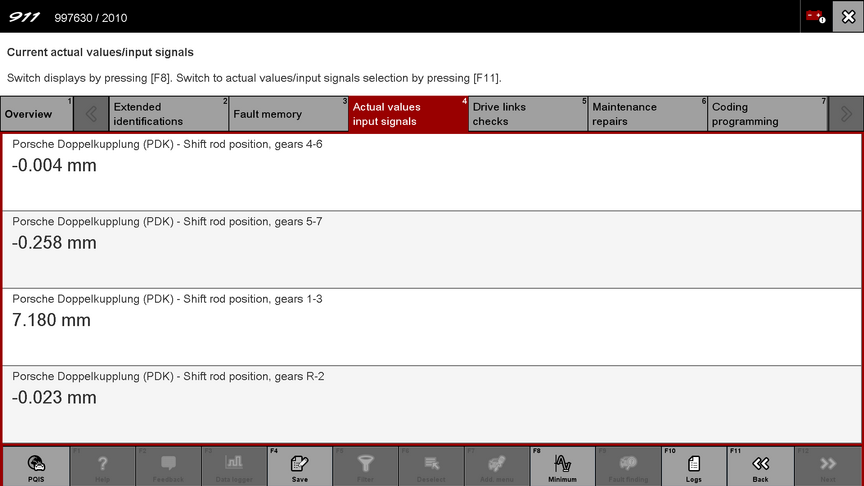
Here’s a shot reading the PDK distance sensors on my car.
And here’s a shot just prior to initiating PDK Calibration also from my car.
Disclaimer and various thoughts
Point #1 - Tread with caution with PIWIS as you can do some real damage to your car if you are reckless. If you are feeling adventurous, play with it in Simulation mode disconnected from the car to get a feel for how it works and what it does.
Point #2 – Downloading unknown files from the internet always has risk and I cannot 100% guarantee these files are virus free. However, I am paranoid and ran all kinds of scans and had Malwarebytes check out my system after running it. I’ve had no problems whatsoever. Plus running in VMware provides protection as it isolates the running PIWIS files from your host OS.
Point #3 – It’s not an issue if you only use your VAS 6154 with PIWIS, but if you use it with other utilities (such as VCI Manager) do not let it update the firmware. It must remain version 1.6.6, if it gets updated the unit will be worthless with the PIWIS software.
Point #4 – The fact that anyone with some smarts can put together a PIWIS for $75 and do this stuff themselves is just another piece of evidence demonstrating what a racket dealership service and these “PDK specialist” shops are. Stop paying the Porsche Tax and encouraging this thievery, unless you have absolutely no choice. Let the gullible fools get fleeced by these guys, not those of us that can think for ourselves.
Hope it works for you and please report issues in the comments so we can get this better documented.
I'm all setup! TYSM! @PV997 do you have a cashapp? I'd like to tip
Also, can someone tell me where to find PSE (toggle exhaust flaps from PCM), I'm in simulation mode, trying to find the Porsche sports exhaust setting for my 971 Panamera turbo before I connect the VAS to code it.
I'm guessing it exists in one of these 3 areas:
Engine electronics (DME)
Rear-end electronics
PCM (Infotainment)
Great to read it worked but I don't know where the PSE is. No cashapp or tip desired. I have a pathological (and to some extent irrational) contempt for Porsche dealerships and the way they put the screws to people, so knowing one less person will visit them is all the tip I need. Cheers.
Thanks! But I'm really just a wizard in scouring the internet and compiling bits and pieces other people have already figured out. This was already out there but not in step by step form.
Thanks! But I'm really just a wizard in scouring the internet and compiling bits and pieces other people have already figured out. This was already out there but not in step by step form.
Great write-up, running a similar setup on a dedicated laptop, works well.
I have mine setup as a dual boot and have PIWIS 3/Win 10 hosted on a very small thumb drive.
I was able to keep costs around $400 for the Lenovo laptop, 256GB thumb drive and PTG3 USB Module (VCI).
Hmmm, I had issues using a thumb drive as though the read speed is good, the write speed was terrible. Launching time and closing time was very loooong. That's why I suggested an external SSD but if there's a good thumb drive solution that would be great. The SSD launches in maybe five seconds.
What I'd like to do is install a lightweight Linux distro on a thumbdrive (or external SSD) and boot from it. Have both VMware and PIWIS on it without any of the Windows resource hogs. It should run fast and can be used by any computer without needing to install VMware on the PC.
What I'd like to do is install a lightweight Linux distro on a thumbdrive (or external SSD) and boot from it. Have both VMware and PIWIS on it without any of the Windows resource hogs. It should run fast and can be used by any computer without needing to install VMware on the PC.
Great write-up, time to follow your steps so I can undo some custom settings the PO had on my car.
One thing I still don't get, why do we need an external SSD specifically? If the laptop has an internal SSD, which is pretty normal nowadays, I'd think you can just shrink the main OS partition to free up the 200GB needed for PIWIS. Then format that partition to NTFS. Besides the compromise risk (which I'm willing to take on a throwaway, offline computer) am I missing something?
I've been running that same exact setup for a good part of the year now. I think one word of caution is to probably not use Windows 11. I've had so much issues with piwis/vmware performance with windows 11. I recommend running windows 10.
Hmmm, I had issues using a thumb drive as though the read speed is good, the write speed was terrible. Launching time and closing time was very loooong. That's why I suggested an external SSD but if there's a good thumb drive solution that would be great. The SSD launches in maybe five seconds.
What I'd like to do is install a lightweight Linux distro on a thumbdrive (or external SSD) and boot from it. Have both VMware and PIWIS on it without any of the Windows resource hogs. It should run fast and can be used by any computer without needing to install VMware on the PC.
This is what I am using for the thumb drive. SAMSUNG MUF-256AB/AM FIT Plus 256GB
Its a little slower than running off the hard drive but its not painfully slow. My plan is to copy the thumb drive to another SSD M2 (I have a USB to M2 on the way).
Great write-up, time to follow your steps so I can undo some custom settings the PO had on my car.
One thing I still don't get, why do we need an external SSD specifically? If the laptop has an internal SSD, which is pretty normal nowadays, I'd think you can just shrink the main OS partition to free up the 200GB needed for PIWIS. Then format that partition to NTFS. Besides the compromise risk (which I'm willing to take on a throwaway, offline computer) am I missing something?
You definitely can do that, and I should have been more clear on other options.
My thinking was to make this as simple and foolproof as possible for someone who wants to DIY a PDK repair (as an example) and just needs a fast, inexpensive solution. With this method there's no need for a bunch of existing internal HD space, and you don't to play around with HD partitions (which can be dicey for the inexperienced). Using an external SSD is simple and cheap, and it runs surprisingly fast. Plus it's not taking up HD space when it's not being used.
If someone were to use this in their daily work then a setup like you describe or a dedicated computer might make more sense.
Stunning Porsche 356A Super GT Speedster Auction Fails to Meet Reserve
Slideshow: One of the rarest Porsche 356 Speedsters ever built has resurfaced, offering a glimpse into a little-known chapter of the model's competition history.
Theon Goes Full Carbon Fiber With Stunning New Build
Slideshow: Built around a carbon-bodied 964 and a naturally aspirated 4.0-liter flat-six, this bespoke commission highlights how far the restomod formula has evolved.
Tuner Is Converting Porsche 911s Into Shooting Brakes
Slideshow: A Polish Porsche specialist is moving ahead with one of the most unusual 911 conversions in recent memory: a shooting brake version of the 991-generation sports car.
This Coachbuilt Creation Is A Modern Take on the Legendary Porsche 917
Slideshow: A Porsche Carrera GT has been transformed into a one-off coachbuilt machine that blends analog supercar engineering with styling inspired by the legendary 917 race cars.
Is This Convertible Cayenne A Steal, Or A Returnless Investment?
Slideshow: A heavily modified Porsche Cayenne convertible with faux wood trim and a long list of flaws recently sold at auction for surprisingly little money.





















































































 A PIWIS 3 for only $75