When you click on links to various merchants on this site and make a purchase, this can result in this site earning a commission. Affiliate programs and affiliations include, but are not limited to, the eBay Partner Network.
Im finally getting around to installing my deck.
I'm not too familiar with wiring up decks and what not, but fortunately a friend of mine is more familiar with this stuff and has been super helpful.
That said, I just want to confirm that I have the wires from the MOST box spliced into the correct wires in the harness, as well as confirm that I have the speaker wires plugged into the correct RCA inputs as well.
Something I'm getting bothered by is that based on this setup, the sound quality does not seem anywhere near what my BOSE system was.
Now my test was based on streaming music from Spotify on my phone to the deck. But the sound quality is definitely not there. It almost seems as if 95% of the power is going to the front speakers, and maybe 5% power going to to back speakers, and virtually ZERO power going to the subs?
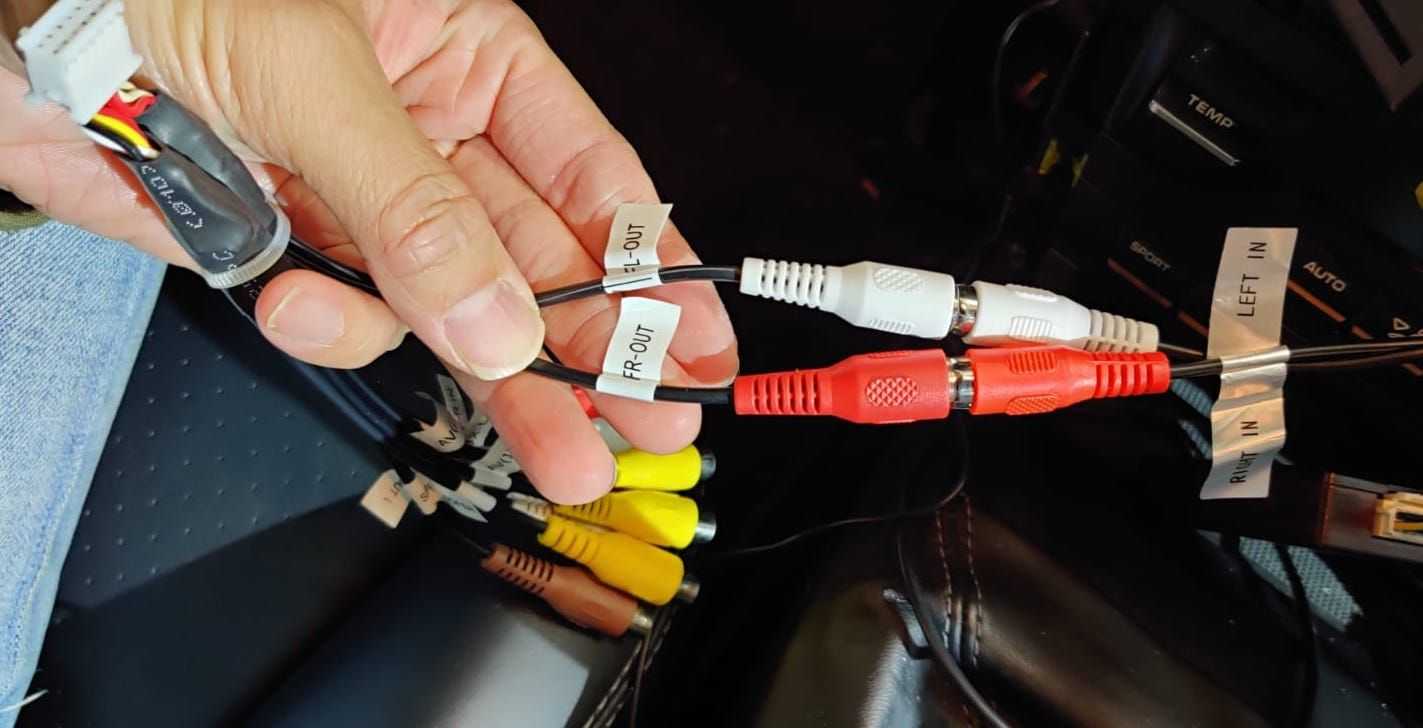
Am I missing something here? In the first picture, these appear to be the only speaker wires I have connected. Are there more wires for me to connect to get a fuller sound?
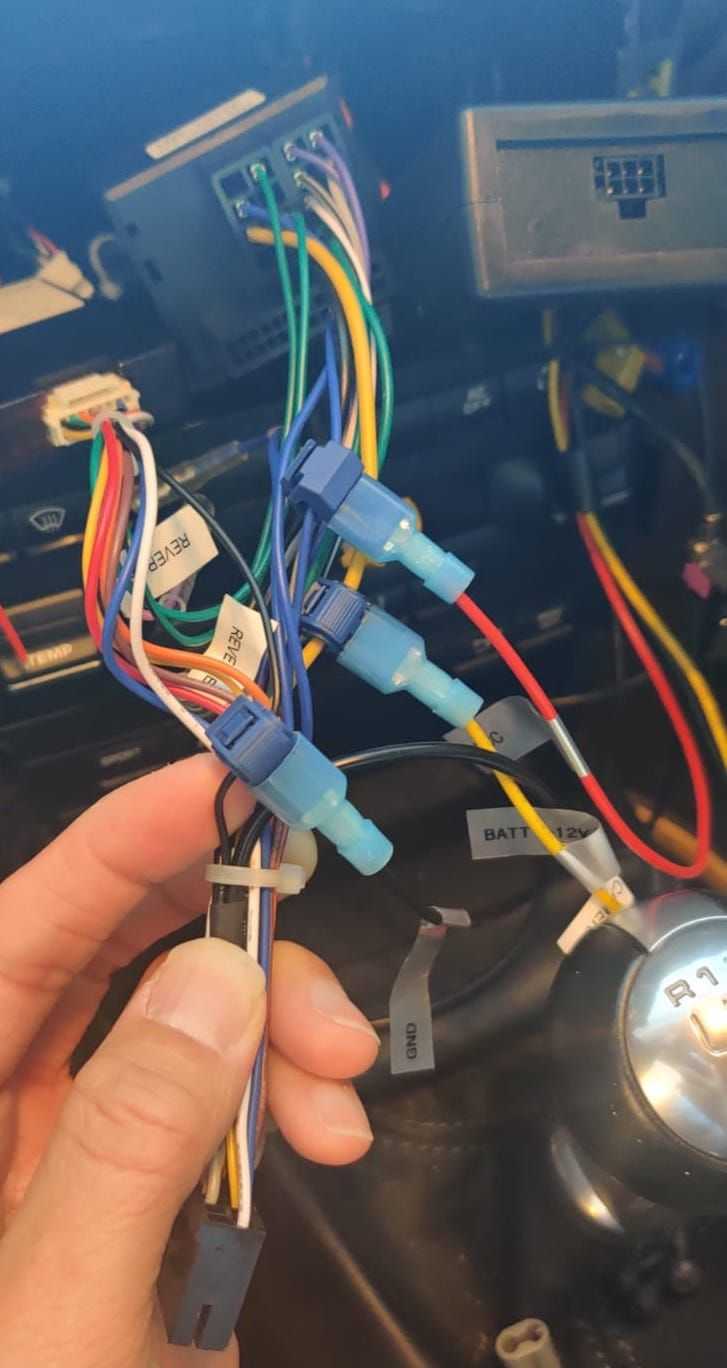
And second image, these are the wires I spliced into from MOST to harness.
Red/Blue
Yellow/Yellow
Black/Black
Any feedback would be greatly appreciated. Especially on the sound quality. Its pretty bad and I'm not even remotely close to being an audiofile. I really hope this is not the final result. Because if it is, stock deck is going back in.
Sorry, second post here right after my first one, but just wanted to keep it separate.
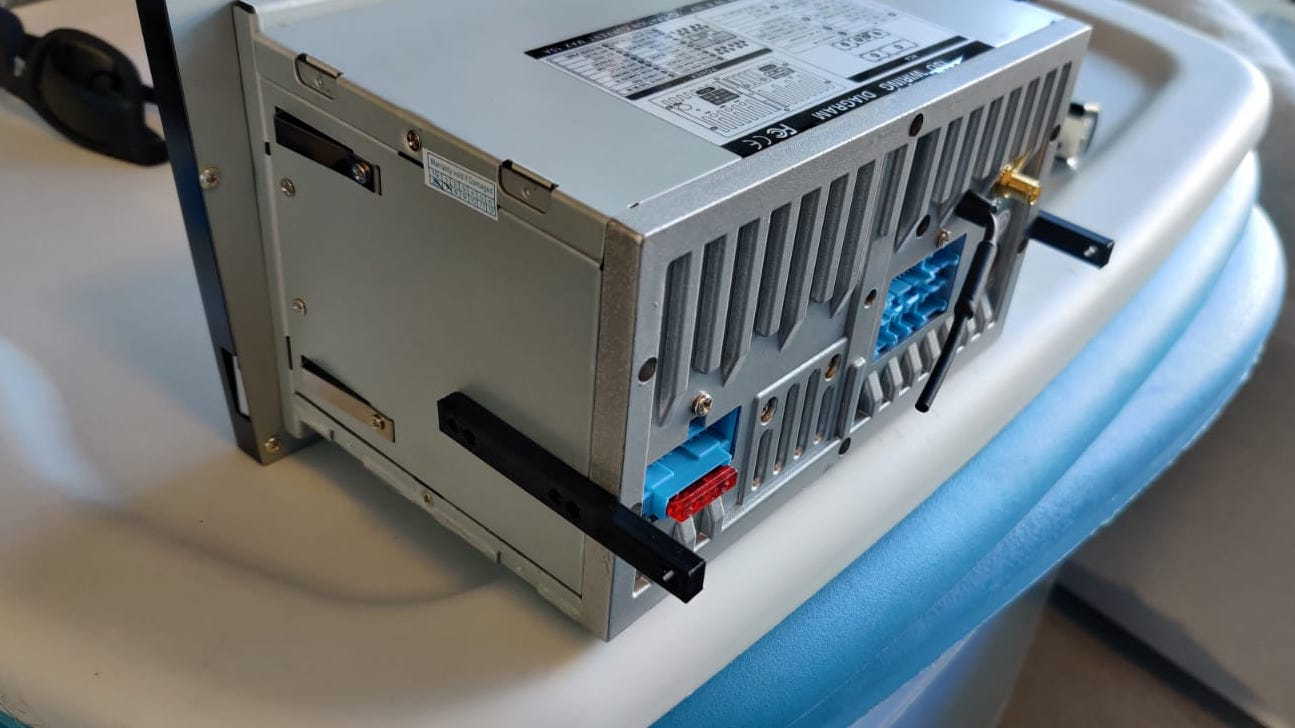
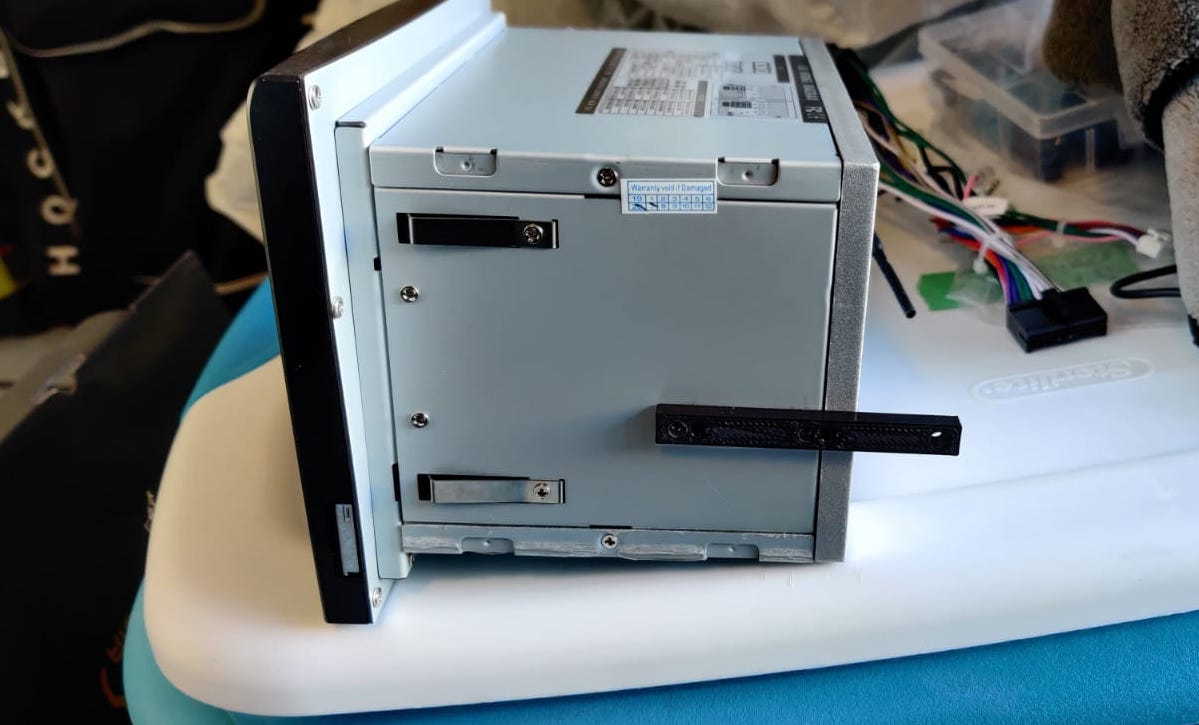
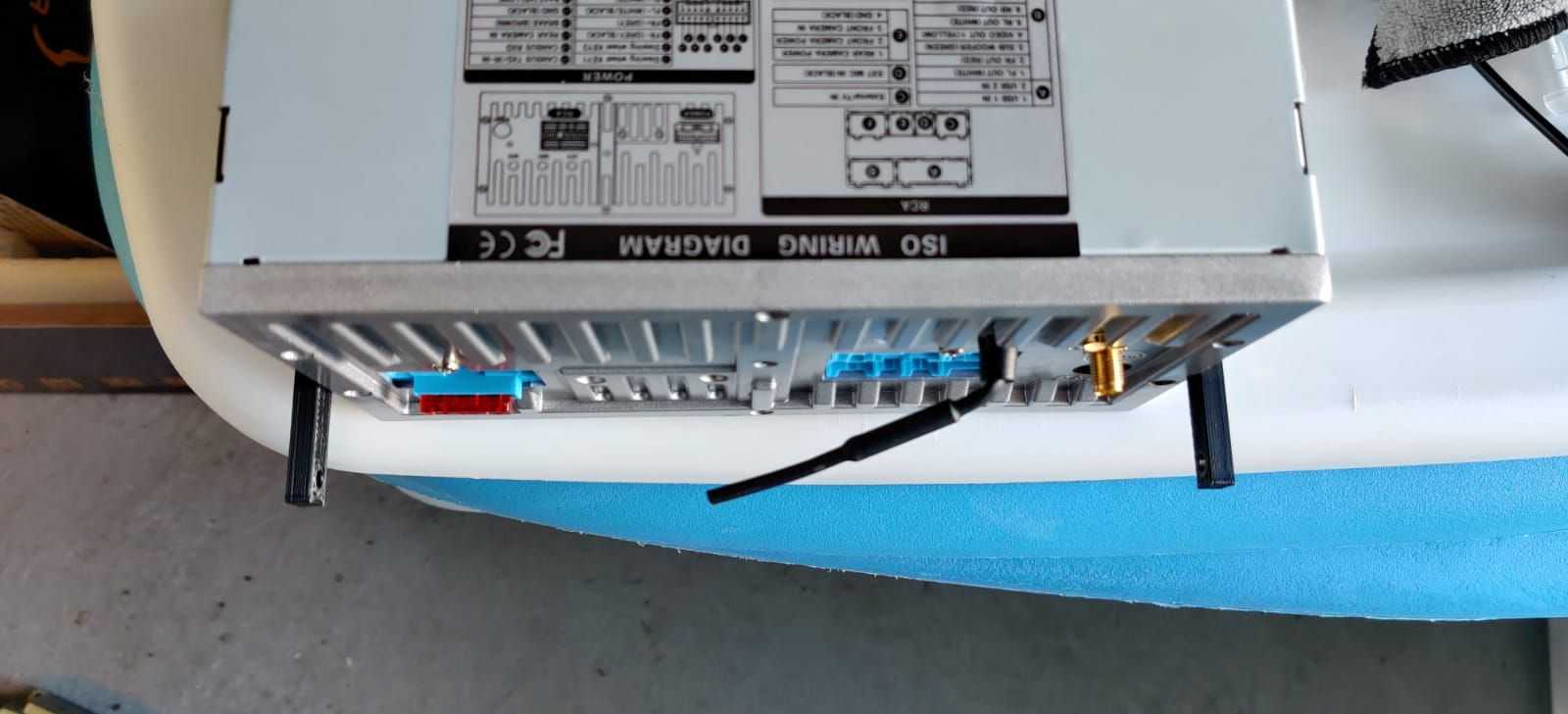
I took AitchUK's bracket details from post# 251 and ended up having someone on Fiverr create the file for me to 3D print it.
A friend of mine printed it for me (but after modifying/tweaking the original file I paid for on Fiverr a little bit) and although it is not perfect (and not quite as well executed as a CNC machine could execute), I think it will work great.
Im simply re-using the screws from the metal bracket, and it seems very secure. At the end of the day, these brackets are not holding much weight at all as they are moreso providing just some added support.
I have yet to test fit it since my deck isn't ready to be installed yet (as per the previous post), but hopefully it will slide in with no issues!
Im finally getting around to installing my deck.
I'm not too familiar with wiring up decks and what not, but fortunately a friend of mine is more familiar with this stuff and has been super helpful.
That said, I just want to confirm that I have the wires from the MOST box spliced into the correct wires in the harness, as well as confirm that I have the speaker wires plugged into the correct RCA inputs as well.
Something I'm getting bothered by is that based on this setup, the sound quality does not seem anywhere near what my BOSE system was.
Now my test was based on streaming music from Spotify on my phone to the deck. But the sound quality is definitely not there. It almost seems as if 95% of the power is going to the front speakers, and maybe 5% power going to to back speakers, and virtually ZERO power going to the subs?
Am I missing something here? In the first picture, these appear to be the only speaker wires I have connected. Are there more wires for me to connect to get a fuller sound?
And second image, these are the wires I spliced into from MOST to harness.
Red/Blue
Yellow/Yellow
Black/Black
Any feedback would be greatly appreciated. Especially on the sound quality. Its pretty bad and I'm not even remotely close to being an audiofile. I really hope this is not the final result. Because if it is, stock deck is going back in.
Wiring looks right to me though I would have connected the MOST black wire to the fat black one rather than the thin black one. If they are tied together internal to the HU then it should work but the fat black wire is the actual ground for the HU.
The Bose amp remembers the last OE head unit settings before it was removed. Did you turn the volume up to about 2/3 and verify the fader was set in the middle before you removed it? If the volume was set low the new HU will sound very distorted (know from experience). If you didn't do this you'll need to temporarily reinstall the OE HU to get the settings correct.
Wiring looks right to me though I would have connected the MOST black wire to the fat black one rather than the thin black one. If they are tied together internal to the HU then it should work but the fat black wire is the actual ground for the HU.
The Bose amp remembers the last OE head unit settings before it was removed. Did you turn the volume up to about 2/3 and verify the fader was set in the middle before you removed it? If the volume was set low the new HU will sound very distorted (know from experience). If you didn't do this you'll need to temporarily reinstall the OE HU to get the settings correct.
Hey PV997
Thanks for the quick reply.
I can make the swap to the thicker wire no problem. I think it was mainly because the clamps I had, that black wire was too thick. But I think i have another way to splice into it. I'll change the wire up and tape up the thinner one.
Could the crappy ground on the thin wire be cause of some weak sound?
As for the settings, yes I set the volume at what I think was 3/4 of the way to max volume (quite loud) so that is fine. I actually think I set it a bit too loud but not a big deal.
The fader on the oem deck was also dead center before I disconnected it, so that is fine too.
Thanks for the quick reply.
I can make the swap to the thicker wire no problem. I think it was mainly because the clamps I had, that black wire was too thick. But I think i have another way to splice into it. I'll change the wire up and tape up the thinner one.
Could the crappy ground on the thin wire be cause of some weak sound?
As for the settings, yes I set the volume at what I think was 3/4 of the way to max volume (quite loud) so that is fine. I actually think I set it a bit too loud but not a big deal.
The fader on the oem deck was also dead center before I disconnected it, so that is fine too.
I assume they are tied together inside the HU as I'm pretty sure that thin black wire supplies ground to the CAN bus module. So it depends on how much current the MOST box pulls. That thin black wire is tiny (at least how it looks in the picture) so there could be a voltage drop (from too much resistance) when it is powering both the CAN bus and the MOST. That could cause the MOST to malfunction. Note that the MOST power/ground wires are thicker than the CAN bus wires so it probably pulls more current.
This is speculation on my part, but it may be worth a try if it's not too much trouble.
Edit: On second look it's hard to tell from that picture just how big that thin black wire is so it may be fine. I didn't have the problems you are having though and it worked fine once I got the volume set right. If switching to the fat wire doesn't fix it then maybe it's a problem with the MOST box.
I've got it all hooked up now. Went with the ground you recommended.
Albeit I still find the sound is nowhere near the oem bose quality, but maybe it requires me to tweak the equilizer better.
The last thing I'm wondering about is the backup camera.
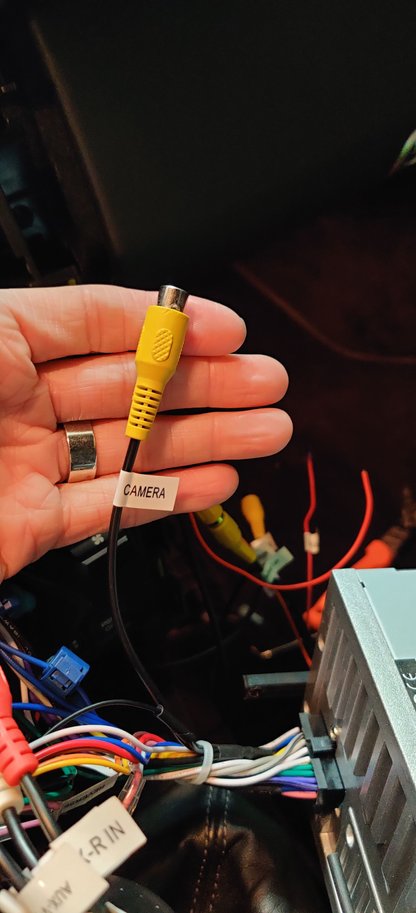
There is a camera rca that's part of the main harness. Is this one for the front camera?
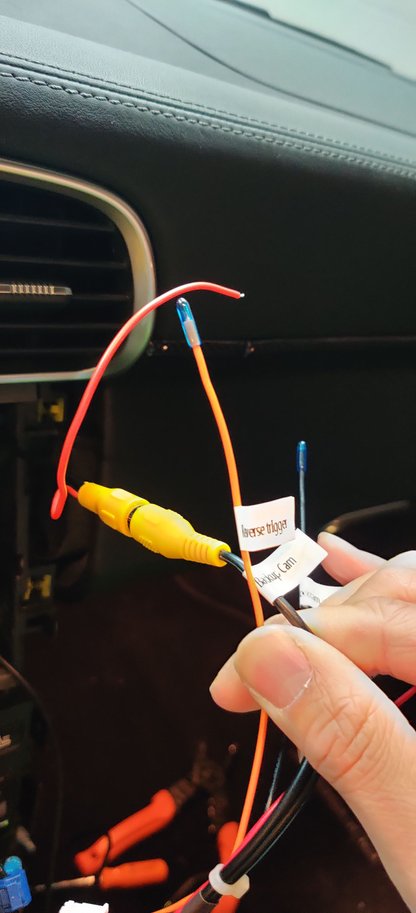
Reason I ask is there is a smaller harness (pictured below) that has an rca for "backup camera". I'm assuming this is the one I need to plug into. Also, that loose red wire that is part of the backup camera wire, does that need to be spliced with the orange wire in this same smaller harness that is labeled "reverse trigger"? This orange wire seems to be capped off so I'm not sure if I'm supposed to do that 🤔
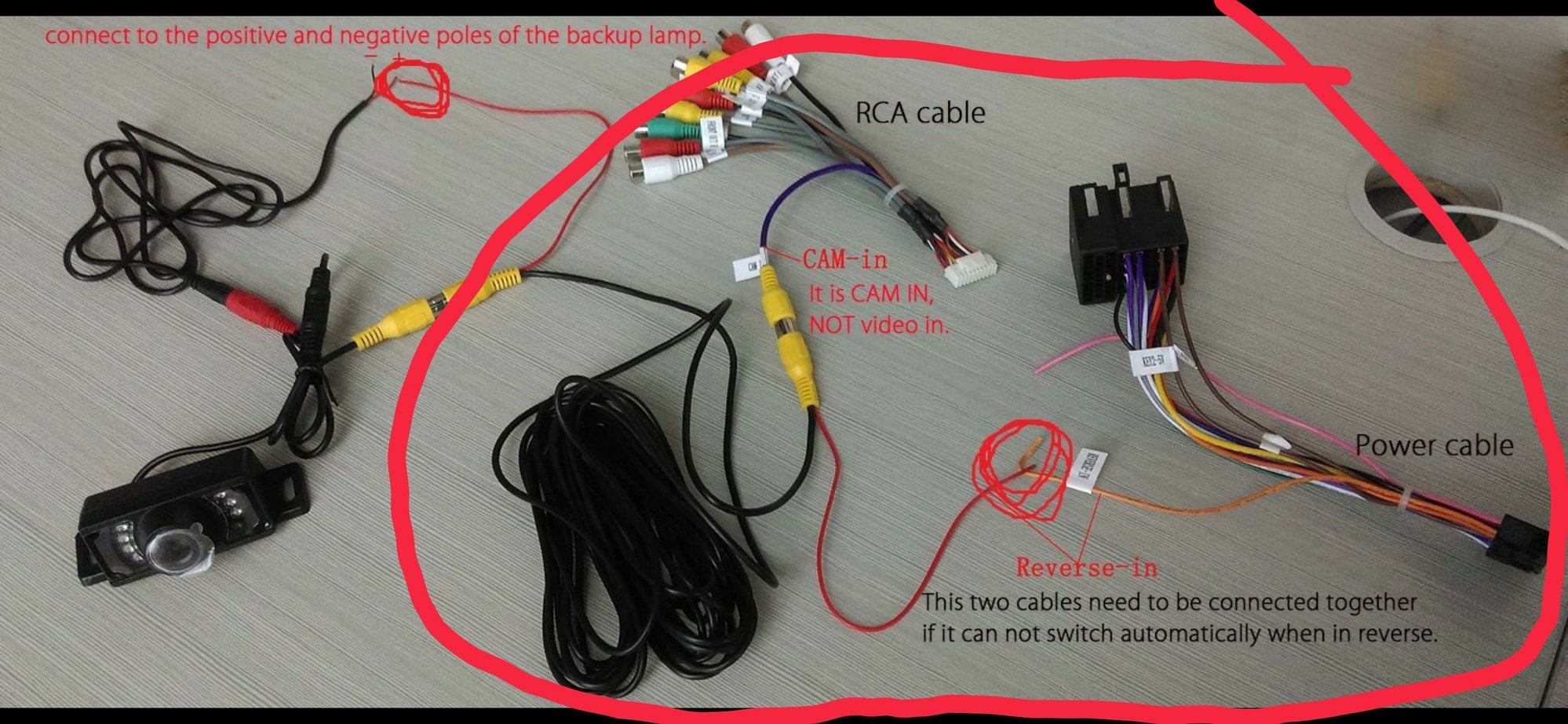
Picture 3 - Pulled this picture from a Facebook thread and this was posted by Bob Luo. But the wiring on this image seems different. Rca from the camera side appears as if it should connect to an Rca on a separate smaller harness (as I've pictured above) and not the big bundle of Rca for all the speakers).Second, in the image, the thin red wire that's connected to that same camera Rca, is being connected to the orange wire that us part if the main harness, labeled "reverse in". My main harness doesn't appear to have this same small orange wire, but my small orange wire is part of the same "reverse camera" smaller harness, and is labeled "reverse trigger"? Bob Luo any help?
Thanks!
Originally Posted by PV997
I assume they are tied together inside the HU as I'm pretty sure that thin black wire supplies ground to the CAN bus module. So it depends on how much current the MOST box pulls. That thin black wire is tiny (at least how it looks in the picture) so there could be a voltage drop (from too much resistance) when it is powering both the CAN bus and the MOST. That could cause the MOST to malfunction. Note that the MOST power/ground wires are thicker than the CAN bus wires so it probably pulls more current.
This is speculation on my part, but it may be worth a try if it's not too much trouble.
Edit: On second look it's hard to tell from that picture just how big that thin black wire is so it may be fine. I didn't have the problems you are having though and it worked fine once I got the volume set right. If switching to the fat wire doesn't fix it then maybe it's a problem with the MOST box.
yes, i bought the cambus module for the unit when i ordered. and it was fitted. pretty sure that it is working as it sees the battery level and reacts when i turn the headlights on/off and the reverse camera screen lines move when the steering wheel moves. all of those things rely on the canbus to work, afaik
Late to the post but wanted to say I installed a similar Android HU in my Cayenne and went through all this as well; it seems the CAN Bus boxes they build work but often generate random (but consistent) Gateway related errors. I was dealing with a different vendor and they were quite accommodating and relayed the details to the engineers who actually flashed me a new CAN Bus unit and sent it. Cleared up many but not all of the errors. But basically they are not significant, and you only see them if you use a PIWIS or Durametric (or a VAG COM on the Cayenne); I think the box does it's own polling of various things on the bus at various times, and if a car system happens to poll at the same time it gets interrupted and sets the gateway errors. I've run it for a year or two in my CTT and they have never been a functional problem. Great thread btw, I am trying to decide on the best vendor for a HU in my 997.1 now. Down to Dicola or Owtosin for PX6, or stick to the vendor from my Cayenne which works well but is PX5 from Hiriot. Really want the new DSP though, the Bose sound in the 997 is so much worse than Bose in the Cayenne.
I have the PX6 mostly installed in my 2009 997.1 Turbo (updated PCM) and so far so good. Any chance someone has a 3D printer and would like to crank out some more of those brackets to help keep the HU stable?
I figured out a solution to keep the head unit stable and will post that once I finish my install. In the meantime, has anyone else with a 997.1 6spd had issues getting the canbus box to send a reverse trigger signal?
I double checked all connections and am able to access my reverse camera via the f-cam app, so I know the camera is powered and connected properly. Just not getting a reverse signal from the CANBUS.
I figured out a solution to keep the head unit stable and will post that once I finish my install. In the meantime, has anyone else with a 997.1 6spd had issues getting the canbus box to send a reverse trigger signal?
I double checked all connections and am able to access my reverse camera via the f-cam app, so I know the camera is powered and connected properly. Just not getting a reverse signal from the CANBUS.
Please share!
I currently have the deck installed but it's not really held in right now. I did print those brackets as pictured above and that seems to hold the deck in place fairly securely. After driving the car for 3 or 4 days, the deck had not moved at all. So it's stable. However I can also slide the deck out fairly easily with a pry tool 😂😂
I currently have the deck installed but it's not really held in right now. I did print those brackets as pictured above and that seems to hold the deck in place fairly securely. After driving the car for 3 or 4 days, the deck had not moved at all. So it's stable. However I can also slide the deck out fairly easily with a pry tool 😂😂
If you put the original R/H side, screw in place, it will prevent any fore/aft movement as OE.
I currently have the deck installed but it's not really held in right now. I did print those brackets as pictured above and that seems to hold the deck in place fairly securely. After driving the car for 3 or 4 days, the deck had not moved at all. So it's stable. However I can also slide the deck out fairly easily with a pry tool 😂😂
Would you be able/willing to share the 3D print file please?
I figured out a solution to keep the head unit stable and will post that once I finish my install. In the meantime, has anyone else with a 997.1 6spd had issues getting the canbus box to send a reverse trigger signal?
I double checked all connections and am able to access my reverse camera via the f-cam app, so I know the camera is powered and connected properly. Just not getting a reverse signal from the CANBUS.
thats odd, not heard of anyone else having canbus issues like reverse not working.
are you sure you have connected together the 2 pink wires that come out the back of the HU? they need to be pushed into each other to make a circuit. if these are not then the unit won't know that you have put it into reverse.