When you click on links to various merchants on this site and make a purchase, this can result in this site earning a commission. Affiliate programs and affiliations include, but are not limited to, the eBay Partner Network.
I have had my 992 for three weeks and have played with the PCM quite a bit to try to figure out how I want to set it up and use it. The PCM section in the Owner's Manual is pretty thin, and not a model of clarity. Similarly, the supplemental Porsche Connect - Driver's Manual has some minimal info about use of Apple CarPlay (why is Apple CarPlay included in a manual about Porsche Connect rather than the Owner's Manual??). I have set up the PCM home screen with the help of the thread of user's pictures of how they set up their screen. So, I think another thread with user's experiences and suggestions of how they use the PCM, with more detailed instructions of how to use it, or questions from user's seeking help, would be useful. (Does anyone actually use the radio rotary buttons to navigate the PCM?)
In my case, I either want to listen to my own music or various SiriusXM stations. For my music, I have loaded up a SD chip and set it up to shuffle tracks so I don't have to interact with the PCM while I am driving. If I want to skip a track, I use the skip button on the steering wheel. I don't know if I can set up and select play lists on the SD so I shuffle through Rock, Pop, Jazz and Classical randomly.
I have not quite figured out how to easily switch XM channels other than by using the PCM talk button. I don't know if there is any way to skip through favorite channels, and I am not quite sure yet how to even set up favorite channels. Ultimately, I do not intend to subscribe to this SiriusXM service when it runs out. Instead, I intend to use the Sirius app on my iPhone through Apple CarPlay, since I have another subscription that allows that. But I still feel that switching between PCM and CarPlay is glitchy and the manuals are not clear about how to easily switch between them.
LOL it is a rather steep learning curve. Unfortunately I have yet to locate a good or complete guide book beyond the contents of this forum and my own curiosity.
I can offer my thoughts regarding CarPlay and how I puzzled it out based on my needs.
First, I DO have my iPhone connect with the PCM via Bluetooth, but NOT for CarPlay! This is VERY important.
Second, I do not let the CarPlay application on my iPhone connect to the PCM via Bluetooth. I do this by following this path on my iPhone: Settings > General > CarPlay > PORSCHE > Turn the CarPlay button to the Off position.
Third, I do this so that CarPlay will work only with the iPhone connected via the #2 USB Port in the Console. This accomplishes several things.
A.) It frees my iPhone to use the internet as I see fit, including as a hotspot for the car.
B.) I have unlimited data on my cell phone plan at a speed far in excess of what the integral AT&T SIM Chip provides. Using CarPlay wirelessly with Bluetooth shuts off my iPhones access to the cell phone network and thus the internet as well.
B.) I have a number of functions in my electronic life that my phone can not manage if it is tied wirelessly via Bluetooth to this car, because that shuts off my iPhones access to the cell phone network and thus the internet as well.
C.) If I allow my iPhone to connect to the car via wireless CarPlay incoming phone calls are quite garbled and often hard to decipher. With the iPhone hardwired, everything, including CarPlay, works perfectly
D.) It keeps my iPhone fully charged, which is actually the least important advantage to this setup.
Last edited by Bluehighways; Feb 10, 2021 at 01:25 AM.
LOL it is a rather steep learning curve. Unfortunately I have yet to locate a good or complete guide book beyond the contents of this forum and my own curiosity.
I can offer my thoughts regarding CarPlay and how I puzzled it out based on my needs.
First, I DO have my iPhone connect with the PCM via Bluetooth, but NOT for CarPlay! This is VERY important.
Second, I do not let the CarPlay application on my iPhone connect to the PCM via Bluetooth. I do this by following this path on my iPhone: Settings > General > CarPlay > PORSCHE > Turn the CarPlay button to the Off position.
Third, I do this so that CarPlay will work only with the iPhone connected via the #2 USB Port in the Console. This accomplishes several things.
A.) It frees my iPhone to use the internet as I see fit, including as a hotspot for the car.
B.) I have unlimited data on my cell phone plan at a speed far in excess of what the integral AT&T SIM Chip provides. Using CarPlay wirelessly with Bluetooth shuts off my iPhones access to the cell phone network and thus the internet as well.
B.) I have a number of functions in my electronic life that my phone can not manage if it is tied wirelessly via Bluetooth to this car, because that shuts off my iPhones access to the cell phone network and thus the internet as well.
C.) If I allow my iPhone to connect to the car via wireless CarPlay incoming phone calls are quite garbled and often hard to decipher. With the iPhone hardwired, everything, including CarPlay, works perfectly
D.) It keeps my iPhone fully charged, which is actually the least important advantage to this setup.
This is interesting. I use wireless CarPlay, sometimes it needs a kick to connect to the car WiFi properly but generally it works well. Calls are clear, I can stream services via the phone fine etc. the only real complaint now is battery use when streaming, but that’s not CarPlay specific - it does the same using AirPods.
This is interesting. I use wireless CarPlay, sometimes it needs a kick to connect to the car WiFi properly but generally it works well. Calls are clear, I can stream services via the phone fine etc. the only real complaint now is battery use when streaming, but that’s not CarPlay specific - it does the same using AirPods.
No issues at all with getting CarPlay up and running this way. The instant I plug the iPhone in, it's up and ready to go. This always takes place even before the PCM has completely booted up. My Cell Phone network is Verizon. Maybe that has something to do with my particular observations. Also, I have a number of proximity systems that trigger off my cell phone's Bluetooth handshake (or the lack there-of). When/if I let CarPlay connect with Bluetooth to the car, this essentially renders my non-car systems inoperative.
I've since changed the USB/Lightening Connector Cord to a 90* version for the sake of appearance more than anything else.
.
Last edited by Bluehighways; Feb 10, 2021 at 01:52 AM.
No issues at all with getting CarPlay up and running this way. The instant I plug the iPhone in, it's up and ready to go. This always takes place even before the PCM has completely booted up. My Cell Phone network is Verizon. Maybe that has something to do with my particular observations. Also, I have a number of proximity systems that trigger off my cell phone's Bluetooth handshake (or the lack there-of). When/if I let CarPlay connect with Bluetooth to the car, this essentially renders my non-car systems inoperative.
I've since changed the USB/Lightening Connector Cord to a 90* version for the sake of appearance more than anything else.
.
I would like to have it working straightaway for sure, that part of using a wired connection does have appeal. BTW we're on Verizon too and while my phone does connect to multiple Bluetooth devices at the same time that's mainly when I'm at my desk and not in the car or leaving the garage.
After many many cars I think of myself as set up savvy....the 992 PCM seemed like a cruel joke by the Porsche software guys. The answer was the dealership in-house expert. Purchased mine from Jim Ellis Porsche in Atlanta and a ten minute phone call with their guy was miraculous, can't recommend this enough if your dealer has such an individual. If your dealership has no such service then call PCNA in atlanta and I'm sure they have someone there.
No issues at all with getting CarPlay up and running this way. The instant I plug the iPhone in, it's up and ready to go. This always takes place even before the PCM has completely booted up. My Cell Phone network is Verizon. Maybe that has something to do with my particular observations. Also, I have a number of proximity systems that trigger off my cell phone's Bluetooth handshake (or the lack there-of). When/if I let CarPlay connect with Bluetooth to the car, this essentially renders my non-car systems inoperative.
I've since changed the USB/Lightening Connector Cord to a 90* version for the sake of appearance more than anything else.
.
Don't take this out of context, but why not just move your phone into the center console, and charge it there? All the functions you need while driving, can be found on CarPlay.
Don't take this out of context, but why not just move your phone into the center console, and charge it there? All the functions you need while driving, can be found on CarPlay.
Because, when you have your phone blue tooth connected to your Porsche Infotainment, you can more easily access phone calls, messages, Pandora, even Serius XM that you have from another car or source without having to pay for it a second time on your car. Unlike other cars such as BMW, the Porsche Infotainment system has numerous short comings, including lack of a truely functional touch wheel. Having the phone right there and accessible goes a long way to reducing these short comings.
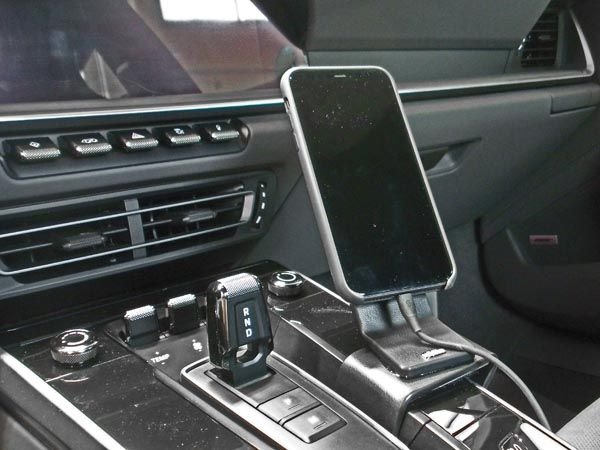
BTW, the ProClip mount offers a great, out of the way position to hold your phone. Easy snap on and off
Don't take this out of context, but why not just move your phone into the center console, and charge it there? All the functions you need while driving, can be found on CarPlay.
To hard to reach and my center console contains other things that consume the room the cell phone might occupy.
LOL it is a rather steep learning curve. Unfortunately I have yet to locate a good or complete guide book beyond the contents of this forum and my own curiosity.
I can offer my thoughts regarding CarPlay and how I puzzled it out based on my needs.
First, I DO have my iPhone connect with the PCM via Bluetooth, but NOT for CarPlay! This is VERY important.
Second, I do not let the CarPlay application on my iPhone connect to the PCM via Bluetooth. I do this by following this path on my iPhone: Settings > General > CarPlay > PORSCHE > Turn the CarPlay button to the Off position.
Third, I do this so that CarPlay will work only with the iPhone connected via the #2 USB Port in the Console. This accomplishes several things.
A.) It frees my iPhone to use the internet as I see fit, including as a hotspot for the car.
B.) I have unlimited data on my cell phone plan at a speed far in excess of what the integral AT&T SIM Chip provides. Using CarPlay wirelessly with Bluetooth shuts off my iPhones access to the cell phone network and thus the internet as well.
B.) I have a number of functions in my electronic life that my phone can not manage if it is tied wirelessly via Bluetooth to this car, because that shuts off my iPhones access to the cell phone network and thus the internet as well.
C.) If I allow my iPhone to connect to the car via wireless CarPlay incoming phone calls are quite garbled and often hard to decipher. With the iPhone hardwired, everything, including CarPlay, works perfectly
D.) It keeps my iPhone fully charged, which is actually the least important advantage to this setup.
Most interesting! I might try carplay this way. I do think that verzion is contributing to some of your issues. I believe they do limit access to data depending on how you are using the phone.
I would like to have it working straightaway for sure, that part of using a wired connection does have appeal. BTW we're on Verizon too and while my phone does connect to multiple Bluetooth devices at the same time that's mainly when I'm at my desk and not in the car or leaving the garage.
My story is probably more circuitous and confusing than helpful. So allow me to try and clarify what I'm doing.
My iPhone connects to the car using the Bluetooth connection for ALL but one thing. This one thing is, I have prevented the CarPlay function (and ONLY the CarPlay function) from connecting using the iPhone's Bluetooth system. This prevents the CarPlay app on my phone from hijacking the iPhone's WiFi capability to communicate with the car. This is because CarPlay when connecting wirelessly to the car uses BOTH the iPhone's Bluetooth system AND the its WiFi system. Forcing CarPlay to ONLY use the hardwire connection, results in my iPhone's WiFi system remaining available for whatever I might choose to use it for. I can still make and receive calls via CarPlay. In fact, ALL of the CarPlay functions involving the iPhone are active and perform flawlessly.
The only downside that I can find (so far), is that one MUST plug the iPhone in for CarPlay to work.
..
Last edited by Bluehighways; Feb 10, 2021 at 08:45 PM.
My story is probably more circuitous and confusing than helpful. So allow me to try and clarify what I'm doing.
My iPhone connects to the car using the Bluetooth connection for ALL but one thing. This one thing is, I have prevented the CarPlay function (and ONLY the CarPlay function) from connecting using the iPhone's Bluetooth system. This prevents the CarPlay app on my phone from hijacking the iPhone's WiFi capability to communicate with the car. This is because CarPlay when connecting wirelessly to the car uses BOTH the iPhone's Bluetooth system AND the its WiFi system. Forcing CarPlay to ONLY use the hardwire connection, results in my iPhone's WiFi system remaining available for whatever I might choose to use it for. I can still make and receive calls via CarPlay. In fact, ALL of the CarPlay functions involving the iPhone are active and perform flawlessly.
The only downside that I can find (so far), is that one MUST plug the iPhone in for CarPlay to work.
..
It does bug me that carplay uses both bluetooth and wifi at same time. I have to disable carplay to see videos off the garmin mini which is annoying. But may I ask what you need iphone wifi for when driving? Are you tethering the phones wifi to some other cool techno gizmo that does something cool?
It does bug me that carplay uses both bluetooth and wifi at same time. I have to disable carplay to see videos off the garmin mini which is annoying. But may I ask what you need iphone wifi for when driving? Are you tethering the phones wifi to some other cool techno gizmo that does something cool?
I do NOT want to be tied to the integral AT&T SIM Card for the PCM. Our Porsches use a Cell Phone Network Signal System called "GSM". AT&T and T-Mobile use GSM. Sprint, Verizon, and US Cellular use a Network Signal System called "CDMA". The result is that even IF you want to get a different SIM Card (for the slot in the console) you're still tied to either AT&T, T-Mobil or another provider that uses GSM. I'm not aware of any workaround so that a CDMA network can be used on a system designed for the GSM system.
I want to use my iPhone's Hot Spot for the PCM rather than to pay for an additional data or cell phone service (SIM Card) that would essentially be redundant to the capabilities that already exist via my iPhone/Verizon. Also, the AT&T network's coverage is NOT a particularly good here in the L.A./Southern California area.
My iPhone also triggers the opening and closing my garage door as it accesses or cannot access one of my home networks. Similar tie in to my home management system.
Another option I use, once and awhile, is to employ Google Maps on my iPhone and at the same time have Waze running via CarPlay on the PCM.
My story is probably more circuitous and confusing than helpful. So allow me to try and clarify what I'm doing.
My iPhone connects to the car using the Bluetooth connection for ALL but one thing. This one thing is, I have prevented the CarPlay function (and ONLY the CarPlay function) from connecting using the iPhone's Bluetooth system. This prevents the CarPlay app on my phone from hijacking the iPhone's WiFi capability to communicate with the car. This is because CarPlay when connecting wirelessly to the car uses BOTH the iPhone's Bluetooth system AND the its WiFi system. Forcing CarPlay to ONLY use the hardwire connection, results in my iPhone's WiFi system remaining available for whatever I might choose to use it for. I can still make and receive calls via CarPlay. In fact, ALL of the CarPlay functions involving the iPhone are active and perform flawlessly.
The only downside that I can find (so far), is that one MUST plug the iPhone in for CarPlay to work.
..
I tried the wired Carplay connection today. I do say that the "music" does sound better. One annoyance is that you have to unlock the iphone to use the Carplay features. Its a minor thing, but the 2 steps of plugging in the phone, then unlocking (or vice versa) is not as convenient as the bluetooth connection with no phone manipulation.
I have had my 992 for three weeks and have played with the PCM quite a bit to try to figure out how I want to set it up and use it. The PCM section in the Owner's Manual is pretty thin, and not a model of clarity. Similarly, the supplemental Porsche Connect - Driver's Manual has some minimal info about use of Apple CarPlay (why is Apple CarPlay included in a manual about Porsche Connect rather than the Owner's Manual??). I have set up the PCM home screen with the help of the thread of user's pictures of how they set up their screen. So, I think another thread with user's experiences and suggestions of how they use the PCM, with more detailed instructions of how to use it, or questions from user's seeking help, would be useful. (Does anyone actually use the radio rotary buttons to navigate the PCM?)
In my case, I either want to listen to my own music or various SiriusXM stations. For my music, I have loaded up a SD chip and set it up to shuffle tracks so I don't have to interact with the PCM while I am driving. If I want to skip a track, I use the skip button on the steering wheel. I don't know if I can set up and select play lists on the SD so I shuffle through Rock, Pop, Jazz and Classical randomly.
I have not quite figured out how to easily switch XM channels other than by using the PCM talk button. I don't know if there is any way to skip through favorite channels, and I am not quite sure yet how to even set up favorite channels. Ultimately, I do not intend to subscribe to this SiriusXM service when it runs out. Instead, I intend to use the Sirius app on my iPhone through Apple CarPlay, since I have another subscription that allows that. But I still feel that switching between PCM and CarPlay is glitchy and the manuals are not clear about how to easily switch between them.
9 Vehicles Porsche Helped Engineer that Aren't Porsches
Slideshow: Long before engineering consulting became trendy, Porsche was quietly helping other automakers build everything from supercars to economy hatchbacks.
9 Features and Characteristics That Only Porsche People Understand
Slideshow: Some brands build cars. Porsche builds traditions, obsessions, and a few habits that stopped making sense decades ago but somehow became part of the charm.
This Builder Is Turning Heads With Its Slantnose 911 Creation
Slideshow: A small Polish tuner has reimagined the Porsche 911 Slantnose for the modern era, blending 1980s nostalgia with widebody tuning culture and serious performance upgrades.
Porsche 911 GT3 Artisan Edition Pays Homage to Japanese Culture
Slideshow: Porsche has created a Japan-only 911 GT3 Artisan Edition that blends track-ready hardware with design cues inspired by traditional Japanese craftsmanship.
Porsche Reveals Coupe Variant of the Electric Cayenne With a Fresh Look
Slideshow: Porsche's latest electric Cayenne Coupe blends dramatic styling with supercar acceleration, turning the brand's midsize SUV into a 1,139-horsepower flagship.







 PCM - Hints and Instructions