When you click on links to various merchants on this site and make a purchase, this can result in this site earning a commission. Affiliate programs and affiliations include, but are not limited to, the eBay Partner Network.
Look for innodrive in your assistance systems settings. There’s a speed limit setting that you may need to increase. Mine was default set to 20, and innodrive started working when I turned it up to max.
Look for innodrive in your assistance systems settings. There’s a speed limit setting that you may need to increase. Mine was default set to 20, and innodrive started working when I turned it up to max.
Exactly right - appears that P.I.D. gives the error message if its “maximum speed” setting is lower than the current speed. (Footnote - before discovering this solution, the service department at my dealer said that the problem was no/poor GPS signal!)
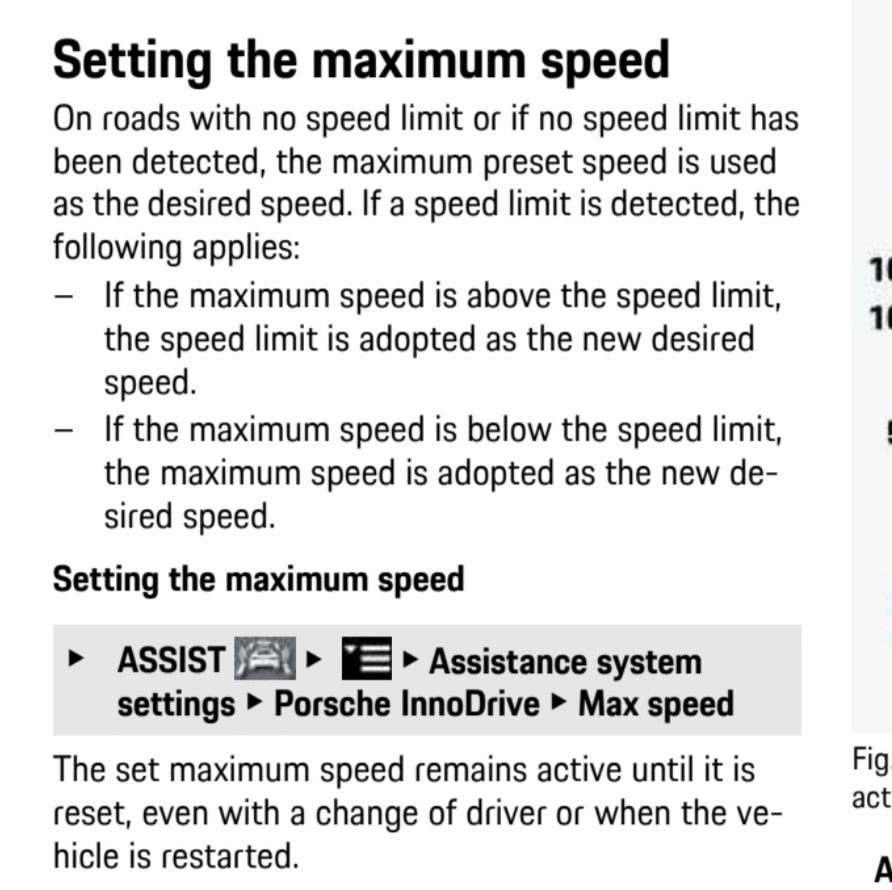
Here is the relevant section from the Owner’s Manual (page 213):
Last edited by peterdouglas; Feb 5, 2021 at 10:34 AM.
Exactly right - appears that P.I.D. gives the error message if its “maximum speed” setting is lower than the current speed. (Footnote - before discovering this solution, the service department at my dealer said that the problem was no/poor GPS signal!)
Here is the relevant section from the Owner’s Manual (page 213):
I checked and my speed was set to 20mph. I put it to max and it did indeed work! Unfortunately, I tried again 20 minutes later and received the same error message. I verified that speed was still set to 130mph It was raining, but from what I have read it looks like that should not be a problem. I'll keep playing with it and see if it keeps refusing to enable.
I checked and my speed was set to 20mph. I put it to max and it did indeed work! Unfortunately, I tried again 20 minutes later and received the same error message. I verified that speed was still set to 130mph It was raining, but from what I have read it looks like that should not be a problem. I'll keep playing with it and see if it keeps refusing to enable.
i set to local unrestricted speeds (50/55) and so far seems to be working ok.
Look for innodrive in your assistance systems settings. There’s a speed limit setting that you may need to increase. Mine was default set to 20, and innodrive started working when I turned it up to max.
i set to local unrestricted speeds (50/55) and so far seems to be working ok.
Again getting “Innodrive unavailable-temporary condition” message - for no apparent reason.
Any ideas of cause/cure? (Had previously changed the speed setting, so that’s not the reason anymore.)
Again getting “Innodrive unavailable-temporary condition” message - for no apparent reason.
Any ideas of cause/cure? (Had previously changed the speed setting, so that’s not the reason anymore.)
While I had previously reset the maximum speed, it magically reset itself to 20mph, disabling Innodrive. Somewhat annoying.
I checked and my speed was set to 20mph. I put it to max and it did indeed work! Unfortunately, I tried again 20 minutes later and received the same error message. I verified that speed was still set to 130mph It was raining, but from what I have read it looks like that should not be a problem. I'll keep playing with it and see if it keeps refusing to enable.
If you have Sport Chrono with the new "WET" mode that might be limiting the speed as well.
yes, if ALK is enabled.
mist frequent problem causing Innodrive to be unavailable is low speed setting in Innodrive settings
Originally Posted by siberian
If you have Sport Chrono with the new "WET" mode that might be limiting the speed as well.
siberian
not the case in my own personal experience - rather the problem generally is caused by Innodrive speed setting sometimes spontaneously defaulting to 20mph
Ok would you recommend buying the innodrive just to get ALK...so buy it but disable innodrive and the result is adaptive cruise with keeping car in middle of lane, no bouncing. ??
I have a 500 mile drive home from dealer when I pickup my car in July so just curious if I should consider it. Right now I have just acc and lca, build locks next week.




 Innodrive “not available” message


 It was raining, but from what I have read it looks like that should not be a problem. I'll keep playing with it and see if it keeps refusing to enable.