When you click on links to various merchants on this site and make a purchase, this can result in this site earning a commission. Affiliate programs and affiliations include, but are not limited to, the eBay Partner Network.
I know this, you cannot get in the car and hook up cable and have it work. It keeps trying to make the wireless connection. BT shows Mr12V connected
I had similar issues until I cleared the Mr12Volt Bluetooth connection on my phone and also went into the Mr12Volt Bluetooth menu and cleared out the phones.
After that, it would connect via USB consistently.
On the iPhone BT, I have "forget this device" for Mr12V. Further, I have turned off BT and WIFI entirely and tried to connect with USB. No joy.
How do you, "went into the Mr12Volt Bluetooth menu and cleared out the phones"? In the system settings for Mr12V on the PCM? And how do you do that if you can't get Mr12V to launch on the PCM?
Last edited by jfort; Nov 6, 2025 at 03:18 PM.
Reason: addition
On the iPhone BT, I have "forget this device" for Mr12V. Further, I have turned off BT and WIFI entirely and tried to connect with USB. No joy.
How do you, "went into the Mr12Volt Bluetooth menu and cleared out the phones"? In the system settings for Mr12V on the PCM? And how do you do that if you can't get Mr12V to launch on the PCM?
I am not sure how your phone can connect wirelessly if you turn off BT and WIFI on the phone...
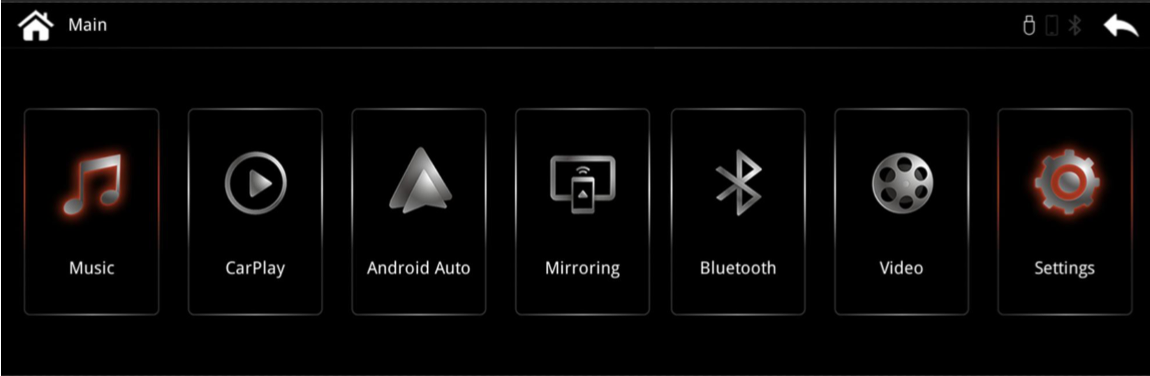
Bluetooth is one of the options on the main Mr12Volt screen - before CarPlay launches:
If you can't see past the first couple of icons, try turning the select (right) **** on the PCM and it will scroll to the other icons. On that screen there is an option to clear out the devices currently paired with Mr12volt. I can't find a sample of that screen, but if necessary I can go take one in the car. If you get connected to CarPlay and can't see this screen, press the Home icon in CarPlay and you should get back to this screen. Worst case, leave your phone inside and away from the car, and when you get to the PCM you should see this screen. You may have to switch the source to TV if it isn't already selected.
Once you get this cleared out, you should be able to have your phone in the car, and it should NOT connect to CarPlay until you plug it into the USB port.
I am not sure how your phone can connect wirelessly if you turn off BT and WIFI on the phone...
Bluetooth is one of the options on the main Mr12Volt screen - before CarPlay launches:
If you can't see past the first couple of icons, try turning the select (right) **** on the PCM and it will scroll to the other icons. On that screen there is an option to clear out the devices currently paired with Mr12volt. I can't find a sample of that screen, but if necessary I can go take one in the car. If you get connected to CarPlay and can't see this screen, press the Home icon in CarPlay and you should get back to this screen. Worst case, leave your phone inside and away from the car, and when you get to the PCM you should see this screen. You may have to switch the source to TV if it isn't already selected.
Once you get this cleared out, you should be able to have your phone in the car, and it should NOT connect to CarPlay until you plug it into the USB port.
I can get to the Mr12Volt > BT screen. I deleted my iPhone that was listed there. How about the “auto connect” box? On our Off? Since it is on the BT screen, I would expect it to be off, thus directing it to the cable. Right?
On the iPhone, on BT, forget Mr12Volt? Then, on the Mr12V screen select CarPlay?
I had it working earlier today. While having CarPlay running, I turned off BT and WIFI on the phone and it was connected/running. So cable works. But tonight I couldn’t get it to connect. Can you describe your car and phone set up and the procedure when you get in the car?
After much trial and error, I have been able to launch Mr12Volt CarPlay twice using the USB cable.
1. BT is off on the iPhone (earlier, on the BT list of devices, for Mr12Volt, I "forgot this device.") After connected by cable, I hope to be able to turn on BT.
2. iPhone is connected by USB
3. Start the car and get to Mr12Volt screen with icons.
4. On the PCM screen: Mr12Volt screen > Settings icon (all the way to the right) > General: "Auto start phone link app" checked "yes"
5. On the PCM screen: Mr12Volt screen > Bluetooth icon: "Auto Connect" box is "no" or empty
6. On the PCM screen: Mr12Volt screen > Bluetooth icon: I deleted my iPhone as a device on the right side of the screen
What a pain. I eagerly await a software update. By the way, I have the 2024 dated firmware for Mr12V and iOS 26.1 on the iPhone 17
Yes, Mr12Volt has released recent MCU software updates for its P2000 series, but there’s no confirmed fix yet specifically for iPhone 17 connectivity issues. Apple is also aware of broader iPhone 17 Wi-Fi and CarPlay bugs that may be contributing to the problem.
Here’s what’s currently known:
🔧 Mr12Volt P2000 Series Updates
Latest MCU updates were posted on August 4, 2025, covering various vehicle systems including Audi MMI, BMW CCC/CIC/NBT, and Jaguar XF/XKR.
These updates require a MicroSD card (≤16GB, FAT32) and involve manual installation via the P2000 unit.
While these updates improve compatibility and performance, no specific mention is made of iPhone 17 or iOS 26 fixes.
📱 iPhone 17 Connectivity Issues
Users are reporting Wi-Fi drops, Bluetooth instability, and CarPlay glitches—especially when unlocking the phone or accessing the lock screen.
These issues affect CarPlay performance, including lag and audio skips, which may impact Mr12Volt devices relying on wireless connections.
Apple has acknowledged the problem and is likely working on a fix, but no targeted iOS update has been released yet to resolve it.
✅ What You Can Do
Check Mr12Volt’s update page for your specific car model and MCU version to ensure you’re running the latest firmware.
Update your iPhone 17 to the latest iOS version available, as Apple may roll out incremental fixes.
If problems persist, consider using a wired CarPlay connection (if supported) or reverting to an earlier iOS version if possible.
After much trial and error, I have been able to launch Mr12Volt CarPlay twice using the USB cable.
1. BT is off on the iPhone (earlier, on the BT list of devices, for Mr12Volt, I "forgot this device.") After connected by cable, I hope to be able to turn on BT.
2. iPhone is connected by USB
3. Start the car and get to Mr12Volt screen with icons.
4. On the PCM screen: Mr12Volt screen > Settings icon (all the way to the right) > General: "Auto start phone link app" checked "yes"
5. On the PCM screen: Mr12Volt screen > Bluetooth icon: "Auto Connect" box is "no" or empty
6. On the PCM screen: Mr12Volt screen > Bluetooth icon: I deleted my iPhone as a device on the right side of the screen
What a pain. I eagerly await a software update. By the way, I have the 2024 dated firmware for Mr12V and iOS 26.1 on the iPhone 17
I checked all of my Mr12Volt settings, and here is what I have:
Bluetooth is ENABLED on the phone, but there is nothing related to Mr12Volt or CarPlay
iPhone is connected via USB
When I start the car, and plug in my phone, I get the Mr12Volt screen, then the large icons, then a spinning connecting to CarPlay (with the white rectangle in the header), bluetooth icon is greyed out
On Settings/General I also have the "Auto Start Phone link app". not sure what this does
On Bluetooth screen, Auto Connect is checked, and Auto Answer is not.
On Bluetooth screen, there are NO devices listed.
On my iPhone Settings:
Bluetooth is enabled, but there is nothing related to Mr12Volt or CarPlay
Wifi is enabled (shouldn't matter)
Settings/General/CarPlay I have CarPlay Vehicle listed - I can't remember where this came from, but you can click on this and "forget this car" to remove any extra cars from the list. Make sure there is no left over Mr12Volt cars listed.
As an aside, you can tell if CarPlay is connected Wirelessly if you can see the Battery on the left have side of the CarPlay screen under the time (sometimes it's at the bottom also). if you can NOT see the battery, then I believe you are still connected wirelessly.
I would try checking the Auto Connect box on the Mr12Volt General screen, and try again.
If you are still not having success, what do you see in Mr12Volt if your phone is NOT plugged in, and you do NOT click on any of the large icons? It should sit on the black main screen showing the icons . If you get the spinning "connecting to CarPlay", then it's still trying something wirelessly.
Assuming you just see the black icons, then you should be able to plug in your phone and wait. In a few seconds, the white rectangle should show up on the Mr12Volt header, and then the spinning "Connecting to CarPlay", and in a few seconds it should display. Occasionally, I have had to "wake up my iPhone and then it will connect.
In Factory Mode > phone connection: in two places, make it USB only. In settings > General: I turned off auto start phone link. Of course, in the Bluetooth icon there is nothing that would try to connect with the phone. Before, the PCM powered up when you open the door. Now it doesn’t. The power is up when you push in the key. If you push the big CarPlay icon to launch CarPlay it says the phone is not connected. When you connect the phone to USB it launches CarPlay. I did this with the iPhone BT turned off entirely. It worked as described. Then I turned on Bluetooth on the phone and it still worked. My take on it is that set up this way, the P 2000 does not try to connect with Bluetooth wireless immediately upon power up, which seemed to preclude the USB connection.
Also, check out turn off. Take the key out and the PCM stayed on. Close the door. The PCM stayed on (I knew that it stayed on for some period, thus when entering later the music wasn't where it shut off before even though you can't hear anything.) Lock the door and it goes off. That’s why it is common knowledge to make sure there is no battery drain you always lock the door.
Also, check out turn off. Take the key out and the PCM stayed on. Close the door. The PCM stayed on (I knew that it stayed on for some period, thus when entering later the music wasn't where it shut off before even though you can't hear anything.) Lock the door and it goes off. That’s why it is common knowledge to make sure there is no battery drain you always lock the door.
Glad you figured it out! I will have to check out these menus. I think I stayed away from them thinking it was going to reset to factory defaults or something.
The turn off menu sounds interesting - alot of people complain about the CarPlay/bluetooth connectivity after the car is turned off. Is there an option to have the PCM power down when the car is turned off?
I think I would prefer the PCM to power off when the car is turned off, rather than have to remember to lock the car in the garage every time.
Still not sure about iPhone USB. before I left my shop today, I tried to get it going with iPhone USB on and cable connected. It would not connect. Then I tried again with iPhone USB turned off entirely. It connected on the cable.
I have selected “USB Only” in the system and BT settings with the cable connected, yet it still tries to connect wirelessly. How can that be?
I've thought so before. But here are today's notes:
11/11/25. On the iPhone with USB attached, Bluetooth is on. Turn on ignition. Mr12Volt tries to connect wirelessly, I think. Let it show in the BT device list but quickly “forget this device.”
On PCM > Mr12V > Bluetooth: CarPlay window upper bar shows the small phone icon as active and BT is grayed out. Auto Connect is turned off. There is no indication of the Bluetooth or the phone.
In Settings > General: car setting auto start phone link app is checked yes
In Settings > System is > Factory Mode> Phone Link Setting : shows USB and Wireless.
9 Vehicles Porsche Helped Engineer that Aren't Porsches
Slideshow: Long before engineering consulting became trendy, Porsche was quietly helping other automakers build everything from supercars to economy hatchbacks.
9 Features and Characteristics That Only Porsche People Understand
Slideshow: Some brands build cars. Porsche builds traditions, obsessions, and a few habits that stopped making sense decades ago but somehow became part of the charm.
This Builder Is Turning Heads With Its Slantnose 911 Creation
Slideshow: A small Polish tuner has reimagined the Porsche 911 Slantnose for the modern era, blending 1980s nostalgia with widebody tuning culture and serious performance upgrades.
Porsche 911 GT3 Artisan Edition Pays Homage to Japanese Culture
Slideshow: Porsche has created a Japan-only 911 GT3 Artisan Edition that blends track-ready hardware with design cues inspired by traditional Japanese craftsmanship.
Porsche Reveals Coupe Variant of the Electric Cayenne With a Fresh Look
Slideshow: Porsche's latest electric Cayenne Coupe blends dramatic styling with supercar acceleration, turning the brand's midsize SUV into a 1,139-horsepower flagship.