

Digital Dash Display problems

Thread Starter
Racer
Joined: Dec 2009
Posts: 392
Likes: 1
From: Blighty
 Digital Dash Display problems
On my left display and center display three different hortizontal lines are dim, whilst the others are fully lit.
On the right display, one line is dim whilst all the others are lit.
This is both on orange and red.
If you look closely, the information is there but just unlit.
Is this a bulb problem or something else? and any ideas to fix?
Thanks in advance
On the right display, one line is dim whilst all the others are lit.
This is both on orange and red.
If you look closely, the information is there but just unlit.
Is this a bulb problem or something else? and any ideas to fix?
Thanks in advance

Addict
Rennlist Member
Rennlist Member

Joined: Jul 2001
Posts: 7,333
Likes: 117
From: Shawnee, KS, USA
On my left display and center display three different hortizontal lines are dim, whilst the others are fully lit.
On the right display, one line is dim whilst all the others are lit.
This is both on orange and red.
If you look closely, the information is there but just unlit.
Is this a bulb problem or something else? and any ideas to fix?
Thanks in advance
On the right display, one line is dim whilst all the others are lit.
This is both on orange and red.
If you look closely, the information is there but just unlit.
Is this a bulb problem or something else? and any ideas to fix?
Thanks in advance
The information display is this:

backlit by these bulbs:
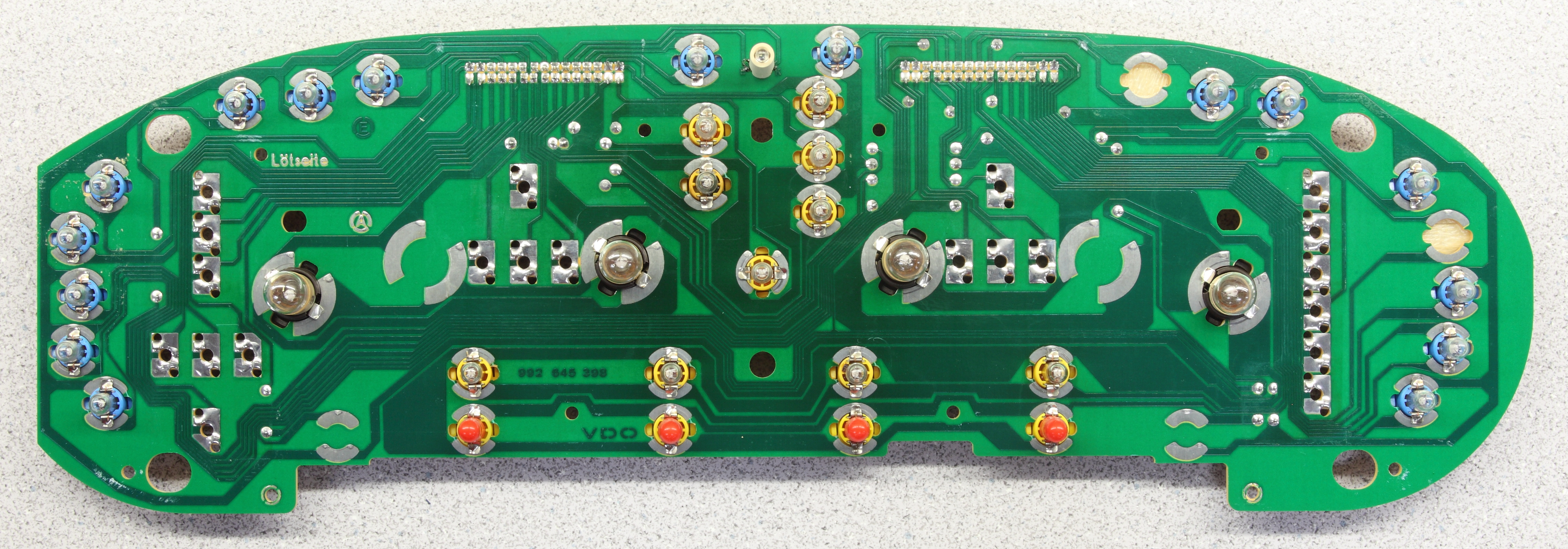
A failed backlighting bulb will just cause a whole region (approximately one-fourth
 ) of the information display to go dark.
What you're describing is consistent with a failure of one of the lines to a multiplexed-driven grid display failing. This could be due to a failed driver (electronic component), a failed connection between the drivers and the display, or failed wiring or traces on the display itself.
Unfortunately, all this stuff is small-scale surface-mounted stuff. It might be possible to repair it, but it probably won't be easy and would likely take some precision soldering/desoldering skills and tools.
I've never gotten beyond the below photos in disassembling the information display; it's possible that by removing the five screws on the PC board (seen in the last photo), you'll discover that the board is connected to the display via a flex cable, and if you're lucky, that flex cable might use a socketed connection at each end where you can plug/unplug the cable and perhaps fix a "corrosion at the connection" problem.


Addict
Rennlist Member
Rennlist Member
Joined: Jul 2001
Posts: 7,333
Likes: 117
From: Shawnee, KS, USA
BTW, you can click any of the above photos to get really big versions.
And... in doing that on the last photo, I just noticed that you can actually see the big flex cable(s) that go from the PC board to the display—look very carefully at the gap between the driver PC board and the display board and you'll see flex cable making that 90° bend.
And... in doing that on the last photo, I just noticed that you can actually see the big flex cable(s) that go from the PC board to the display—look very carefully at the gap between the driver PC board and the display board and you'll see flex cable making that 90° bend.
Last edited by Ed Scherer; Sep 28, 2011 at 08:36 PM.