When you click on links to various merchants on this site and make a purchase, this can result in this site earning a commission. Affiliate programs and affiliations include, but are not limited to, the eBay Partner Network.
Thanks Matt, I'm trying to avoid drilling into my bumper. I saw there were some AHD plate bulb cameras that advertised 1080p. These should be compatible as well correct?
they should, I'm not sure I've seen anyone here use one yet though.
What does the custom 7862 SW offer? I'm mostly going to use this for carplay navigation and streaming audio occasionally. I'm not all that interested in onboard navigation, internet connectivity not through my phone, and bluetooth calling. I just highly prioritize snappy response so I wanted the best CPU + RAM combo.
- optimized kernel, removed any lookups to chinese servers
- latest set of applications
- removed chinese crapware (voice assistant, other irrelevant crap)
- Nova launcher with custom layout, icon pack, background
- Porsche boot logo / boot animation
Benchmarks aside, you'd be hard pressed to tell the difference between the UIS7862, 7870, and SD665 in real world usage.
Matt, that sounds perfect. I'll look for a seller with the 7862 without the bose integration. Might try and gamble on one of the 1080p cameras as well.
Thanks for helping me out.
Matt, that sounds perfect. I'll look for a seller with the 7862 without the bose integration. Might try and gamble on one of the 1080p cameras as well.
Thanks for helping me out.
Not sure if anyone has seen this guide from a different RL thread but it is the best install guide I have seen for these units. It is for Chstek brand unit but should be 99% the same for Owtosin and other branded Android units. Includes head unit install plus add-ons like front and rear cameras, DAB, Bose and non-Bose, and much more. This should be in post # 1 for all to see.
Big thanks to @andy2111 and the others that put this guide together. It is clear that much time was spent collating the information and putting it into a well-organized format.
Last edited by finpat997; Jan 14, 2025 at 02:13 PM.
I havent installed yet but this is the 1080P rear camera I got (the AD2 version, Color Name:Dynamic 1920x1080P). It doesnt specify that it is for Porsche but it lists other VW group brands and the shape and measurements match up with the light for 997s.
I've seen in a number of places on this thread that you have to turn the volume to max on the PCM prior to installing this unit on a Bose setup.
But what do I do since I bricked my PCM?
Is there anyway for you to solder the pins back on or build a custom harness? I can't think of a way to pre-set the volume without the PCM. Also, from what I've read on other forum posts the PCM units are keyed to the cars and can't be easily swapped out.
Not sure if anyone has seen this guide from a different RL thread but it is the best install guide I have seen for these units. It is for Chstek brand unit but should be 99% the same for Owtosin and other branded Android units. Includes head unit install plus add-ons like front and rear cameras, DAB, Bose and non-Bose, and much more. This should be in post # 1 for all to see.
Big thanks to @andy2111 and the others that put this guide together. It is clear that much time was spent collating the information and putting it into a well-organized format.
Hope people over here find this guide helpful - it's aimed at cars originally fitted with PCM 3.1 so I can't comment on any OS, settings or other configuration differences for Android units that ship for older versions of PCM, but hopefully there's enough in common for it to be useful.
Please share where you got this Porsche Theme for your main screen
The graphics are easy to add you just put whatever image you want on a USB and then add it in the settings as home screen or background it's very easy to do. The built in GPS is on a navigation app and it has a GPS receiver cable and antenna you just need to route it and stick it to the dash. I only use the CarPlay/Android auto part for maps as I like to use the Waze app which is just wireless from your phone with the wireless CarPlay/android auto function the unit has. As for the antennas, I just stuck them all inside the cavity the old unit came out on some of the plastic dash mouldings and they all seem to work still. I routed the mic to the top of my steering column covers just in front of the speedo cluster and the USBs to the glove box
The graphics are easy to add you just put whatever image you want on a USB and then add it in the settings as home screen or background it's very easy to do.
no, changing the background is very easy to do. Creating the graphics in Photoshop, changing the launcher, creating a new layout, manually remapping icons, and creating a OEM+ looking result takes time. As does packaging everything such that it all automatically installs using the same mechanism as the OS update.
Last edited by MattDevoCustoms; Jan 15, 2025 at 11:08 PM.
I installed the Sadocom seller's version of the 7862 head unit with Bose. The seller reached out to me via WhatsApp to confirm the trim color they should send out and that I had Bose. They prewired the MOST and canbus modules to the main harness so I did not having to wire anything together to get the unit to power on. Out of the box the unit turned off and on via the accessory (key) power. I read multiple posts where it was recommended to connect both the blue auto ant wire from the main HU harness and the antenna's blue wire to the accessory power wire. I did do this just to see what would happen and it did the opposite effect in that the radio would not turn off when the key was pulled out.
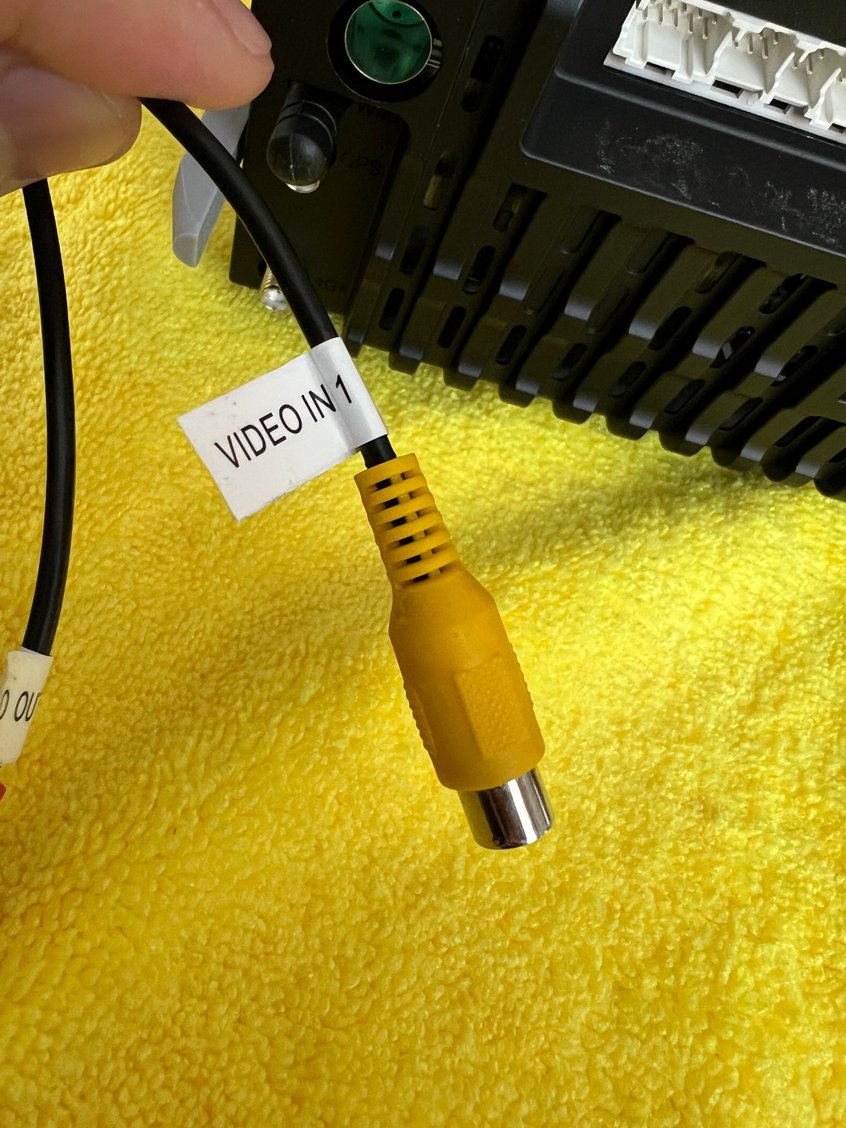
Regarding the camera wiring, which was another topic in this thread. I already had front and rear cameras pre wired from my previous head unit and I did not want to rerun wiring how other posts had suggested to. The front camera gets power and ground from the HomeLink harness inside the front bumper. The camera's male yellow RCA cable is routed into the cabin and connected to the "Video In 1" female RCA from the HU. Using the HU's "Aux" application gives me full time access to the front camera. The rear camera is powered and grounded from the passenger side tail light. The male RCA from the camera connects to the "Backup" female RCA from the HU. The trigger wire attached to the camera's male RCA taps into the position 5 "Reverse" wire from the main HU harness.
I also installed @MattDevoCustoms software for a consistent OEM feel. In his install instructions Matt lays out the steps in mapping the music physical button to the radio via string com.syu.radio. I do not use the radio so I instead mapped the music button to my front camera. If you'd like to do this as well the string to use is com.syu.av
Don't hesitate to purchase from the Sadocom store if you are on the fence. The surrounding trim is ever so slightly off, but you honestly cannot tell the difference from the OEM Volcano Grey. The 3D printed rails make the fitment snug as well. Thank you to everyone who posted helpful information in this thread. I must have read through all the pages twice to make sure I did not miss anything.
Harness pin configuration sent from seller Position 5 backup wire to tap Front camera input
HomeLink harness to tap front camera's power into Front camera mounted
I installed the Sadocom seller's version of the 7862 head unit with Bose. The seller reached out to me via WhatsApp to confirm the trim color they should send out and that I had Bose. They prewired the MOST and canbus modules to the main harness so I did not having to wire anything together to get the unit to power on. Out of the box the unit turned off and on via the accessory (key) power. I read multiple posts where it was recommended to connect both the blue auto ant wire from the main HU harness and the antenna's blue wire to the accessory power wire. I did do this just to see what would happen and it did the opposite effect in that the radio would not turn off when the key was pulled out.
Regarding the camera wiring, which was another topic in this thread. I already had front and rear cameras pre wired from my previous head unit and I did not want to rerun wiring how other posts had suggested to. The front camera gets power and ground from the HomeLink harness inside the front bumper. The camera's male yellow RCA cable is routed into the cabin and connected to the "Video In 1" female RCA from the HU. Using the HU's "Aux" application gives me full time access to the front camera. The rear camera is powered and grounded from the passenger side tail light. The male RCA from the camera connects to the "Backup" female RCA from the HU. The trigger wire attached to the camera's male RCA taps into the position 5 "Reverse" wire from the main HU harness.
I also installed @MattDevoCustoms software for a consistent OEM feel. Don't hesitate to purchase from the Sadocom store if you are on the fence. The surrounding trim is ever so slightly off, but you honestly cannot tell the difference from the OEM Volcano Grey. Thank you to everyone who posted helpful information in this thread. I must have read through all the pages twice to make sure I did not miss anything.
Harness pin configuration sent from seller
Position 5 backup wire to tap
Front camera input
I bought mine from the same vendor and installed it today. Still have to hook up the cameras though So thanks for posting the camera wiring.
Last edited by TRINITONY; Jan 17, 2025 at 09:24 PM.
I also ordered the 7862 unit from Sadocom. My unit came in yesterday but I'm still waiting on the rails and screws. I'll do a test fitting over the weekend to make sure things power on.
Originally Posted by 997_flo
I installed the Sadocom seller's version of the 7862 head unit with Bose. The seller reached out to me via WhatsApp to confirm the trim color they should send out and that I had Bose. They prewired the MOST and canbus modules to the main harness so I did not having to wire anything together to get the unit to power on. Out of the box the unit turned off and on via the accessory (key) power. I read multiple posts where it was recommended to connect both the blue auto ant wire from the main HU harness and the antenna's blue wire to the accessory power wire. I did do this just to see what would happen and it did the opposite effect in that the radio would not turn off when the key was pulled out.
So what do the two antenna wires hook to? looking a the pin-out diagram for the CDR30 it seems they would go to pin 14 which is labeled Ant Control but this pin is occupied by a pink wire that goes into pin 3 on the HU (ACC).
I also ordered the 7862 unit from Sadocom. My unit came in yesterday but I'm still waiting on the rails and screws. I'll do a test fitting over the weekend to make sure things power on.
So what do the two antenna wires hook to? looking a the pin-out diagram for the CDR30 it seems they would go to pin 14 which is labeled Ant Control but this pin is occupied by a pink wire that goes into pin 3 on the HU (ACC).
I ended up not hooking them up to anything and everything works fine.
Theon Goes Full Carbon Fiber With Stunning New Build
Slideshow: Built around a carbon-bodied 964 and a naturally aspirated 4.0-liter flat-six, this bespoke commission highlights how far the restomod formula has evolved.
Tuner Is Converting Porsche 911s Into Shooting Brakes
Slideshow: A Polish Porsche specialist is moving ahead with one of the most unusual 911 conversions in recent memory: a shooting brake version of the 991-generation sports car.
This Coachbuilt Creation Is A Modern Take on the Legendary Porsche 917
Slideshow: A Porsche Carrera GT has been transformed into a one-off coachbuilt machine that blends analog supercar engineering with styling inspired by the legendary 917 race cars.
Is This Convertible Cayenne A Steal, Or A Returnless Investment?
Slideshow: A heavily modified Porsche Cayenne convertible with faux wood trim and a long list of flaws recently sold at auction for surprisingly little money.
Porsche's Top 5 Most Questionable Naming Decisions
Slideshow: For a company obsessed with engineering precision, Porsche has occasionally named its cars in ways that left even loyal enthusiasts scratching their heads.
Pogea Racing's 964 Porsche 911 Reimagination Stands Out in a Crowded Field
Slideshow: Pogea Racing's latest Porsche 964 project blends carbon-fiber construction, modern chassis upgrades, and up to 500 horsepower while keeping the air-cooled 911 experience firmly analog.