When you click on links to various merchants on this site and make a purchase, this can result in this site earning a commission. Affiliate programs and affiliations include, but are not limited to, the eBay Partner Network.
Hi Guys,
I posted this on the turbo forum but didn't get any response.
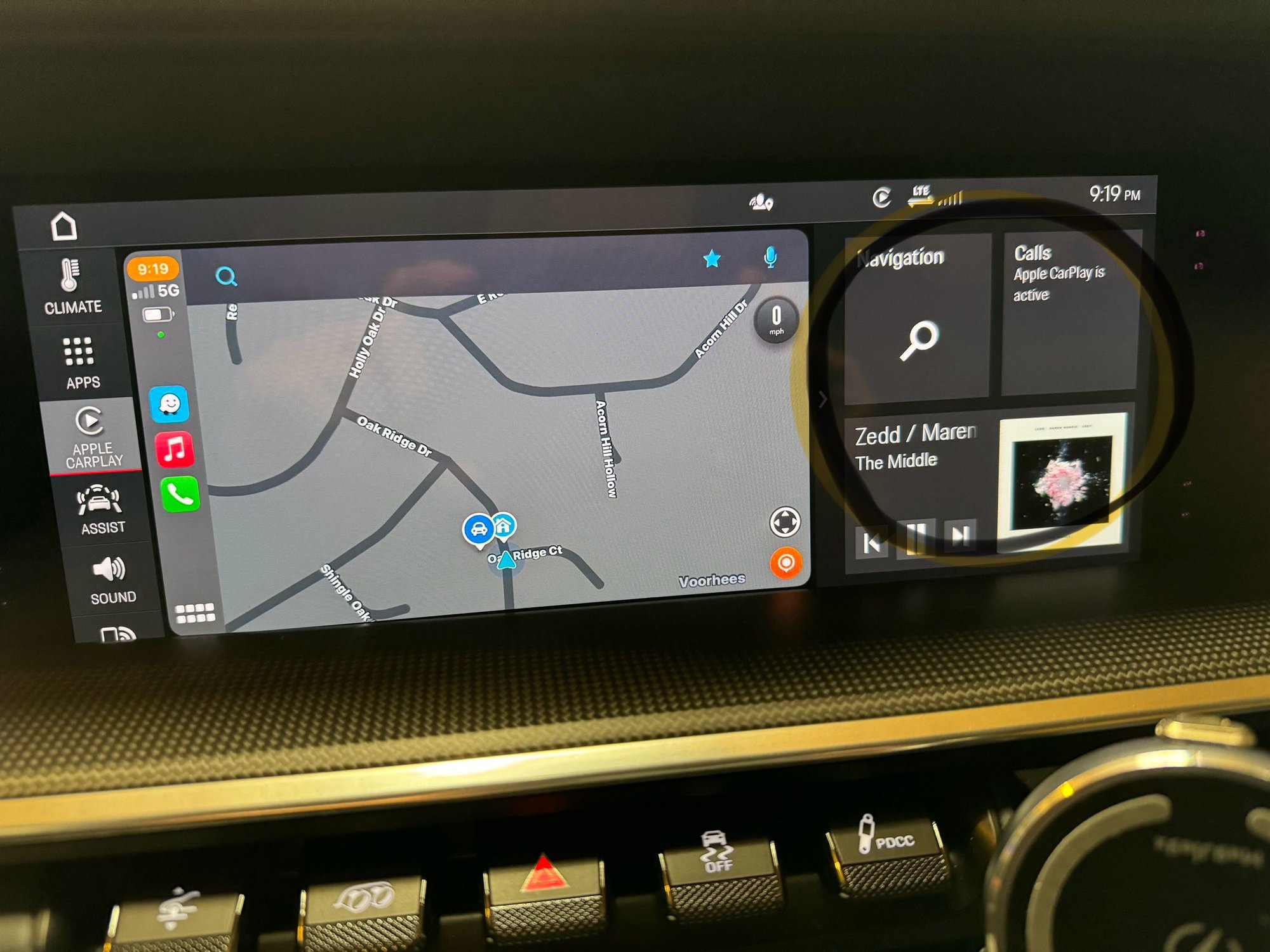
When using Apple Carplay is it possible to rearrange the tiles to the right of the carplay?
I am new to 992.
Thanks.
Thank you for the answer. I’m not sure I’m explaining it right. I know how to change the Apple CarPlay tiles. What I don’t know is just to the right of Apple CarPlay. The part I’m talking about does not look like it’s part of Apple CarPlay.
I think that’s part of the PCM. I have a 21 turbo S so it does not have the updated software. I’m trying to figure out whether those four tiles can be moved around or changed.
Yes, you can, Look up ‘configuring the info widget’ in our manual. You can also swipe up and down on that section of the screen to show other displays.
I’m sorry to keep bringing this up. If it can’t be adjusted then that’s fine.
I am looking to adjust the tiles that I’ve circled. They are to the right of Apple Carplay. I think it’s useless to have navigation and phone in those tiles when you’re going to be using Apple Carplay for navigation and phone. I’d like to replace them with something else. I would also like to move the radio up to the top position. Has anybody made any adjustments in that area. I know I can rearrange the Apple Carplay section. I’m only looking to change the section next to Apple Carplay. Not CarPlay itself.
i’ve already tried changing the home screen. That did not change the section next to the Apple Carplay.
Thanks
Last edited by neil.schneider; Dec 21, 2023 at 10:35 PM.
I’m sorry to keep bringing this up. If it can’t be adjusted then that’s fine.
I am looking to adjust the tiles that I’ve circled. They are to the right of Apple Carplay.
That part of the display belongs to the PCM not CarPlay, and is the Info Widget. Here is the manual page about configuring the Info Widget (Home / Options / Configure Info Widget, delete the tile you don't want with Activate Delete Mode).
Thanks Mike. I’ll give that a try. I already went to the home screen and moved things around to see if that would change the screen when carplay is on. It didn’t seem to affect it. I did not try deleting any of them. In other words, no matter what position I put things in on the home screen. When I go back to the CarPlay screen, those three tiles are there in the same position. Unless I’m doing something wrong. I really do appreciate you trying to help me. I guess nobody else uses CarPlay. Or maybe they just leave those tiles in the same exact spot. As I said, it doesn’t make any sense because two of the tiles cannot be used when CarPlay is on.
Thanks Mike. I’ll give that a try. I already went to the home screen and moved things around to see if that would change the screen when carplay is on. It didn’t seem to affect it.
Just make sure you are editing the Info Widget and not the Home screen. Those instructions are the 2nd column of the manual page, not the 1st column. The Info Widget is the 2x2 tiles that appear when you swipe left from the right edge of the PCM screen.
Thanks for helping Mike. I will certainly give it a shot tomorrow and see if I can figure it out. Obviously other people have done it. I wish somebody would post a picture of Apple Carplay with something other than what I have next to it.
Theon Goes Full Carbon Fiber With Stunning New Build
Slideshow: Built around a carbon-bodied 964 and a naturally aspirated 4.0-liter flat-six, this bespoke commission highlights how far the restomod formula has evolved.
Tuner Is Converting Porsche 911s Into Shooting Brakes
Slideshow: A Polish Porsche specialist is moving ahead with one of the most unusual 911 conversions in recent memory: a shooting brake version of the 991-generation sports car.
This Coachbuilt Creation Is A Modern Take on the Legendary Porsche 917
Slideshow: A Porsche Carrera GT has been transformed into a one-off coachbuilt machine that blends analog supercar engineering with styling inspired by the legendary 917 race cars.
Is This Convertible Cayenne A Steal, Or A Returnless Investment?
Slideshow: A heavily modified Porsche Cayenne convertible with faux wood trim and a long list of flaws recently sold at auction for surprisingly little money.
Porsche's Top 5 Most Questionable Naming Decisions
Slideshow: For a company obsessed with engineering precision, Porsche has occasionally named its cars in ways that left even loyal enthusiasts scratching their heads.
Pogea Racing's 964 Porsche 911 Reimagination Stands Out in a Crowded Field
Slideshow: Pogea Racing's latest Porsche 964 project blends carbon-fiber construction, modern chassis upgrades, and up to 500 horsepower while keeping the air-cooled 911 experience firmly analog.








 Apple CarPlay question