When you click on links to various merchants on this site and make a purchase, this can result in this site earning a commission. Affiliate programs and affiliations include, but are not limited to, the eBay Partner Network.
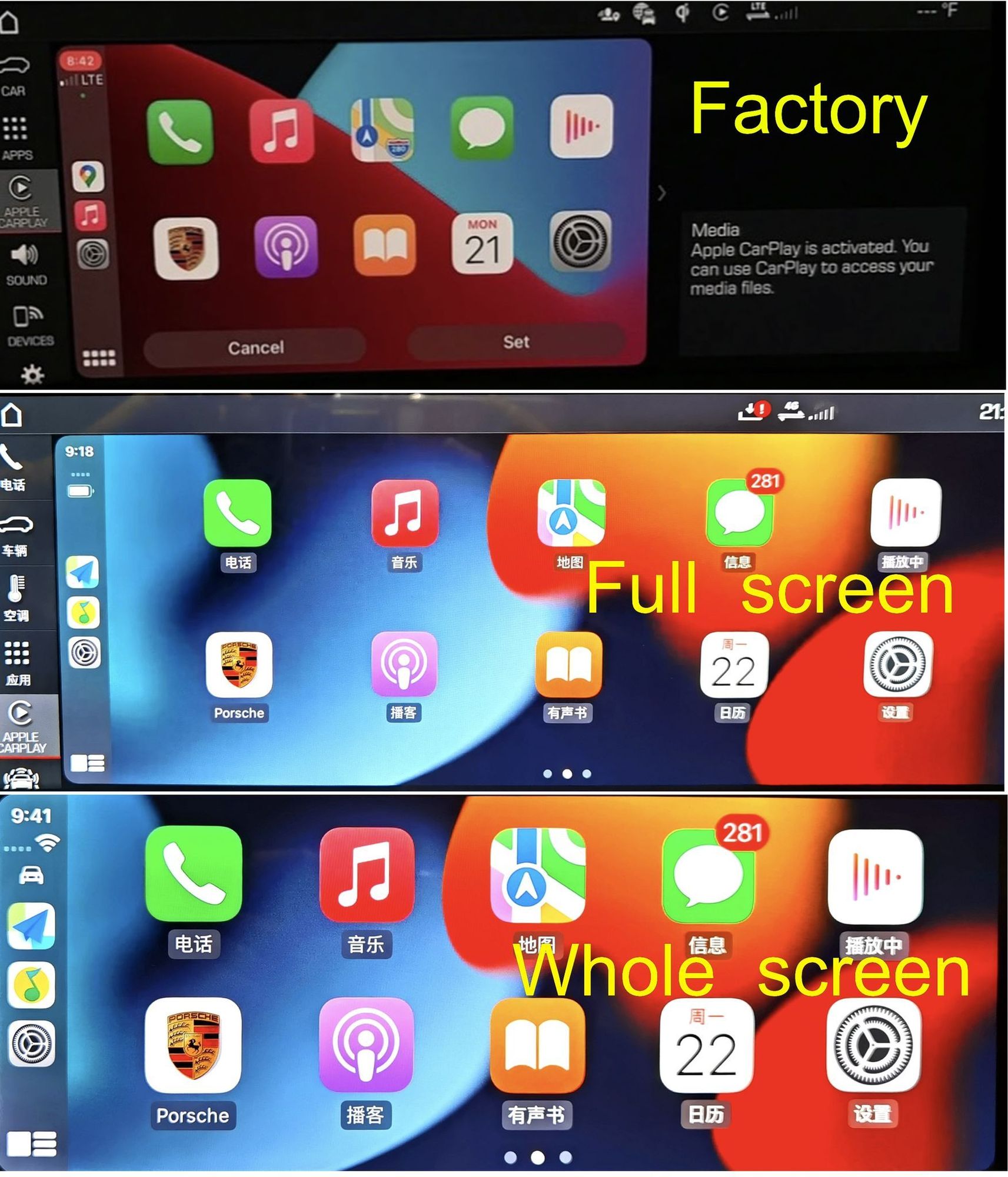
The 2/3 of the screen is because the UI is displaying one of several windows that are available. You should be able to touch and wipe the window to the right and it will disappear from the display giving you 100% Apple Car Play. Touching the window should give you a vertical bar with a triangle/arrow in its center between the window and the rest of the screen. Swiping the bar to the right should dismiss this window.
.
If I recall correctly, to use Apple Car Play wirelessly there is a combination of how the Bluetooth and the internet access is set up on both the phone and the PCM. Hopefully someone else can chime in with how they've setup both their phone and PCM. I have mine set so that my phone is the internet hot spot for the car (instead of the other way around) and that my phone connects to the PCM via Bluetooth at the same time. The downside is that I have to be hard wired for Car Play to work, that's the only downside to my configuration, for me. The upside is that because I have an unlimited data plan for my phone, my car has excellent internet service and that spills over to all sorts of things in the PCM.
Can you get full screen CarPlay on your car? I thought that only came with PCM6 in MY22 cars? Certainly my MY20 car with PCM5 can’t do it, even though that little arrowhead to the right of the CarPlay pane does show up, but greyed out. Seems like they intended for it to work but something stopped it being fully enabled.
For clarity wireless CarPlay establishes the connection via Bluetooth but uses the cars WiFi to communicate with the car once the connection is established. Like using a handshake to say hi to someone then using our voices to do the actual talking….now I wonder where the term handshake came from in IT networking land .
Can you get full screen CarPlay on your car? I thought that only came with PCM6 in MY22 cars? Certainly my MY20 car with PCM5 can’t do it, even though that little arrowhead to the right of the CarPlay pane does show up, but greyed out. Seems like they intended for it to work but something stopped it being fully enabled.
For clarity wireless CarPlay establishes the connection via Bluetooth but uses the cars WiFi to communicate with the car once the connection is established. Like using a handshake to say hi to someone then using our voices to do the actual talking….now I wonder where the term handshake came from in IT networking land .
you are right
the arrow on the right is gray and you cannot have a full screen
About the wireless carplay its not enabled in all cars- i believe its a regional thing.
Dang! I really do hate it when I'm wrong. (I prefer the term "momentarily confused") BUT here's why.
The PCM Map rendition does show an Arrow that allows the User to hide and retrieve a window. Examples with Green Text shown below. (One of the several different windows available is shown below.)
The Car Play Map also shows an identical Arrow, but the Arrow is not functional. In fact, if you try to use it it disappears! Example with Red Text shown below.
.
FWIW, when the Window is shown (optional with PCM or forced with Car Play) it can be changed by swiping up or down. Several window selections are available with either the PCM or Car Play, it's just with Car Play you can't dismiss the window entirely.
.
PCM Map with Arrow that does work. Window shown.
. PCM Map with Arrow that does work. Window hidden.
. Car Play Map with Arrow that does NOT work.
Last edited by Bluehighways; Aug 22, 2022 at 02:22 PM.
I have 992 2021- received the car 2021 April
It came with PCM5 ( must use wire for car-play and on 2/3 on screen for car-play )
can porsche dealer do software update to have PCM6 ? Or it needs hardware changes ?
I can help you to get CarPlay look like PCM6, get whole screen 1920x720 resolution. also enable wireless CarPlay for you. all can be done remotely
From Panamera but it is the same system PCM5 for macan and cayenne and 992
__________________
website: www.innovativesoftnz.com Contact us for discount code
Porsche PCM specialist
Skype:song8062
Email:info@innovativesoft.co.nz
Telegram: ClickHere / @innovative_soft
WhatsApp: +6421404548 http://wa.me/6421404548 To make order on website please contact us to get special discount coupon code for all forum members
Just wanted to give a big thumbs up to Raymond at @innovativesoft! Last night he installed the 'full screen' Carplay mod on my car and it's amazing. Basically works just as you would expect - tons more real estate for Waze or Spotify, while preserving the ability swipe left from the right side to show the car controls climate buttons and sport buttons. It's a little bit of a science project (needs a windows laptop, network adapter, usb drive, network cable etc) but took about and hour and turned out perfectly. Highly recommended.
- John L
Boston,
2021 992 C2S
(no affiliation, just a happy customer)
The price starts from $250 with full screen android auto.
we are the only one who can provide the activation on application level, so that fully invisible to dealer. You can check my other post and reviews on forum so that many car owners have came to us to fix the problem that done by others who inserted fake enabling code.
Which potentially leave the risk to void the warranty
Originally Posted by Michaelx
How much was it? If you do it, do you lose warranty?
Looks very interesting, I would need it for a 992 4S Convertible from 2020 (PCM5). What are the changes in detail? Is it "only" changing the switch to full screen? Or what are the additionals? I´m using an iPhone so I wouldn´t need Android-Auto, but native Spotify would be nice as well.
And another one: I´m from Germany, does that make a difference (As I´m obviously using my PCM in German)
the change is to get the 2/3 screen of CarPlay to full screen display
we can do remotely, doesn’t matter where you are, as long as you have internet access with windows computer
Originally Posted by Michaelx
Looks very interesting, I would need it for a 992 4S Convertible from 2020 (PCM5). What are the changes in detail? Is it "only" changing the switch to full screen? Or what are the additionals? I´m using an iPhone so I wouldn´t need Android-Auto, but native Spotify would be nice as well.
And another one: I´m from Germany, does that make a difference (As I´m obviously using my PCM in German)
Hi, looks great - can you describe a bit the process of this? What is needed?
Got a bit scared from the post from jlegelis above.
He mentioned that a windows computer? So do I need to download something from somewhere and copy it on a USB stick and insert in one of the USB card readers? Or do you need my Porsche-ID and you will perform an OTA?
A step by step What to do would be great.
For detailed instructions please contact me via WhatsApp:+6421404548
It just too hard to explain on this post, it will be very simple to communicate in interactive way
Originally Posted by Michaelx
Hi, looks great - can you describe a bit the process of this? What is needed?
Got a bit scared from the post from jlegelis above.
He mentioned that a windows computer? So do I need to download something from somewhere and copy it on a USB stick and insert in one of the USB card readers? Or do you need my Porsche-ID and you will perform an OTA?
A step by step What to do would be great.
I can help you to get CarPlay look like PCM6, get whole screen 1920x720 resolution. also enable wireless CarPlay for you. all can be done remotely
From Panamera but it is the same system PCM5 for macan and cayenne and 992
Have you enabled wireless for PCM6? In MENA Region and Africa probably we don't have wireless option. I'm not sure if it's a hardware difference or simple code disabled option.
my 992 gt3 is Feb 2022 build
Hi, looks great - can you describe a bit the process of this? What is needed?
Got a bit scared from the post from jlegelis above.
He mentioned that a windows computer? So do I need to download something from somewhere and copy it on a USB stick and insert in one of the USB card readers? Or do you need my Porsche-ID and you will perform an OTA?
A step by step What to do would be great.
Thnx for letting me know,
Michael
I went through the process last Sunday and wrote a detailed review, check out the thread I started.
Theon Goes Full Carbon Fiber With Stunning New Build
Slideshow: Built around a carbon-bodied 964 and a naturally aspirated 4.0-liter flat-six, this bespoke commission highlights how far the restomod formula has evolved.
Tuner Is Converting Porsche 911s Into Shooting Brakes
Slideshow: A Polish Porsche specialist is moving ahead with one of the most unusual 911 conversions in recent memory: a shooting brake version of the 991-generation sports car.
This Coachbuilt Creation Is A Modern Take on the Legendary Porsche 917
Slideshow: A Porsche Carrera GT has been transformed into a one-off coachbuilt machine that blends analog supercar engineering with styling inspired by the legendary 917 race cars.
Is This Convertible Cayenne A Steal, Or A Returnless Investment?
Slideshow: A heavily modified Porsche Cayenne convertible with faux wood trim and a long list of flaws recently sold at auction for surprisingly little money.
Porsche's Top 5 Most Questionable Naming Decisions
Slideshow: For a company obsessed with engineering precision, Porsche has occasionally named its cars in ways that left even loyal enthusiasts scratching their heads.
Pogea Racing's 964 Porsche 911 Reimagination Stands Out in a Crowded Field
Slideshow: Pogea Racing's latest Porsche 964 project blends carbon-fiber construction, modern chassis upgrades, and up to 500 horsepower while keeping the air-cooled 911 experience firmly analog.








 .
.